www.desatech.com
116035-01J34
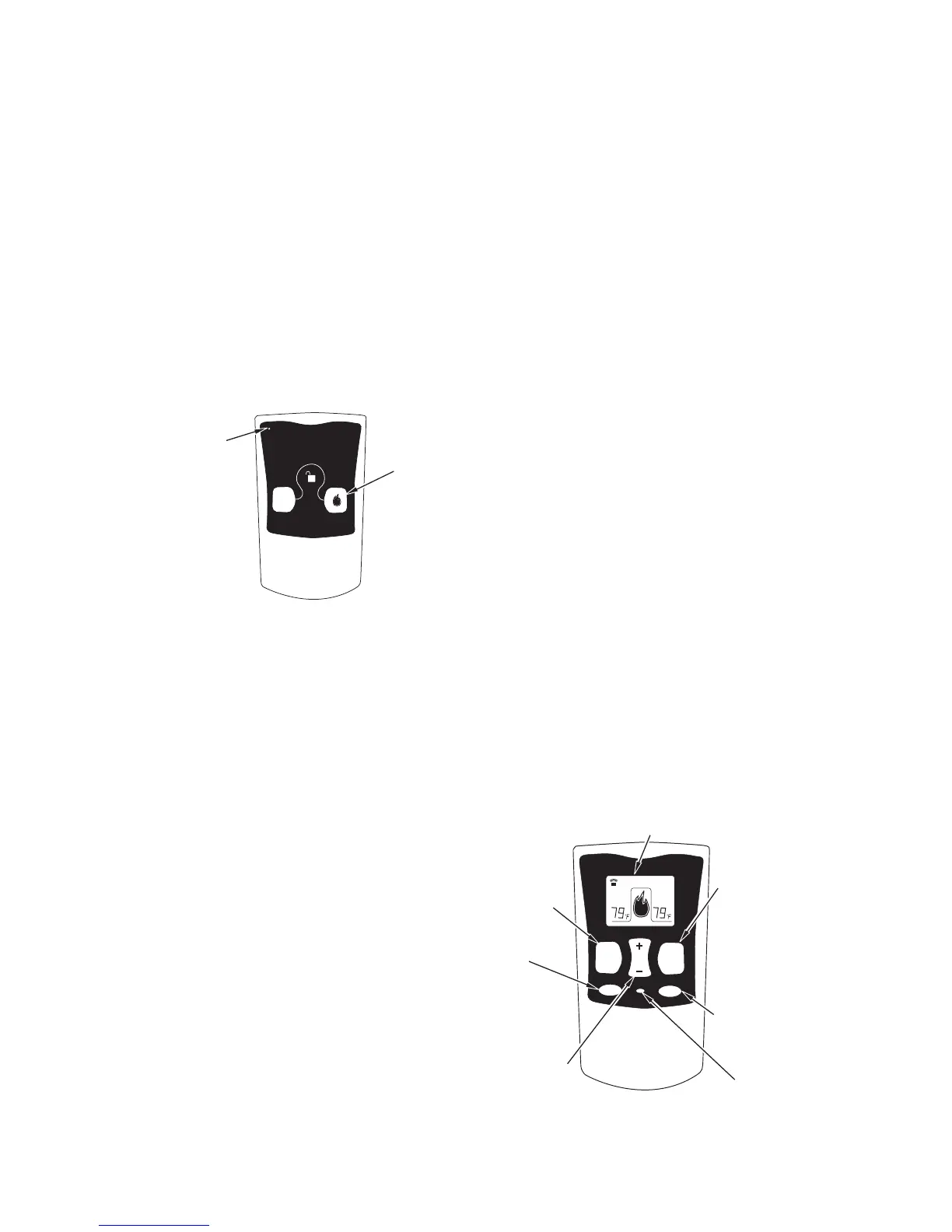
Figure 63 - On/Off Hand-Held Remote
Control Unit HRC100
Control
Button
Indicator
Light
Hold control button on the hand-held remote
until burner turns on. Hold the control button
again until burner turns off (see Figure 63).
TO LOCK press both buttons on hand-held
remote control until light stops ashing. Hand-
held remote control is now locked. If the re
is on it will be turned off automatically. In the
locked state, the light will not light up when
any button is pressed.
TO UNLOCK press both buttons together
on hand-held remote control until the light
stops ashing. The hand-held remote is now
unlocked.
The hand-held remote can be operated using
either the manual mode (MANU) or thermo-
static mode (AUTO) (see Figure 64). To select
Fahrenheit/Centigrade mode display, carefully
press the ˚C/˚F mode button with the end of a
paper clip or similar blunt object.
Manual Mode
1. Press the POWER and LOCK buttons
together to turn on the hand-held remote
control.
2. Press the MANU button to turn on the
replace.
3. Press the POWER and LOCK buttons
together to turn off the replace.
1. Press the POWER and LOCK buttons
together to turn on the hand-held remote
control.
2. Press AUTO button to select this mode.
3. Set the desired room temperature by
pressing the TEMP + or - buttons.
4. Press the POWER and LOCK buttons
together to turn off the replace
Note: Do not leave hand-held remote in the
AUTO mode close to the replace. The radiant
Figure 64 - Thermostat Hand-Held
Remote Control Unit HRC200
Turns
Hand-Held
Remote On
or Off and
Allows You
to Choose
the Manual
Setting
Selects
AUTO
Mode
°C/°F Mode
Button
Locks
System to
Prevent
Accidental
Ignition
Turns
Burners
On or Off
Increases or
Decreases
Room
Temperature in
AUTO Mode
Digital Display Shows
Temperature and Settings
heat from replace will turn off the replace.
Ideally, place the hand-held remote in the cen-
ter of the room facing towards the replace.
Note: Do not hold the hand-held remote for
a long time. Body temperature will affect its
operation in the AUTO mode.
Safety Features
When away from home for an extended period
of time or as a child safety feature to prevent
accidental ignition of the replace, the receiver
ON/OFF/REMOTE switch should be in the
OFF position.
Auto Shutoff Feature
1.
If the average room temperature reaches
a range of 82° F (28° C) to 92° F (33° C),
the hand-held remote control will perform a
safety override and shut the replace off. This
feature is not available in the MANU mode.
2.
The receiver continuously receives signals
from the hand-held remote to control the
room temperature. If the hand-held remote
is misplaced, obstructed or for any reason
cannot transmit to the receiver, the receiver
will shut off the replace. This will occur in 8
or more minutes depending upon location of
remote transmitter and strength of batteries.
This feature allows the user to lock/unlock the
keypad on the hand-held remote in the MANU
or AUTO mode to prevent inadvertent op-
eration (i.e. children operating the hand-held
remote control, etc.). The keypad is locked in
either on or off. Press the POWER and LOCK
buttons together to turn the unit on or off.
OPERATION Continued
MILLIVOLT MODELS



 To Next Page