EasyManua.ls Logo

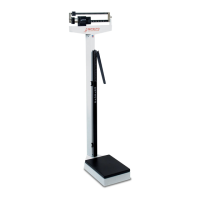
Detecto 339 - User Manual

Detecto 339
32 pages
Print Icon
To Next Page IconTo Next Page
Loading...
8525-0374-0M Rev A y Physician’s Scale Owners Manual
1
Physician’s Scale
Eye-Level Beam Scale
Owner’s Manual
Báscula médica
Báscula de brazo
a la altura de los ojos
Manual del propietario

Questions and Answers

  • M
    Matthew MooreAug 9, 2025
    What to do if the beam does not move at all during weighing on Detecto 339?
    • M
      Megan BarnettAug 9, 2025
      If the beam of your Detecto Scales doesn't move at all during weighing, it could be due to the small and large poise being set higher than the actual weight. Try resetting both poises to a lower or zero weight. Also, check that the draft rod is properly connected and aligned.
  • H
    Heidi WatkinsAug 15, 2025
    How to fix Detecto 339 Scales if the beam does not move freely?
    • R
      Ricardo HickmanAug 15, 2025
      If the beam of your Detecto Scales does not move freely, ensure the beam pointer isn't touching the side of the trig loop, which could impede its movement. Visually check that the linkage is centered and properly aligned, as misalignment can occur during shipping. The linkage must be free-floating for the scale to weigh correctly. If the scale is slightly tipped, inspect the linkage by looking underneath the weigh beam headpiece.
  • W
    wdominguezAug 21, 2025
    How to recalibrate Detecto Scales?
    • S
      Steven DodsonAug 21, 2025
      To recalibrate your Detecto Scales, place a known weight on the scale and turn the balance screw until the pointer remains centered within the trig loop.
  • Q
    qjimenezAug 27, 2025
    How to adjust zero balance on Detecto 339?
    • P
      pbraunAug 27, 2025
      To adjust the zero balance on your Detecto Scales, balance the weighing beam so the beam pointer comes to rest in the center of the trig loop when both the small and large poise are set at zero (far-left position). Refer to Figure 9 and the BALANCING THE SCALE instructions.
  • J
    Julia MunozSep 2, 2025
    Why does the platform rock excessively on my Detecto 339?
    • D
      Dakota MartinSep 2, 2025
      If the platform of your Detecto Scales rocks excessively, make sure the scale is on a level surface. When you push down on any corner of the platform, you shouldn't feel any significant rocking.

Summary

Introduction and Important Information

Copyright Notice

Legal statement regarding the use and reproduction of manual content.

Disclaimer of Liability

Statement limiting the seller's liability for errors or damages from manual use.

Critical Safety Warnings

Crucial safety precautions for patient handling and supervision on the scale.

Scale Preparation and Specifications

Unpacking Instructions

Guide for removing the scale from packaging and checking for transit damage.

Technical Specifications

Key details: models, capacity, height range, and platform size.

Scale Assembly Procedures

Column Attachment

Steps to securely attach the scale column to the base.

Draft Rod Connection

Instructions for connecting the draft rod hook to the long lever.

Height Rod Installation

Procedure for mounting the height rod onto the scale column.

Wheel Assembly Installation

Guide to correctly attaching the wheel assembly to the scale base.

Hand Post Installation

Instructions for installing the optional hand post onto the scale platform.

Scale Operation and Maintenance

Balancing the Scale

Procedure for balancing the scale to ensure accurate measurements.

Troubleshooting Common Issues

Guidance for resolving common problems encountered with the scale.

Replacement Part Identification

Diagram and list identifying the various parts of the scale for replacement.

Limited Warranty Information

Warranty Coverage Details

Details of the manufacturer's warranty coverage and limitations for the scale.

Conditions Voiding Warranty

Conditions under which the manufacturer's warranty becomes invalid.

Freight Carrier Damage Claims

Procedure for filing claims for damage incurred during shipping.

Detecto 339 Specifications

General IconGeneral
BrandDetecto
Model339
CategoryScales
LanguageEnglish

Related product manuals