ENGLISH
12
to conduct a calibration check using a distance no shorter
than the distance of the applications for which the tool will
beused.
1. Start by marking a 5' (1.5 m) line on thefloor.
2. Turn on the laser's vertical beam and position the unit at
one end of the line, facing theline.
3. Adjust the unit so its beam is aligned and centered on
the line on thefloor.
4. Mark the position of the laser beam on the ceiling (a).
Mark the center of the laser beam directly over the
midpoint of the line on thefloor.
5. Reposition the laser at the other end of the line on the
floor. Adjust the unit once again so its beam is aligned
and centered on the line on thefloor.
6. Mark the position of the laser beam on the ceiling (b),
directly beside the first mark (a).
7. Measure the distance between these twomarks.
• If the measurement is greater than the values shown
below, the laser must be serviced at an authorized
servicecenter.
Distance
Between Walls
Allowable Distance
Between
a
and
b
8' 1/8"
10' 3/16"
14' 1/4"
20' 3/8"
Distance
Between Walls
Allowable Distance
Between
a
and
b
2.5 m 3.4 mm
3.0 m 4.2 mm
4.0 m 5.5 mm
6.0 m 8.2 mm
Maintenance
• To maintain the accuracy of your work, check the laser
often to make sure it is properly calibrated. See Field
CalibrationCheck.
• Calibration checks and other maintenance repairs may
be performed by DeWALT service centers.
• When not in use, store the laser in the kit box provided.
Do not store your laser at temperatures below -5˚F
(-20˚C) or above 140˚F (60˚C).
• Do not store your laser in the kit box if the laser is wet.
The laser should be dried first with a soft dry cloth prior
tostorage.
Cleaning
Exterior plastic parts may be cleaned with a damp cloth.
Although these parts are solvent resistant, NEVER use
solvents. Use a soft, dry cloth to remove moisture from the
tool beforestorage.
Troubleshooting
The Laser Does Not Turn On
• Fully charge the battery pack and then reinstall it in the
laserunit.
• If the laser unit is heated above 120˚F (50˚C), the unit
will not turn on. If the laser has been stored in extremely
hot temperatures, allow it to cool. The laser level will
not be damaged by pressing the on/off button before
cooling to its proper operatingtemperature.
The Laser Beams Flash (Fig. K)
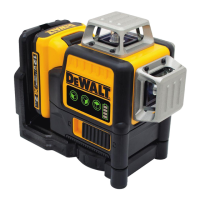
The lasers are designed to self-level up to an average of
4° in all directions. If the laser is tilted so much that the
internal mechanism cannot level itself, the laser beams will
flash indicating that the tilt range has been exceeded. THE
FLASHING BEAMS CREATED BY THE LASER ARE NOT LEVEL OR
PLUMB AND SHOULD NOT BE USED FOR DETERMINING OR
MARKING LEVEL OR PLUMB. Try repositioning the laser on a
more level surface.
When the beams flash THE LASER IS NOT LEVEL (OR PLUMB)
AND SHOULD NOT BE USED FOR DETERMINING OR MARKING
LEVEL OR PLUMB. Tryrepositioning the laser on a more
levelsurface.
If the laser battery pack has a low state of charge, the
beams will flash in a distinctive pattern of 3quick flashes in
1second, followed by constant light output for 4seconds.
This flashing pattern indicates that the battery pack should
be replaced with a fully charged batterypack.
The Laser Beams Will Not Stop Moving
The laser is a precision instrument. Therefore, if it is not
positioned on a stable (and motionless) surface, the laser
will continue to try to find level. If the beam will not stop
moving, try placing the laser on a more stable surface. Also,
try to make sure that the surface is relatively flat, so that the
laser isstable.
Accessories (Fig.L – N)
Some laser kits are packaged with a drop ceiling bracket
10
.
The drop ceiling bracket contains a steel plate and attaches
to the magnetized pivot bracket
6
(Fig. L).
The drop ceiling bracket is equipped with both 1/4" - 20and
5/8" - 11female threads on the bottom of theunit.
This thread is to accommodate current or future DeWALT
accessories. Refer to Figure M and N for examples of
accessories sold separately. Only use DeWALT accessories
specified for use with this product. Follow the directions
included with the accessory.
WARNING: Since accessories, other than those
offered by DeWALT, have not been tested with this
product, use of such accessories with this tool could
be hazardous. To reduce the risk of injury, only
DeWALT‑recommended accessories should be used
with thisproduct.
If you need any assistance in locating any accessory, please
contact your nearest DeWALT service center or go to
www.DeWALT.com.



 To Next Page