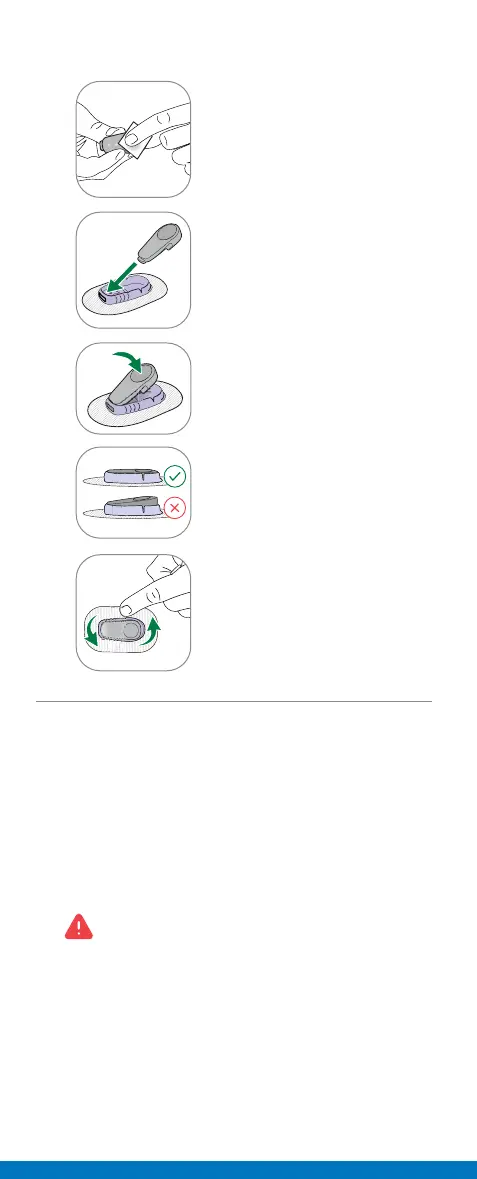
Step 3: Attach Transmitter
1
Clean transmitter with
alcohol wipe.
2
Insert transmitter, tab first,
into holder.
3
Snap in transmitter. It clicks
into place. Make sure it is
flat and snug in holder.
4
Rub around patch 3 times to
help it stick.
Step 4: Sensor Warmup
• After setup, your sensor needs time to get used
to your body.
• Keep your smart device within 6 meters of the
transmitter.
• You will NOT get sensor readings or alerts until
sensor warmup is complete.
If you did not turn on alerts during setup,
turn them on now to get alerts when sensor
warmup is complete.
Wait 2 Hours
When sensor warmup is complete, you will start
getting sensor readings. If you did not turn on alerts
during setup, you can use this time to turn them on,
for use after warmup.



 To Next Page