EasyManua.ls Logo

Dexter Laundry T300 - Page 17

Dexter Laundry T300
87 pages
Print Icon
To Next Page IconTo Next Page
To Previous Page IconTo Previous Page
Loading...
32 33
Part # 8533-080-001 12/15 Part # 8533-080-001 12/15
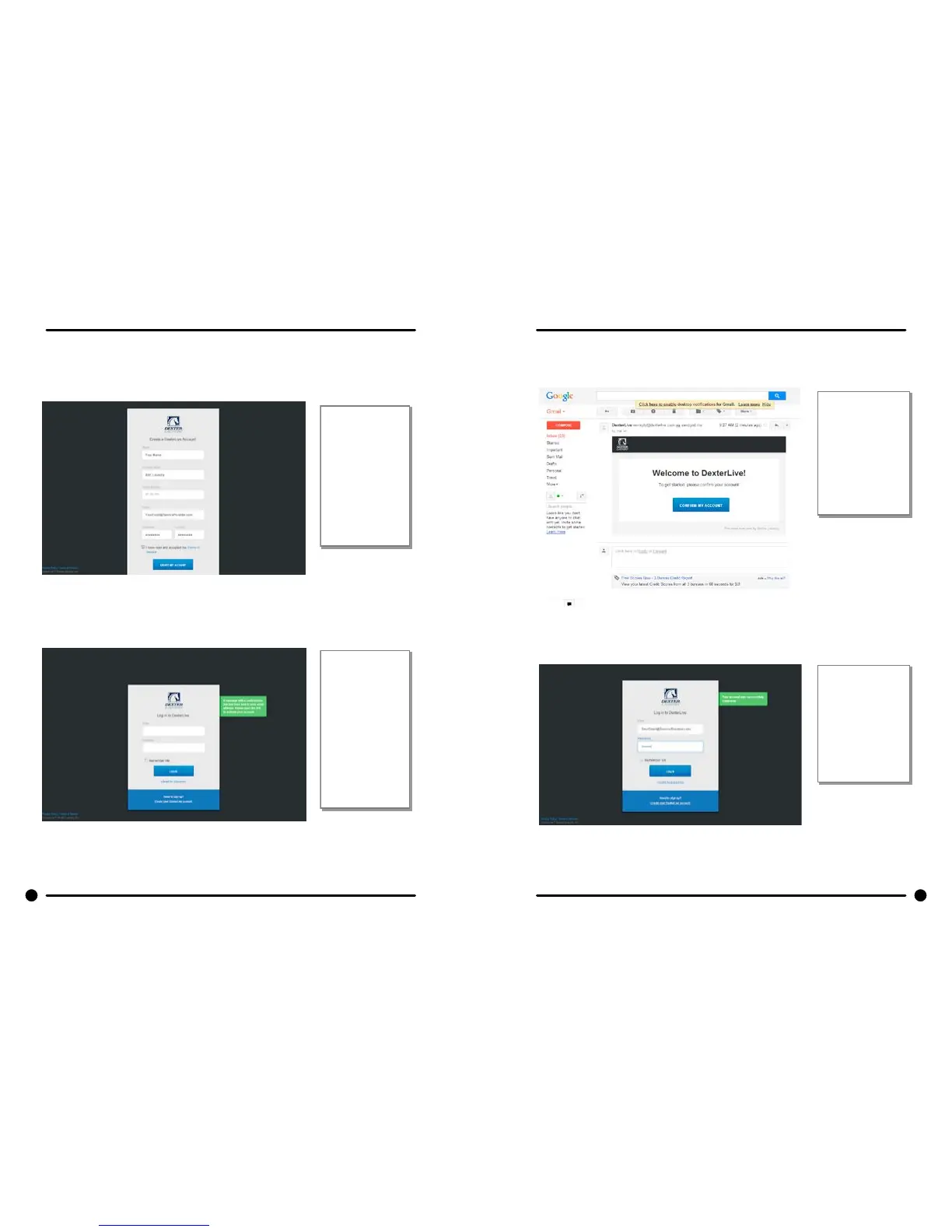
B. Fill in the required elds and click on “Create My Account”.
When creating
a new user
account make
sure to fill in all
fields marked
with asterisks
and check the
“Terms of
Service” box.
C. After selecting to “Create My Account”, you will see the log in screen advising you to go to
your e-mail and activate your account.
After creating
your account
you will need
to use the e-
mail link to
gain first
access. The
account will not
be active until
you confirm
your account.
3) Open the e-mail sent from Dexterlive and select “CONFIRM MY ACCOUNT”
Selecting the
“Confirm My
Account”
hyperlink will
take you back to
the DexterLive
log in page.
4) At the “Log into DexterLive” screen, enter your e-mail/user name and password to access
DexterLive.
Welcome to
DexterLive.
Proceed to the
step to create
your location
information.

Table of Contents

Related product manuals