EasyManua.ls Logo

Dexter Laundry T300 - DexterLive Programming Configuration

Dexter Laundry T300
87 pages
Print Icon
To Next Page IconTo Next Page
To Previous Page IconTo Previous Page
Loading...
34 35
Part # 8533-080-001 12/15 Part # 8533-080-001 12/15
Programming
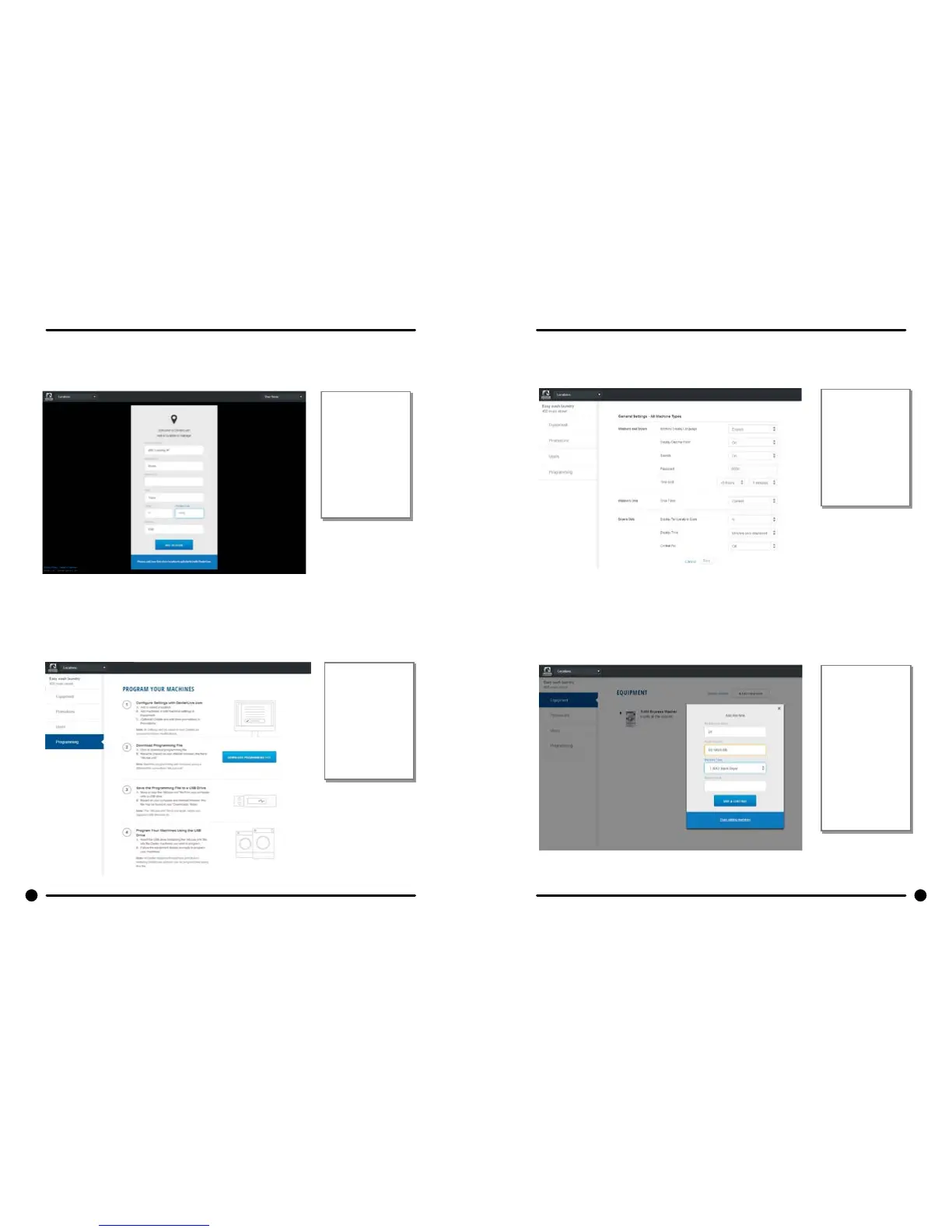
5) To congure your settings with DexterLive.com
A. Add or select a location to program.
DexterLive
gives an owner
the ability to
manage
multiple
locations and
machines.
B. On the left side of the screen, select the “Programming” tab.
Follow
instructions in
the
programming
tab.
C. Edit the “General Settings” (Equipment Tab)
Adjust setting
and offset time
to match your
location.
(Time is set for
Central
Standard Time)
D. Next select the “+Add Equipment” (Equipment Tab), located in the upper right
hand corner.
Name of the
machine.
(Example:
Dryer 1)
Enter serial
number and
machine type
then select
“Save and
Continue.”

Table of Contents

Related product manuals