EasyManua.ls Logo

Dexter Laundry T300 - Pricing, Cycles, and Promotions

Dexter Laundry T300
87 pages
Print Icon
To Next Page IconTo Next Page
To Previous Page IconTo Previous Page
Loading...
36 37
Part # 8533-080-001 12/15 Part # 8533-080-001 12/15
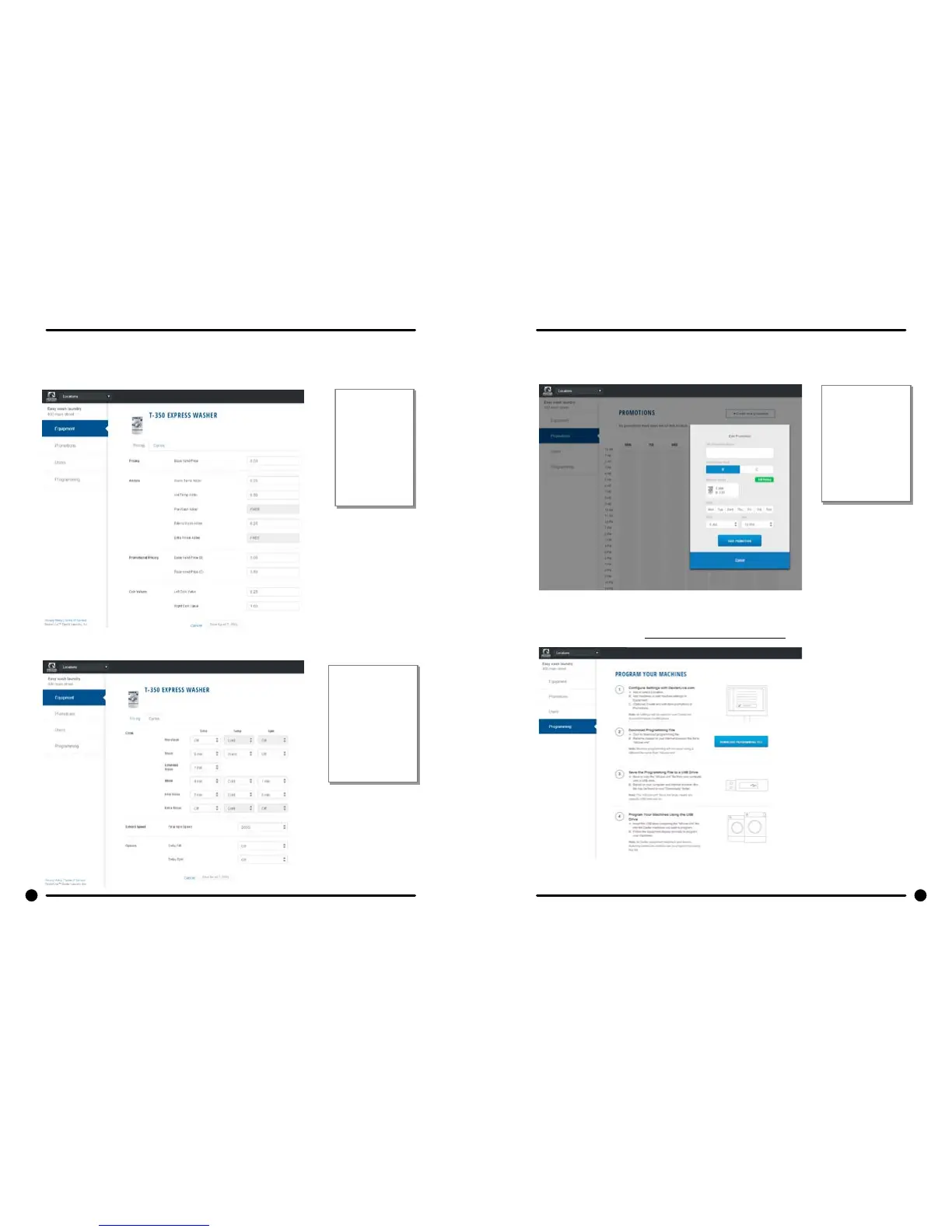
E. When all of the equipment has been added, select “Edit” on the machine type you
wish to modify, and then select “Pricing”. (Equipment Tab and Machine Settings Tab)
Program the
price of the
machine
and the
extra pricing
adders.
F. Cycle changes can be made by selecting the “Cycles” tab.
Adjust cycle
programming
set the length
of time and
extracts speed
as needed.
G. If desired, you may create and edit optional store promotions from the “Promo-
tions” tab.
Select “Save
Promotion”
once your
changes have
been made.
6) Create and download Programming File.
A. Once all preferred prices, cycles and promotions have been modied and saved,
select “DOWNLOAD PROGRAMMING FILE”.

Table of Contents

Related product manuals