USB Ports
USB allows data exchange between your computer and a wide range of simulta-
neouslyaccessibleexternalPlugandPlayperipherals.
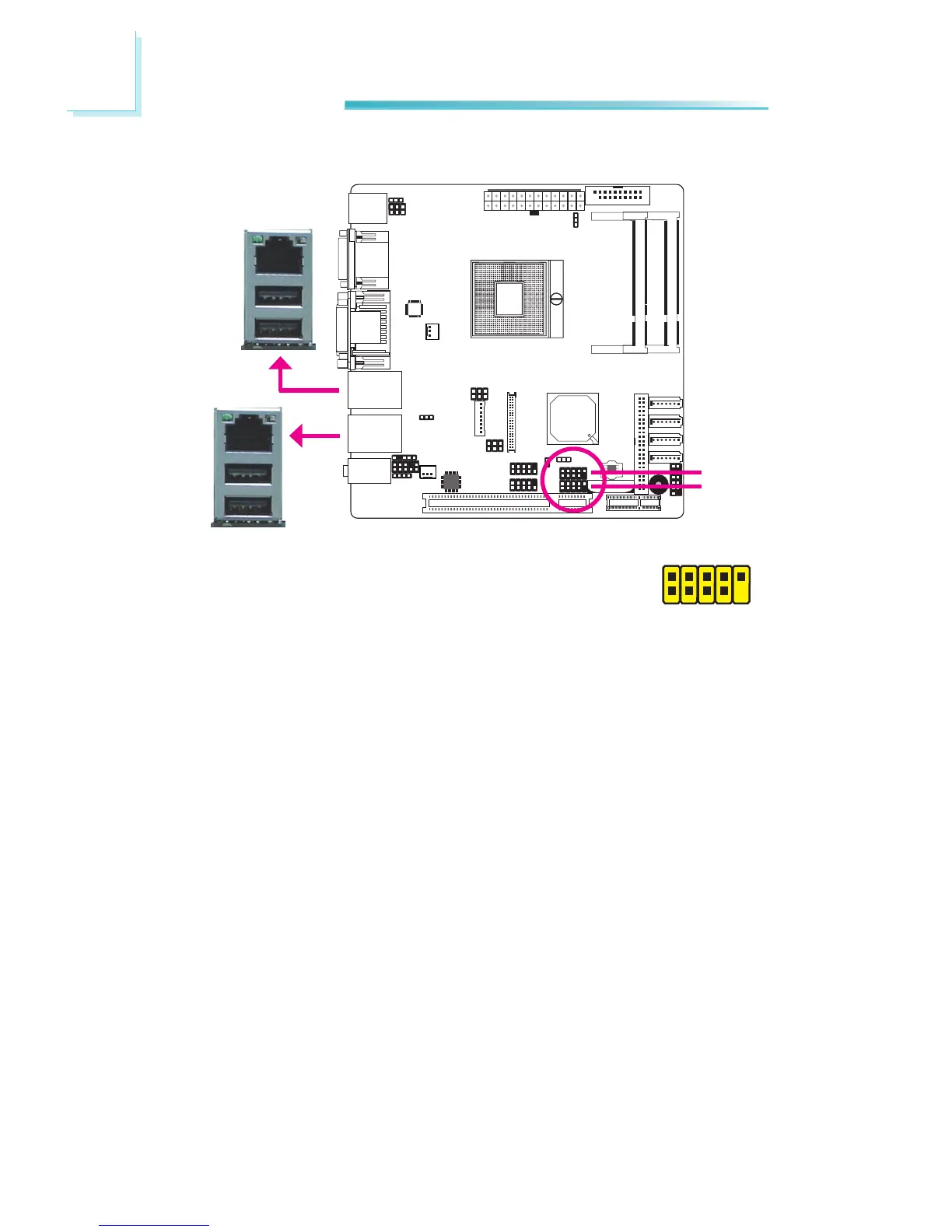
The system board is equipped with four onboard USB 2.0/1.1 ports. The two
10-pin connectors allow you to connect 4 additional USB 2.0/1.1 ports. The USB
ports may be mounted on a card-edge bracket. Install the card-edge bracket
to an available slot at the rear of the system chassis then insert the USB port
cablestoaconnector.
BIOS Setting
ConguretheonboardUSBintheChipsetmenu(“SouthBridge”submenu)ofthe
BIOS.Refertochapter3formoreinformation.
Driver Installation
You may need to install the proper drivers in your operating system to use the
USB device. Referto youroperating system’s manual or documentation for more
information.
USB0
USB1
USB8
USB9
1
VCC
-Data
+Data
GND
Key
VCC
-Data
+Data
GND
N.C.
2
10
9
USB2-3
USB4-5


 To Next Page