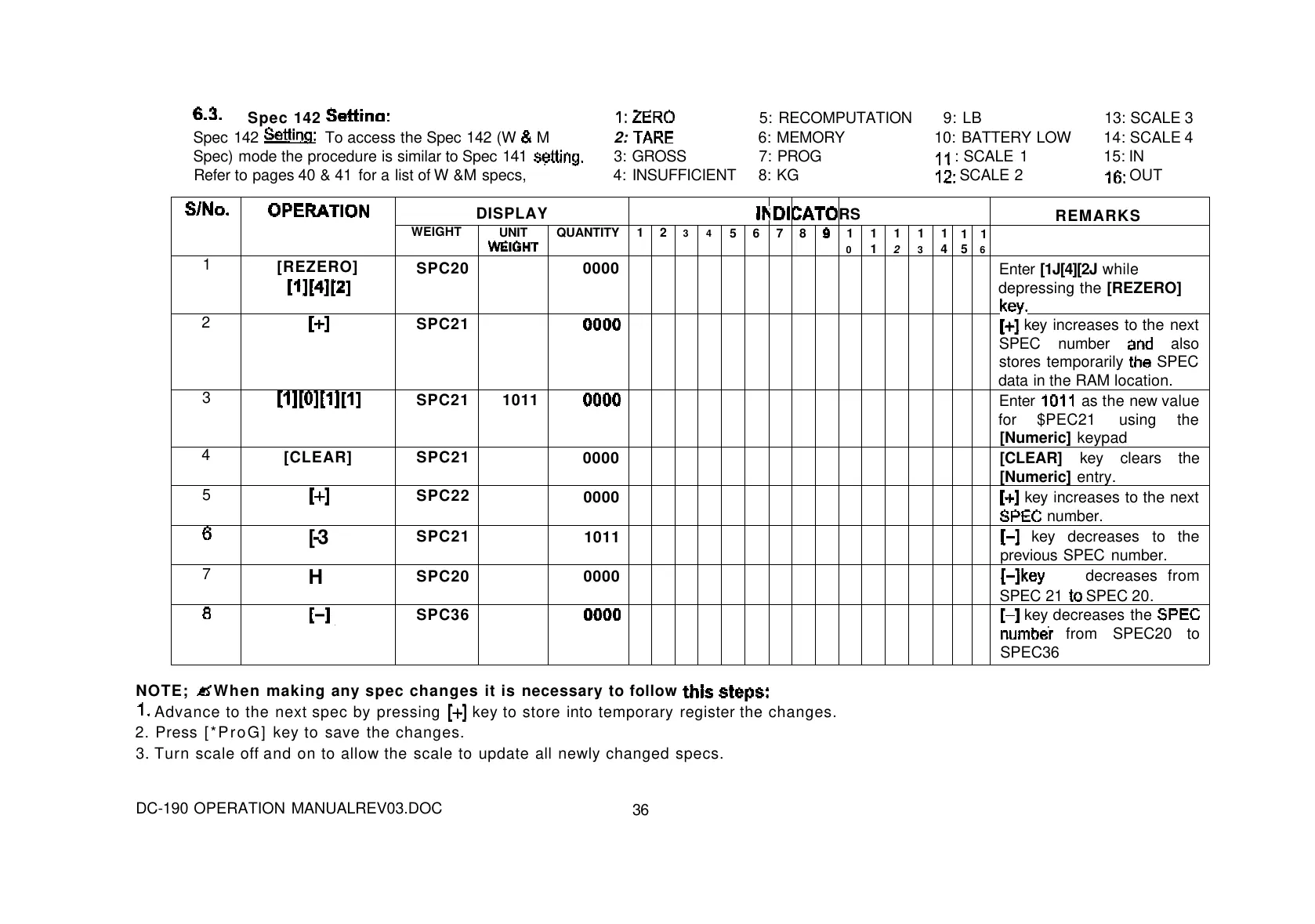
Spec 142
5: RECOMPUTATION 9: LB 13: SCALE 3
Spec 142
To access the Spec 142 (W
M 2:
6: MEMORY 10: BATTERY LOW 14: SCALE 4
Spec) mode the procedure is similar to Spec 141
3: GROSS 7: PROG
: SCALE 1 15: IN
Refer to pages 40 & 41 for a list of W &M specs, 4: INSUFFICIENT 8: KG
SCALE 2
OUT
DISPLAY
RS
REMARKS
WEIGHT
UNIT
QUANTITY
1 2 3 4
5 6 7 8
1
0
1
1
1
2
1
3
1
4
1
5
1
6
1
[REZERO]
SPC20 0000
Enter [1J[4][2J while
depressing the [REZERO]
2
SPC21
key increases to the next
SPEC number
also
stores temporarily
SPEC
data in the RAM location.
3
SPC21 1011
Enter
as the new value
for $PEC21 using the
[Numeric] keypad
4
[CLEAR] SPC21
0000 [CLEAR] key clears the
[Numeric] entry.
5
SPC22
0000 key increases to the next
number.
[-3
SPC21
1011
key decreases to the
previous SPEC number.
7
H
SPC20 0000
decreases from
SPEC 21
SPEC 20.
SPC36
key decreases the
from SPEC20 to
SPEC36
NOTE;
When making any spec changes it is necessary to follow
Advance to the next spec by pressing
key to store into temporary register the changes.
2. Press [*ProG] key to save the changes.
3. Turn scale off and on to allow the scale to update all newly changed specs.
DC-190 OPERATION MANUALREV03.DOC
36



 To Next Page