18 DC-530 Operation Manual
40 Load Cell 1 Sensitivities Selection (mV/V)
1000(8 H): 2.08
1001(9 H): 1.84
1010(A,H):1.60
1011(B H): 1.36
1100(C H): 1.12 [DEFAULT]
1101(D H): 0.88
1110(E H): 0.64
1111(F H): 0.40
41 Load Cell 2 Sensitivities Selection (mV/V)
1000(8 H): 2.08
1001(9 H): 1.84
1010(A H): 1.60
1011(B H): 1.36
1100(C H): 1.12 [DEFAULT]
1101(D H): 0.88
1110(E H): 0.64
1111(F H): 0.40
42 Scale 4 Connection
0: Not Connected
[DEFAULT]
1: Connected
Scale 3 Connection
0: Not Connected
[DEFAULT]
1: Connected
Scale 2 Connection
0: Not Connected
[DEFAULT]
1: Connected
Scale 1 Connection
0: Not Connected
1: Connected [DEFAULT]
43 SCALE 1
00: UniBloc [DEFAULT]
01: Load Cell 1
10: Force Balance
11: Load Cell 2
SCALE 2
00: UniBloc
01: Load Cell 1 [DEFAULT]
10: Force Balance
11: Load Cell 2
44 SCALE 3
00: UniBloc
01: Load Cell 1
10: Force Balance
11: Load Cell 2 [DEFAULT]
SCALE 4
00: UniBloc
01: Load Cell 1
10: Force Balance [DEFAULT]
11: Load Cell 2
45 Tare Decrease
0: No
1: Yes [DEFAULT]
Item Tare Subtraction
0: No
1: Yes [DEFAULT]
Clear Tare on Scale
Change
0: No
1: Yes [DEFAULT]
NOTE: Even if this SPEC
is set to 0: No to keep
the tare value, the tare
value will be changed
when changing scales if
SPEC 36 Bit 0 - Zero
Reset When Scale
Change and SPEC 37
Bit 1 - Clear Tare When
Re-Zero Operation are
both set to 1: Yes
Do Tare Operation When
No Stability
0: No
1: Yes [DEFAULT]
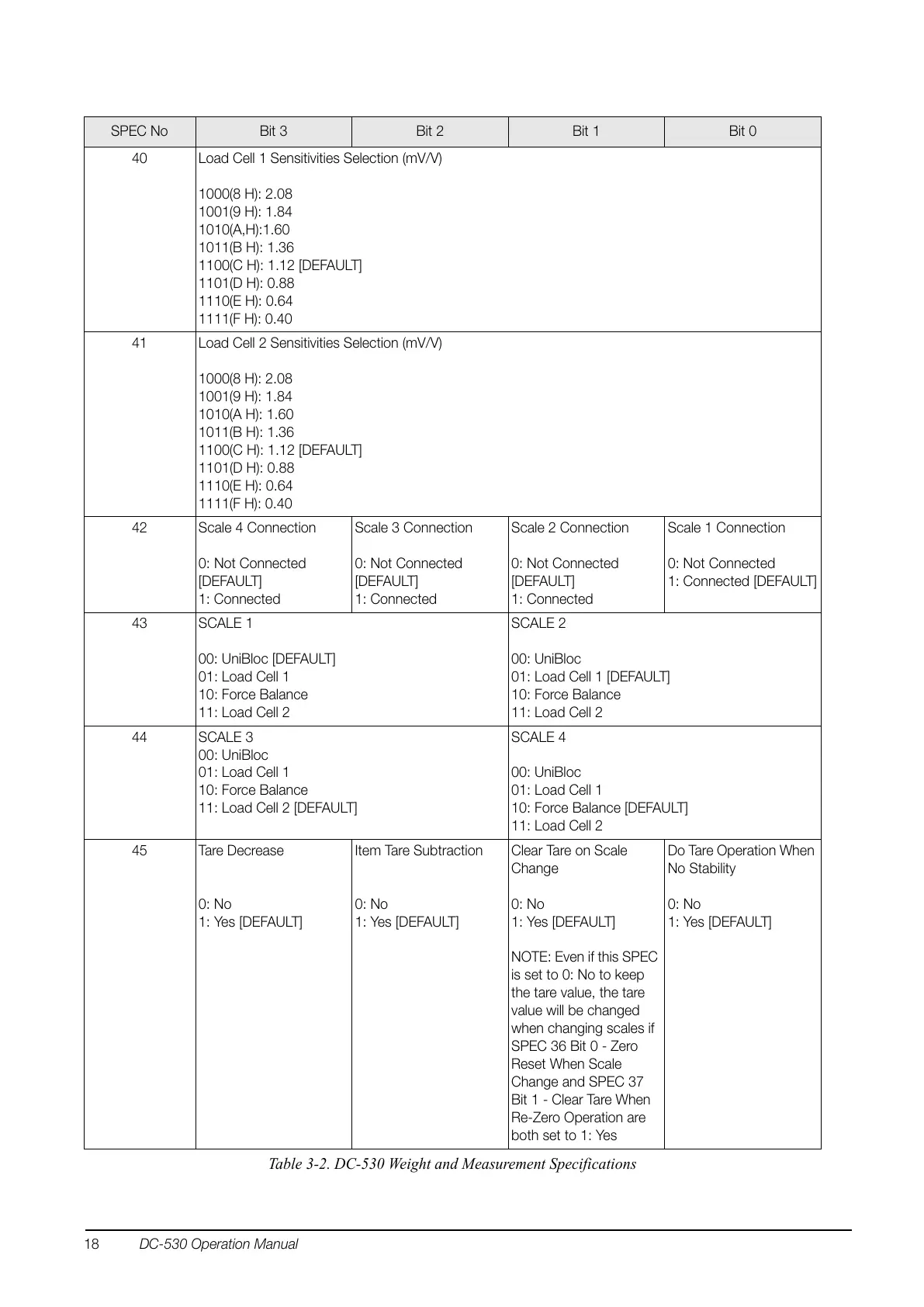
SPEC No Bit 3 Bit 2 Bit 1 Bit 0
Table 3-2. DC-530 Weight and Measurement Specifications


 To Next Page