Configuration Settings 19
46 Tare Increase
0: No
1: Yes [DEFAULT]
Weight Unit
0: kg
1: g [DEFAULT]
NOTE: This SPEC does
not affect the units
displayed unless SPEC
49 Bit 1 - Weight Base is
set to 0: Kg/g.
Overwrite the Tare Value
0: No
1: Yes [DEFAULT]
Do Tare Operation When
No Stability
0: No [DEFAULT]
1: Yes
47 Minus Mask Limit
0: Gross Weight
[DEFAULT]
1: Net Weight
Minus Display
0: Mask
1: Minus [DEFAULT]
Zero Lamp Condition
0: Gross [DEFAULT]
1: Net
Keep Tare When
Changing Scale
0: No [DEFAULT]
1: Yes
NOTE: Even if this SPEC
is set to 1: Yes to keep
the tare value, the tare
value will be changed
when changing scales if
SPEC 36 Bit 0 - Zero
Reset When Scale
Change and SPEC 37
Bit 1 - Clear Tare When
Re-Zero Operation are
both set to 1: Yes
48 Rezero Operation Range
00: 100% of Full Scale [DEFAULT]
01: 10% of Full Scale
10: 2% of Full Scale
Scale Start Range
00: 100% of Full Scale [DEFAULT]
01: 10% of Full Scale
10: 2% of Full Scale
49 Disable Scale
Connection Check
0: No [DEFAULT]
1: Yes
Too Light Range for
Sampling
0: No [DEFAULT]
1: Yes
Weight Base
0: kg/g
1: lb [DEFAULT]
Mask Condition at
Overflow
0: 1d
1: 9d [DEFAULT]
50 not currently in use
SPEC No Bit 3 Bit 2 Bit 1 Bit 0
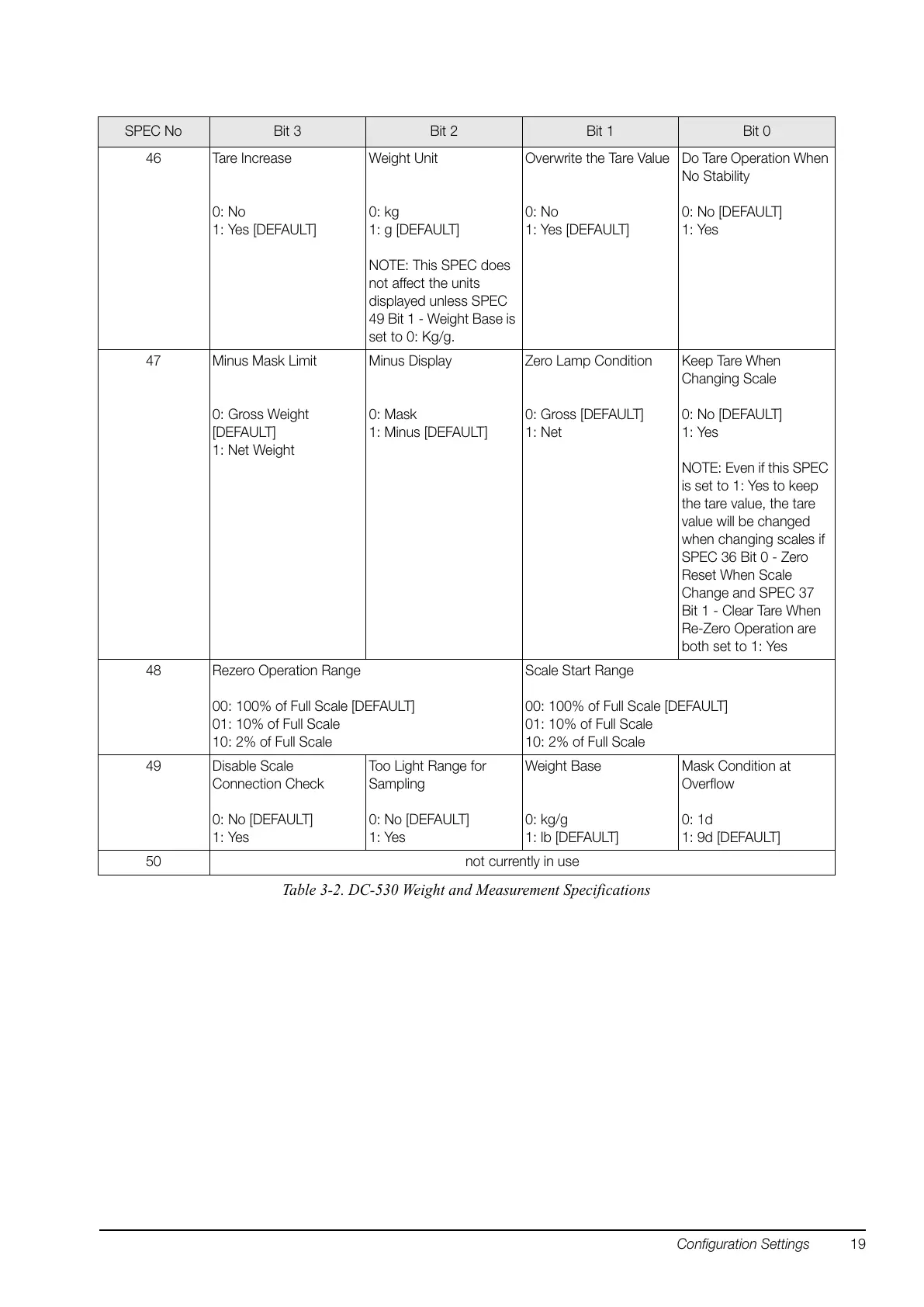
Table 3-2. DC-530 Weight and Measurement Specifications


 To Next Page