ENGLISH
5
EASY REMOTE CONTROL 2 in 1
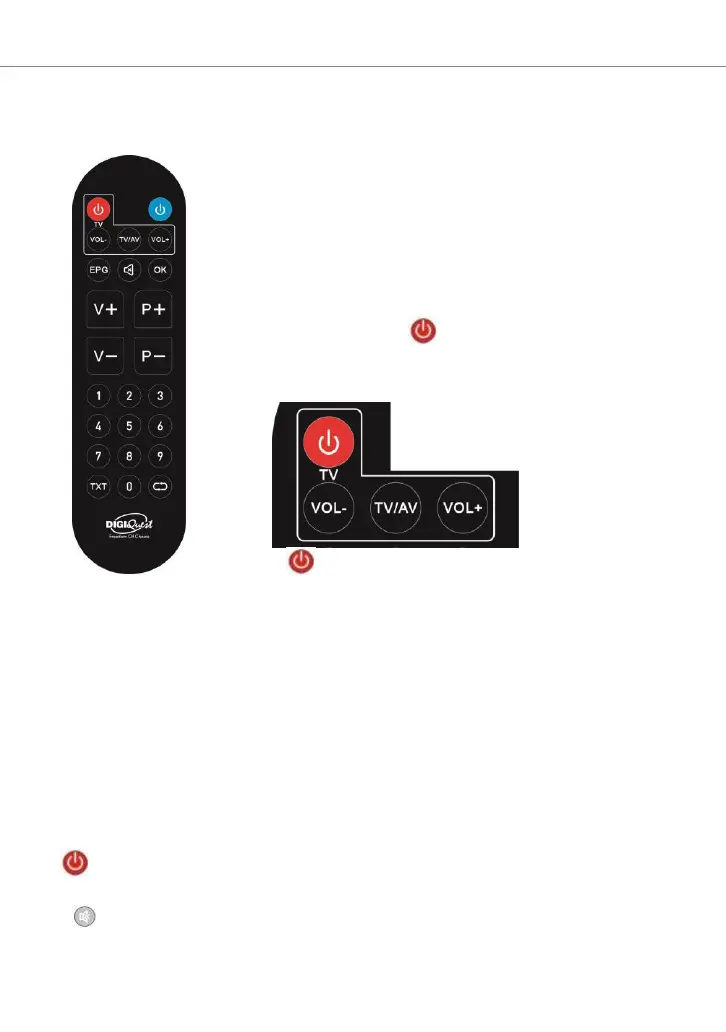
Simplified remote control, possible operations are limited, to perform the
first installation and access the menu use the full remote
control.
It can be programmed to manage some functions of the
TV remote control as well (e.g. managing volume,
power off, channel change). To assign TV functions to
the receiver remote control, follow the steps below:
1. Press and hold the EPG and OK buttons for three
seconds, the red button (led) will light up and you
will enter learning mode.
2. Press the button to be programmed in the top section:
TV on/off red, or VOL+ or VOL- or TV/AV, the LED
will flash.
3. Place the TV remote control in front of the decoder remote control
(so that the two LEDs face each other) at a distance of about 3 cm.
4. Press the corresponding button on the TV remote control until the
red LED stays steady.
5. To finish the programming, press the EPG and OK buttons at the
same time.
Set one button at a time.
Other keys
BLUE: to switch on/off (standby).
EPG: to open the program guide.
MUTE: to mute the sound. Press again to activate.
OK: to display the channel list.
V+ / V-: increase or decrease volume.


 To Next Page