ENGLISH
9
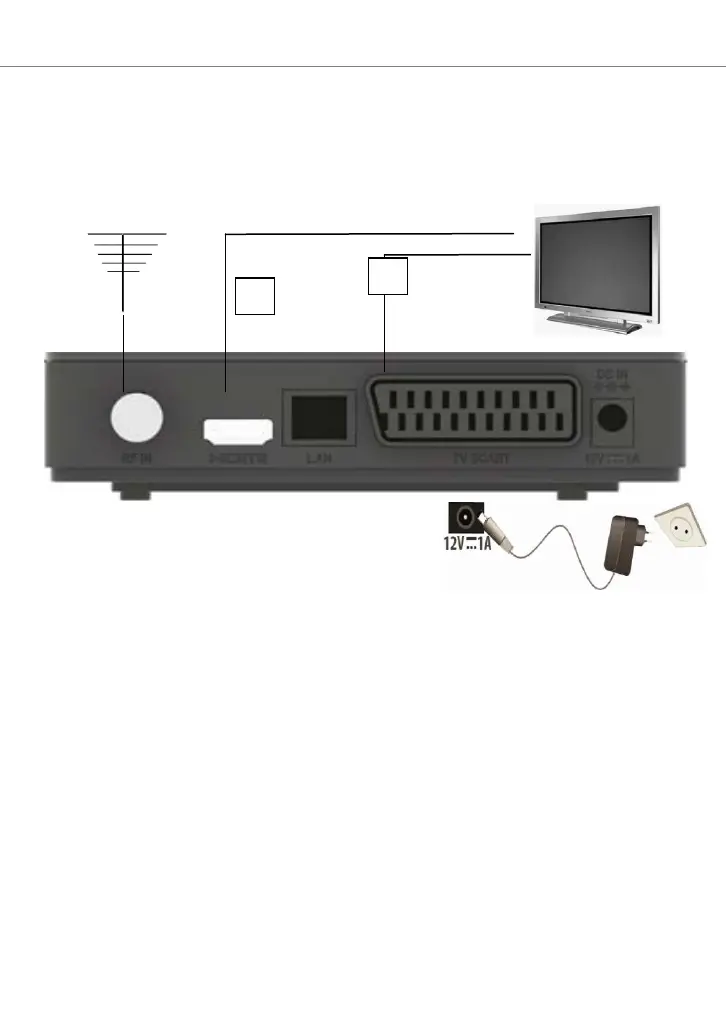
SYSTEM CONNECTION
There are many different types of TV and other equipment that you can
connect to the box. In this manual you will see some of the most
common ways to connect your equipment. WARNING: when making
connections ALL the devices must be disconnected from the
electrical socket.
NOTE: when the decoder is connected to the TV via HDMI, it may be
necessary to select the source (eg. HDMI 1 or 2 etc.) by pressing
the SOURCE button on the remote control of TV (depending on
the brand, the button can also be identified with INPUT, AV, AUX,
ZERO, etc.), otherwise no image appears.
GETTING STARTED
The first time you turn on the decoder (or when you reset it) you need to
tune the channels. Use full remote control. In the "Installation Guide"
screen, scroll through the items using the button: select language and
country using the buttons . In order to use several functions
supported by the decoder, you need to enter the access PIN. Use the
button to scroll down to New Password and enter the desired PIN,
consisting of 4 digits (e.g. 0000 or 1234, etc.), using the numeric keys of
the remote control: make sure to write it down in the following spaces, if
you lose your PIN contact the service department.


 To Next Page