860-00186-00 Rev J
Digital Ally Inc.| Introduction to the DVM-800 System
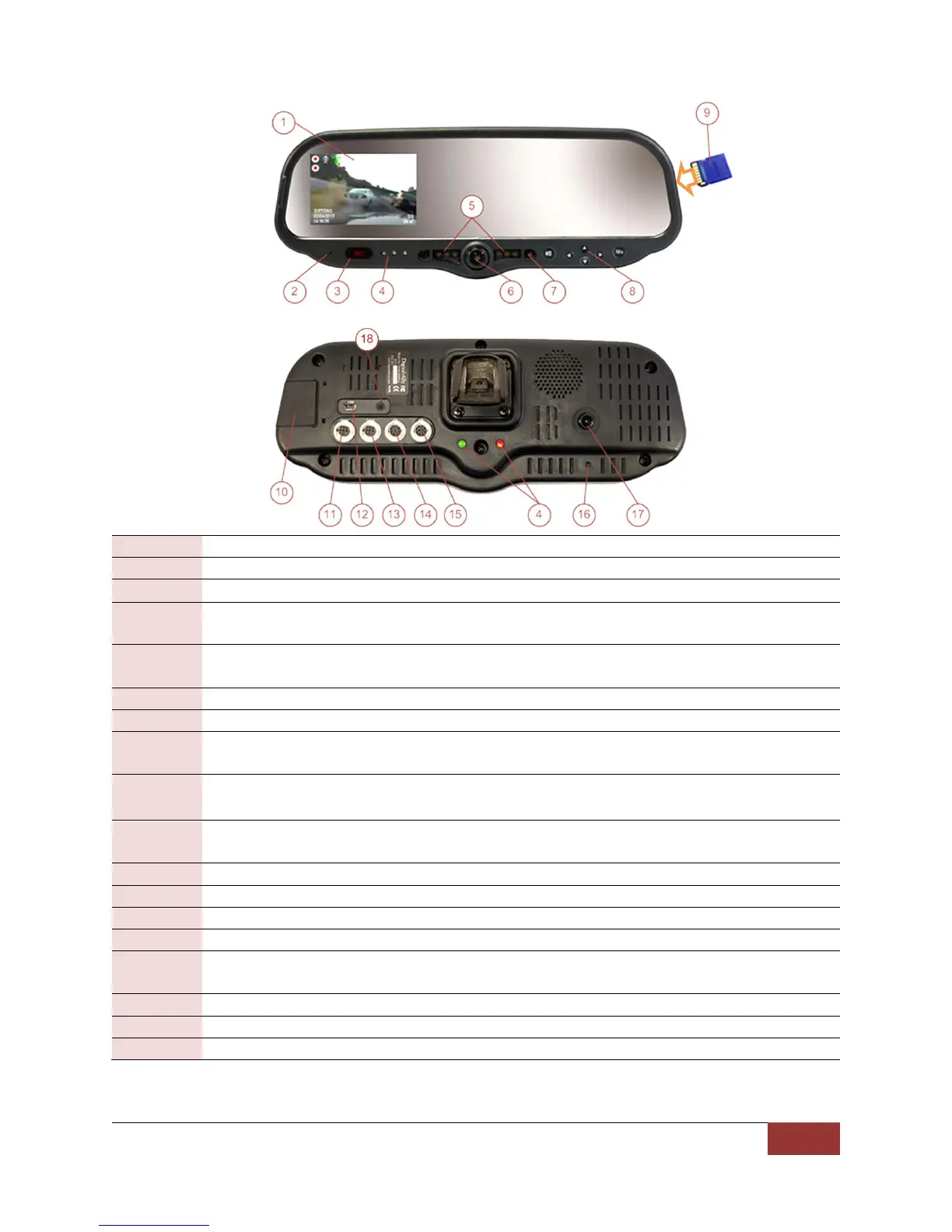
1.2 DVM Features Diagram
LCD Display: Used for viewing video
Internal microphone: Records audio from the passenger compartment
Manual Record button: This button is used to start/stop a manual event recording
LED Status Indicators (Passenger facing & Road facing): These visible indicators give the
operator feedback on the operational status of the DVM
Infrared Illuminators: Automatically provides Infrared illumination for the passenger
facing camera during low light conditions
Passenger facing camera: Records video of the vehicle passenger area
Ambient Light Sensor: Senses ambient light to automatically adjust LCD brightness
Menu and Playback Buttons: Used to navigate the DVM menus, play back videos, and log
into the system
External SD Card: The external SD card is installed behind the external SD door. The SD
card is installed at a slight angle and positioned with the connector pads as shown above
External SD door: Provides access to the external SD card. The included security screw kit
can also be installed
External Camera 1 Port: An external camera can be connected to the DVM with this port
USB Port: For data transfer and Wi-Fi download module
External Camera 2 Port: A 2
nd
external camera can be connected here
External GPS Port: The supplied GPS antenna is connected here
Power port: This port is used to provide power to the DVM or can be used to attach the
optional Interface Box to the system
Reset Button: Used to perform a hard reset of the system
Integrated road facing camera: Records the view in front of the vehicle
External Audio Input: The DWM Wireless Microphone audio cable is connected here


 To Next Page