Setting up Antenna or Cable Input
How to setup the source input. ,~ ,
Auto
Scanning Channels
How to scan and store channels.
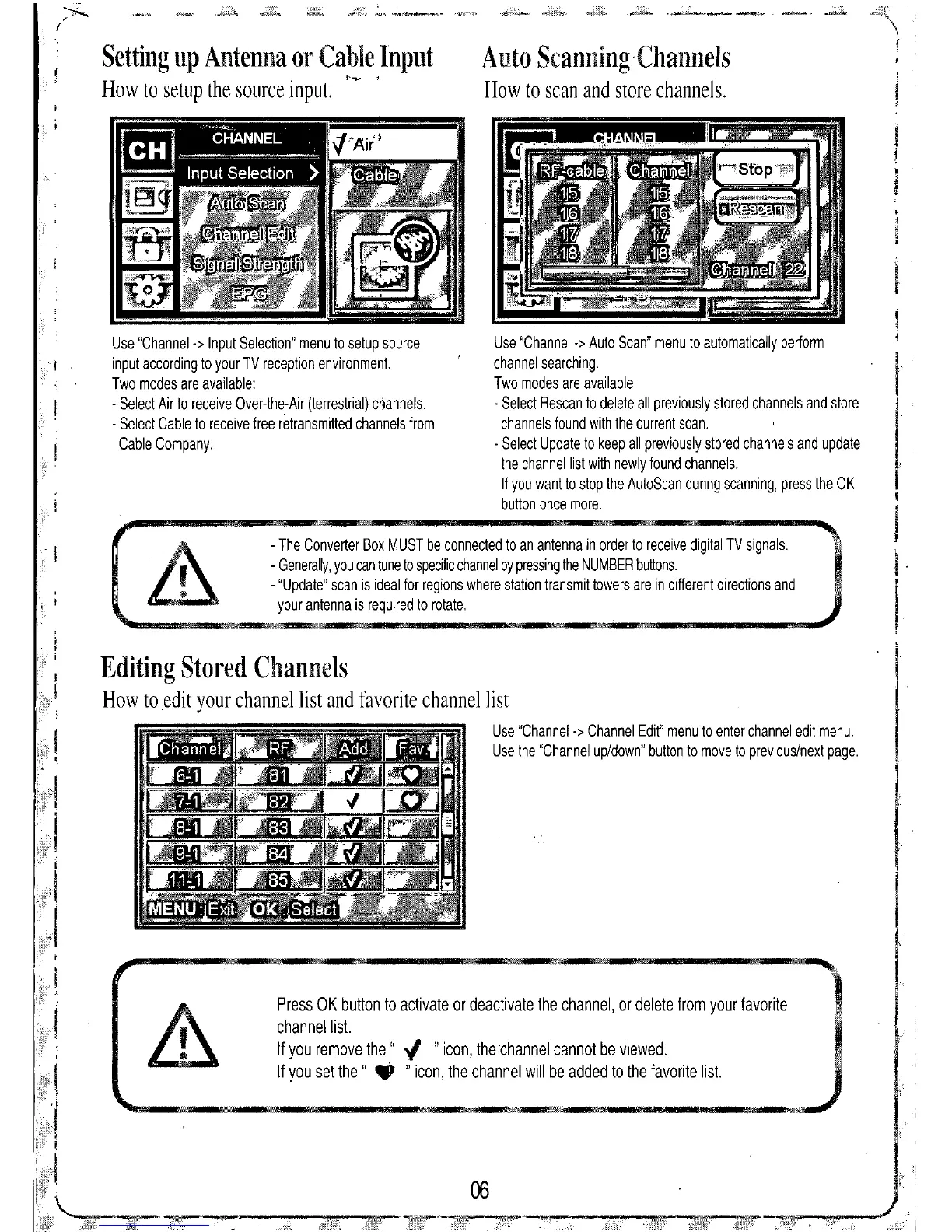
Use "Channel -> Auto Scan" menu to automatically perform
channel searching.
Two modes are available:
- Select Rescan to delete all previously stored channels and store
channels found with the current scan.
- Select Update to keep all previously stored channels and update
the channel list with newly found channels.
If you want to stop the AutoScan during scanning, press the OK
button once more.
Press OK button to
activate
or deactivate the channel, or delete from your favorite
channellisl.
If you
remove
the" ." "icon, the channel cannot be viewed.
If you set the" • "icon, the channel will be added to the favorite list.
- The Converter Box MUST be connected to an antenna in order to receive digital TV signals.
- Generally, you can tune to specific channel by pressing the NUMBER buttons.
- "Update" scan is ideal for regions where station transmit towers are in different directions and
your antenna is required to rotate.
Use "Channel-> Input Selection" menu to setup source
input according to your TV reception environment.
Two modes are available:
- Select Air to receive Over-the-Air (terrestrial) channels.
- Select Cable to receive free retransmitted channels from
Cable Company.
r
Editing Stored Channels
How to edit your channel list and favorite channel list
Use "Channel-> Channel Edit" menu to enter channel edit menu.
Use the "Channel up/down" button to move to previous/next page.


 To Next Page