Vendor Code: 1234
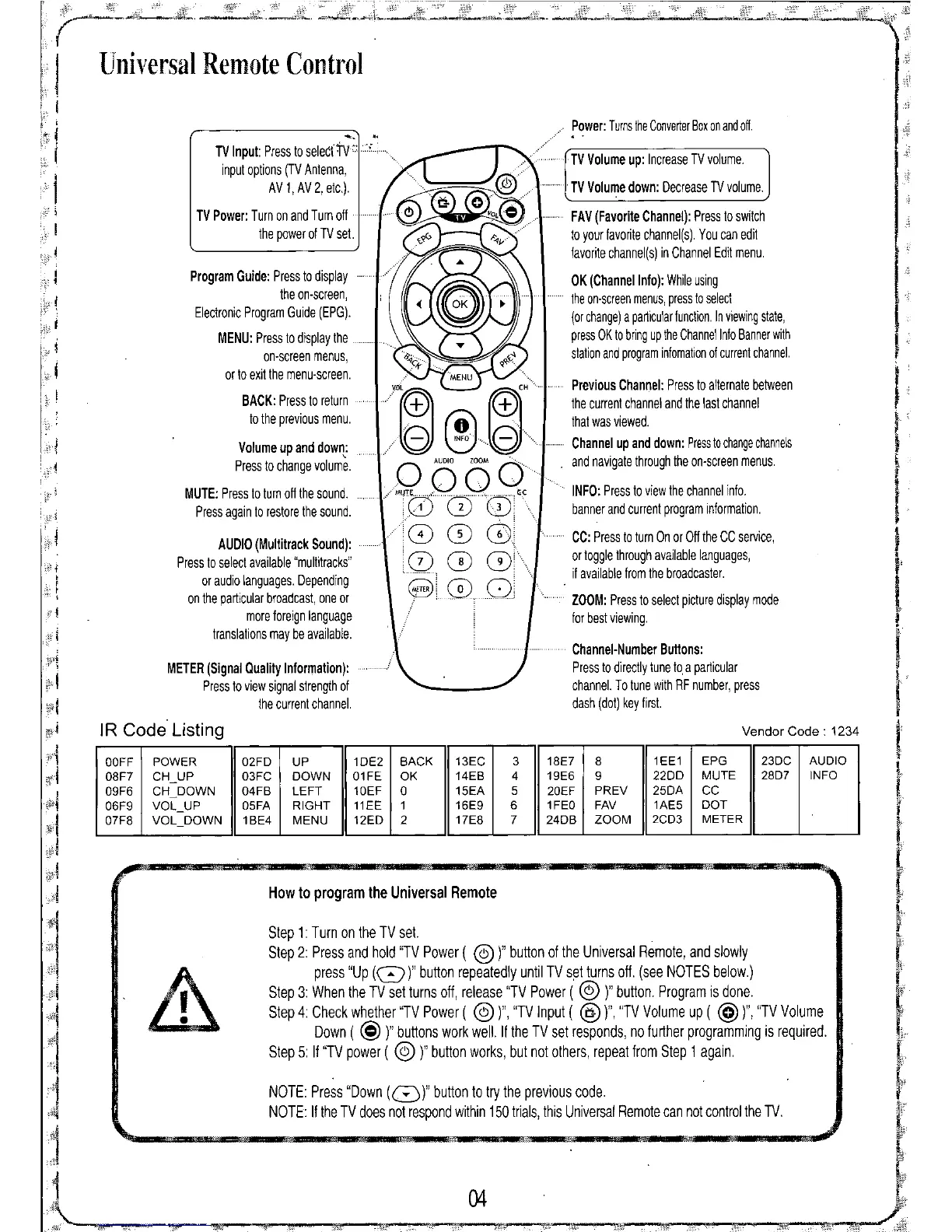
Channel-Number Buttons:
Press to directly tune to.a particular
channel. To tune with RF number, press
dash (dot) key first.
TV
Volume up: Increase TV volume.
TV
Volume down: Decrease TV volume.
FAV (Favorite Channel): Press to switch
to your favorite channel(s). You can edit
favorite channel(s) in Channel Edit menu.
OK (Channel Info): Whileusing
........theon-screenmenus,pressto select
(orchange)a particularfunction.Inviewingstate,
pressOKto bringupthe ChannelInfoBannerwith
stationandprograminfomationof currentchannel.
./y.@~~+ MENu@+".....previOuSChannel:presstoalternatebetween
'0:.J '0:.J
the current channel and the last channel
(OJ',
that was viewed.
//(3 \::.)(3
Channel up and down: Presstochangechannels
o
'co,"
WOM
0"
and navigate through the on-screen menus.
/"",....0.0....
'c
INFO: Pressto view the channel info.
i
CD G)
01
banner and current program information.
:CD CD 0,
cc:
Press to turn On or Off the CC service,
.0.
0
Q).'
or toggle through available languages,
if available from the broadcaster.
8'
00
i
ZOOM: Press to select picture display mode
for best viewing.
TV Input: Press to selecrtv" .
input options (TV Antenna,
AV
1,
AV
2, etc.).
TV Power: Turn on and Turn off
the power of
TV
set.
Program Guide: Press to display
the on-screen,
Electronic Program Guide (EPG).
MENU: Press to display the
on-screen menus,
or to exit the menu-screen.
BACK: Press to return
to the previous menu.
Volume
up and down:
Press to change volume.
MUTE: Press to turn off the sound.
Press again to restore the sound.
Step 1: Turn on the TV set.
Step 2: Press and hold "TV Power (
@)"
button of the Universal Remote, and slowly
press "Up
(0)"
button repeatedly until TV s~t turns off. (see NOTES below.)
Step 3: When the TV set turns Off, release "TV Power (
@ )"
button. Program is done.
Step 4: Check whether "TV Power (
@)",
"TV Input (
@)",
"TV Volume up (
@)",
''TV Volume
Down (
@ )"
buttons work well. If the TV set responds, no further programming is required.
Step 5: If "TV power (
@ )"
button works, but not others, repeat from Step 1 again.
04
. Power: TurnstheConverterBoxonandoff.
NOTE: Press "Down
(8)"
button to try the previous code.
NOTE: If the TV does not respond within 150 trials, this Universal Remote can not control the TV.
AUDIO (Multitrack Sound):
Press to select available "multitracks"
or audio languages. Depending
on the particular broadcast, one or
more foreign language
translations may be available.
How to program the Universal Remote
METER (Signal Quality Information):
Press to view signal strength of
the current channel.
Universal Remote Control
IR Code Listing
OOFF POWER 02FD UP 1DE2
BACK 13EC 3 18E7 8
1EE1 EPG 23DC
AUDIO
08F7 CH_UP 03FC DOWN 01FE OK
14EB 4 19E6 9
2200
MUTE 28D7 INFO
09F6 CH_DOWN 04FB
LEFT
10EF 0
15EA 5
20EF
PREV
25DA
CC
06F9
VOL_UP 05FA RIGHT 11EE 1
16E9 6 1FEO FAV
1AE5 DOT
07F8 VOL_DOWN 1BE4 MENU
12ED 2 17E8 7 24DB
ZOOM
2CD3 METER


 To Next Page