Front Panel
G)
@ @
leB@]
G)
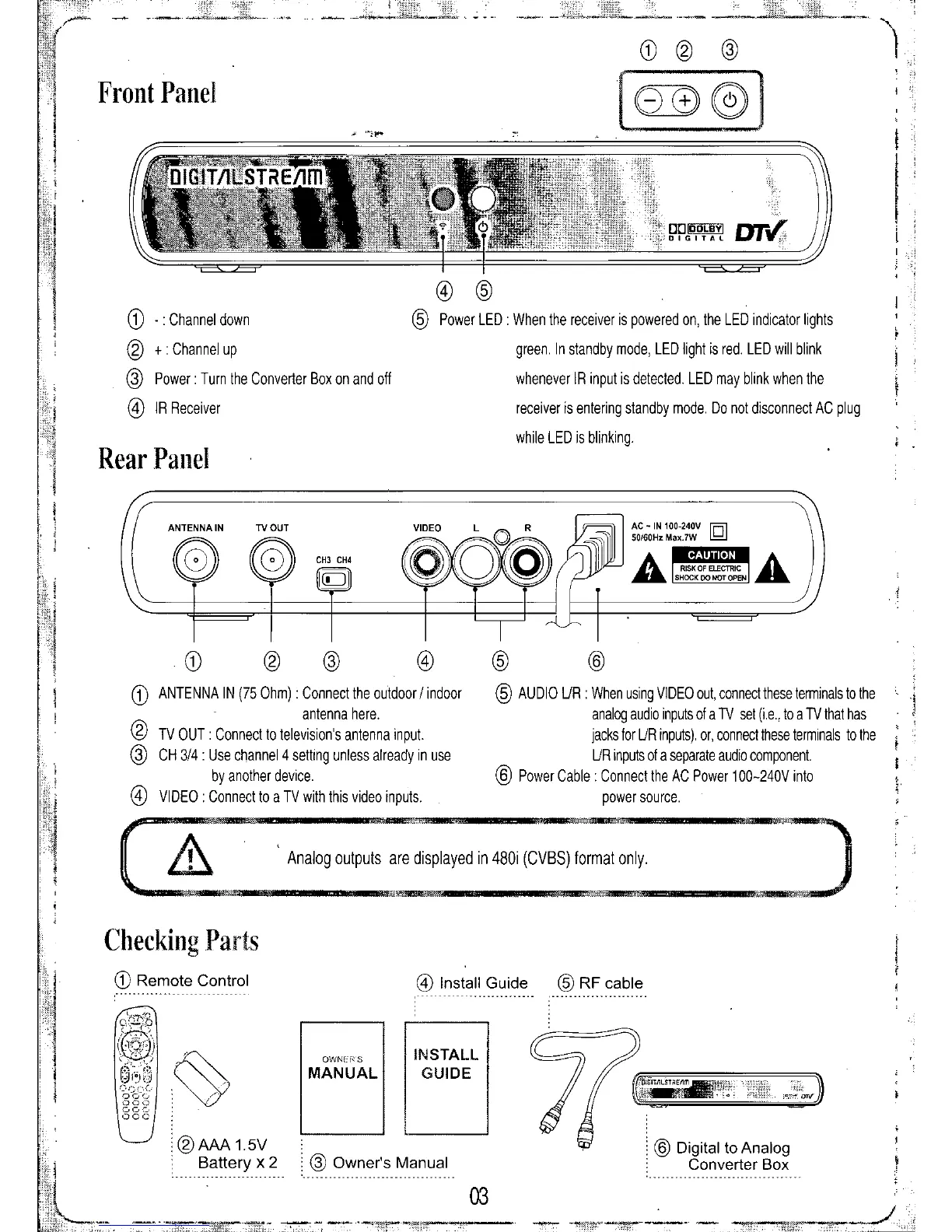
ANTENNA IN (75 Ohm) : Connect the outdoor / indoor
antenna here.
@
TV OUT: Connect to television's antenna input.
@
CH 3/4 : Use channel 4 setting unless already in use
by another device.
@
VIDEO: Connect to a TV with this video inputs.
G) -:
Channel down
@
+:
Channel up
@
Power: Turn the Converter Box on and off
@
IR Receiver
Rear Panel
@ @
@
Power LED When the receiver is powered on, the LED indicator lights
green. In standby mode, LED light is red. LED will blink
whenever IR input is detected. LED may blink when the
receiver is entering standby mode. Do not disconnect AC plug
while LED is blinking.
@
@
@
AUDIO UR : When using VIDEO out, connect these tenminals to the
analog audio inputs of a TV set (i.e., to a TV that has
jacks for UR inputs). or, connect these terminals to the
UR inputs of a separate audio component.
@
Power Cable: Connect the AC Power 100-240V into
power source.
,
,.
Analog outputs are displayed in 480i (CVBS) format only.
Checking
Parts
G)
Remote Control
@
Install Guide
@
RF
cable
@
Owner's Manual
@
Digital to Analog
Converter Box
tNSTALL
GUIDE
QWNET($
03
MANUAL
@AAA15V
. Battery x 2


 To Next Page