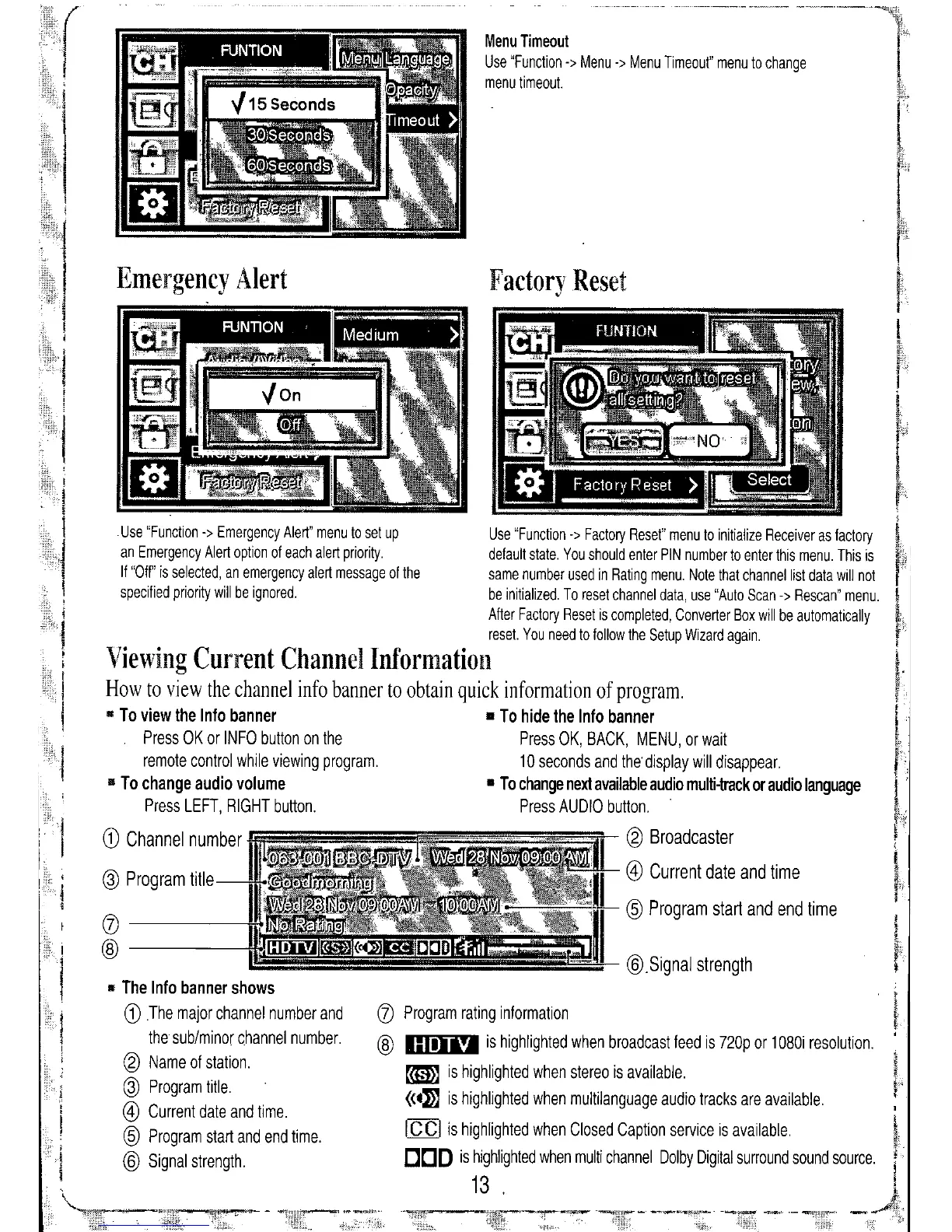
@.Signal strength
@
Program start and end time
Factory Reset
Menu
Timeout
Use "Function
->
Menu
->
Menu Timeout" menu to change
menu timeout.
(j)
Program rating information
@
Imll"
is highlighted when broadcast feed is 720p or 1080i resolution.
~ is highlighted when stereo is available.
«4:»)
is highlighted when multilanguage audio tracks are available.
Ie CI
is highlighted when Closed Caption service is available.
DOD
is highlighted when multi channel Dolby Digital surround sound source.
13 .
Emergency Alert
Use "Function
->
Emergency Alert" menu to set up
an Emergency Alert option of each alert priority.
If "Off" is selected, an emergency alert message of the
specified priority will be ignored.
11
The Info banner shows
G)
The major channel number and
the sub/minor channel number.
@
Name of station.
@
Program title.
@
Current date and time.
@
Program start and end time.
@
Signal strength.
Use "Function
->
Factory Reset" menu to initialize Receiver as factory
default state. You should enter PIN number to enter this menu. This is
same number used in Rating menu. Note that channel list data will not
be initialized. To reset channel data, use "Auto Scan
->
Rescan" menu.
After Factory Reset is completed, Converter Box will be automatically
reset. You need to follow the Setup Wizard again.
Viewing Current Channel Information
How to view the channel info banner to obtain quick information of program .
•• To view the Info banner • To hide the Info banner
Press OK or INFO button on the Press OK, BACK, MENU, or wait
remote control while viewing program. 10 seconds and the' display will disappear.
" To change audio volume • To change next available audio multi-track or audio language
Press LEFT, RIGHT button. Press AUDIO button.
G)
Channel number
@
Broadcaster
@
Current date and time
@
Program title
(j)
@


 To Next Page