Setting up the Time Functions
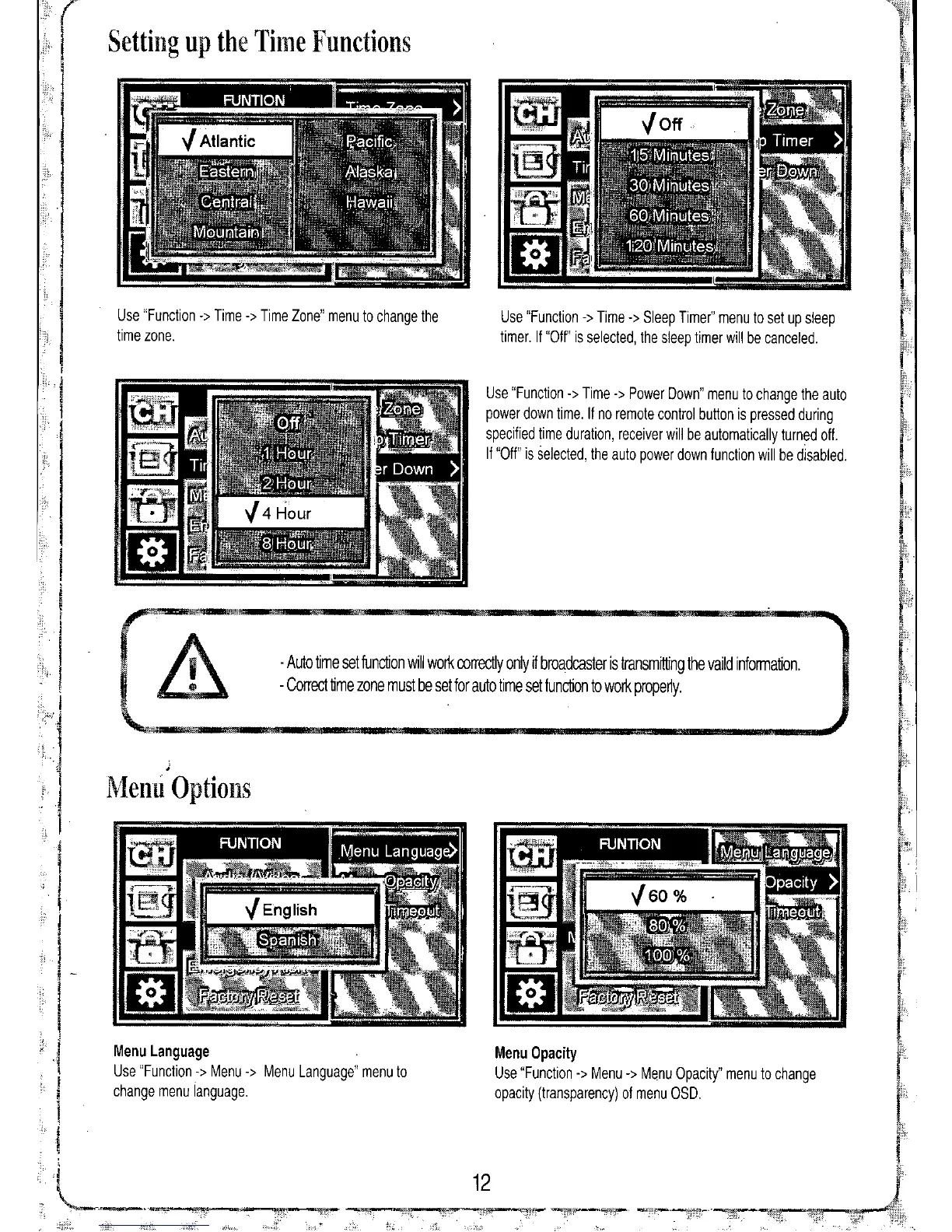
Use "Function
->
Time
->
Time Zone" menu to change the
time zone.
Use "Function
->
Time
->
Sleep Timer" menu to set up sleep
timer. If "Off" is selected, the sleep timer will be canceled.
Use "Function
->
Time
->
Power Down" menu to change the auto
power down time.
If
no remote control button is pressed during
specified time duration, receiver will be automatically turned off.
If "Off" is selected, the auto power down function will be disabled.
- Auto time set function will work correctly only
if
broadcaster is transmitting the vaild information.
- Correct time zone must be set for auto time set function to work properly.
Menu Opacity
Use "Function
->
Menu
->
Menu Opacity" menu to change
opacity (transparency) of menu OSD.
Menu Language
Use "Function
->
Menu
->
Menu Language" menu to
change menu language.
Menu Options


 To Previous Page