4.3.6. Setting of addressing
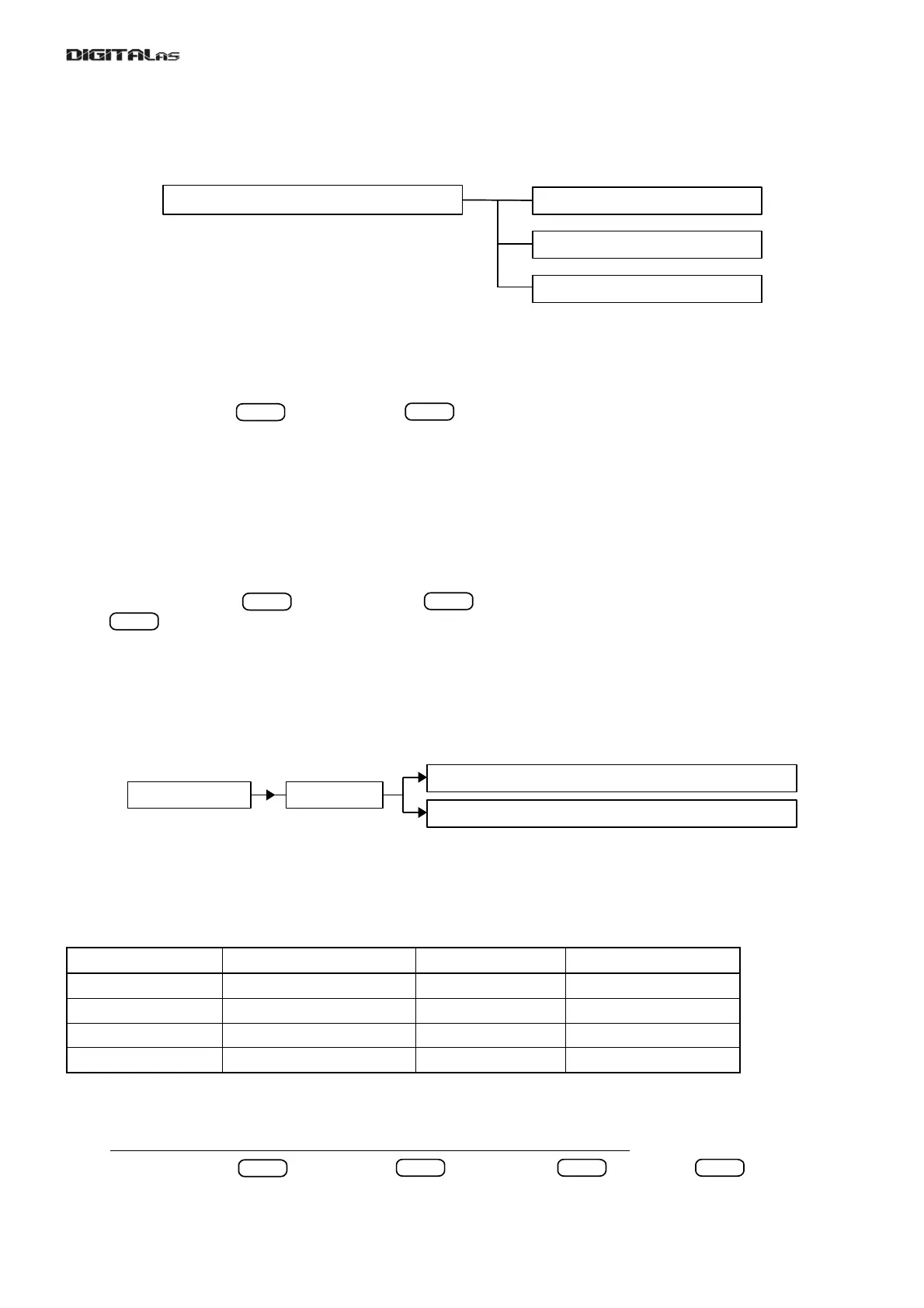
DD-5100 door phone system allows to use three types of addressing (fig. 27) - regular, shifted and hotel. The
mentioned types are described in detail below.
Fig. 27: Setting of addressing
Regular addressing
Set in the system by default. This is a regular type of addressing: all 255 physical and logic ID addresses are
placed by a rank order from 1 to 255. In order to activate this type perform the following:
[6.AddrESSinG] > > [1.rEGULAr] > > [donE] – regular addressing is set
Shifted addressing
Shifted addressing is a type, when all 255 physical ID addresses are placed by a rank order from 1 to 255,
while logic addresses will be shifted upon an appropriate constant value. For example, if addressing is set for
Sh=100, logic addresses will be placed from 101 to 355. In this case when calling to logic address LID=115, a
system will call a physical address FID=15. Sh – shifting constant value, LID – logic address, FID – physical
address. Physical address could be counted upon the following formula ( FID = LID – Sh ).
e.g. FID = LID – Sh = 115 – 100 = 15. Setting of this type addressing is as follows:
[6.AddrESSinG] > > [2.ShiFtEd] > > [Sh- ] > (enter shifting constant, e.g. Sh=100) >
> [donE] – addressing shifted by Sh=100
A maximum allowed shifting value is Sh=9744. In this case logic address will be from 9745 to 9999.
Hotel addressing
Hotel addressing is a type, when all 255 physical ID addresses are placed by a rank order from 1 to 255,
while logic addresses will be scrolled upon number of floors and number of flats within a floor. In order to configure
hotel addressing for an appropriate house, choose this type of addressing, start a new addressing configuration
and set intervals for logic addresses. See fig. 28 for hotel addressing menu structure:
Fig. 28: Hotel addressing menu structure
For better understanding let us analyze an example. Let’s imagine that we need to configure a door phone
for a four-storey house with 6 flats on the second floor with numbers starting from No.4. Other floors contain 9 flats.
See table 3 for an example with physical FID and logic LID address link.
Table 3: An example of hotel addressing
Floor number Number of flats within a floor Logic addresses, LID Physical addresses, FID
1 9 101 - 109 1 - 9
2 6 204 - 209 10 - 15
3 9 301 - 309 16 - 24
4 9 401 - 409 25 - 33
For configuration a hotel addressing to the mentioned house perform the following steps:
1) Choose this type of addressing and start a new addressing configuration:
[6.AddrESSinG] > > [3.hotEL] > > [2.StArt] > > [SEt?] > > [donE] – An
old hotel configuration is deleted, a new one is started.
29
ENTER
ENTER
ENTER
ENTER
ENTER
ENTER
ENTER ENTER ENTER
[6.AddrESSinG] [3.hotEL]
[1.Add Int] – add new floor (interval of logic addresses)
[2.StArt] – activate hotel addressing
[6.AddrESSinG] – setting of addressing
[1.rEGULAr] – regular addressing
[2.ShiFtEd] – shifted addressing
[3.hotEL] – hotel addressing


 To Next Page