Chapter 5. Doorphone net types and configuration
Warning: Net configuration is supported only in DD-5100 doorphone with software version v.358 and
higher.
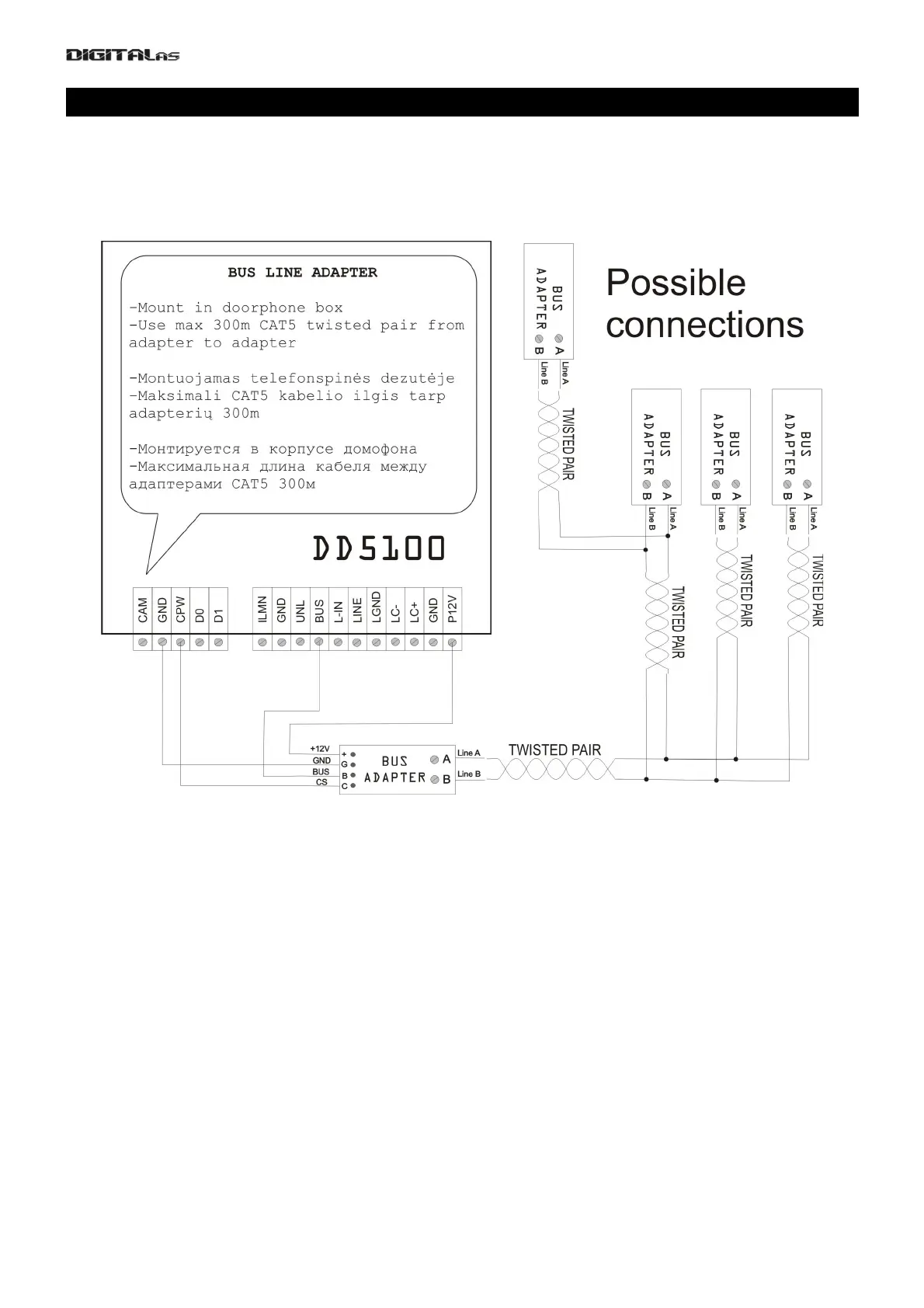
Important: intercom connecting to the network is recommended to connect the call through a network
extender panels that protect the call panel of Electromagnetic pulse interference and remove the impulse
line(fig. 11)
Fig. 11 Intercom connection through a network extender
5.1. Introduction to Net configurations
L – Low Level (Slave) doorphone. To this doorphone should be connected handsets line. In this doorphone are
saved main settings, user keys and codes.
H – High Level (Master) doorphone. This doorphone interacts with L doorphone and through it calls to L doorphone
connected handset. H doorphone also asks L doorphone for programmed keys and codes to decide whether to
open the H doorphone controlled doors.
To check selected doorphone Net type, following key sequence needs to be entered:
*1003#
following info will be shown on display:
[(doorphone type). (active Net type, if any)]
[doorphone ID number]
Example:
[L.nt2] – L type doorphone. NET2 type Net configuration
[ 102] – L doorphone ID = 102
possible H values (1-255)
33


 To Next Page