User Manual
14
/
76
2. Function Introduction
This chapter provides some general information that you need to learn before using an oscilloscope. It contains:
2.1. Menu and Control Keys
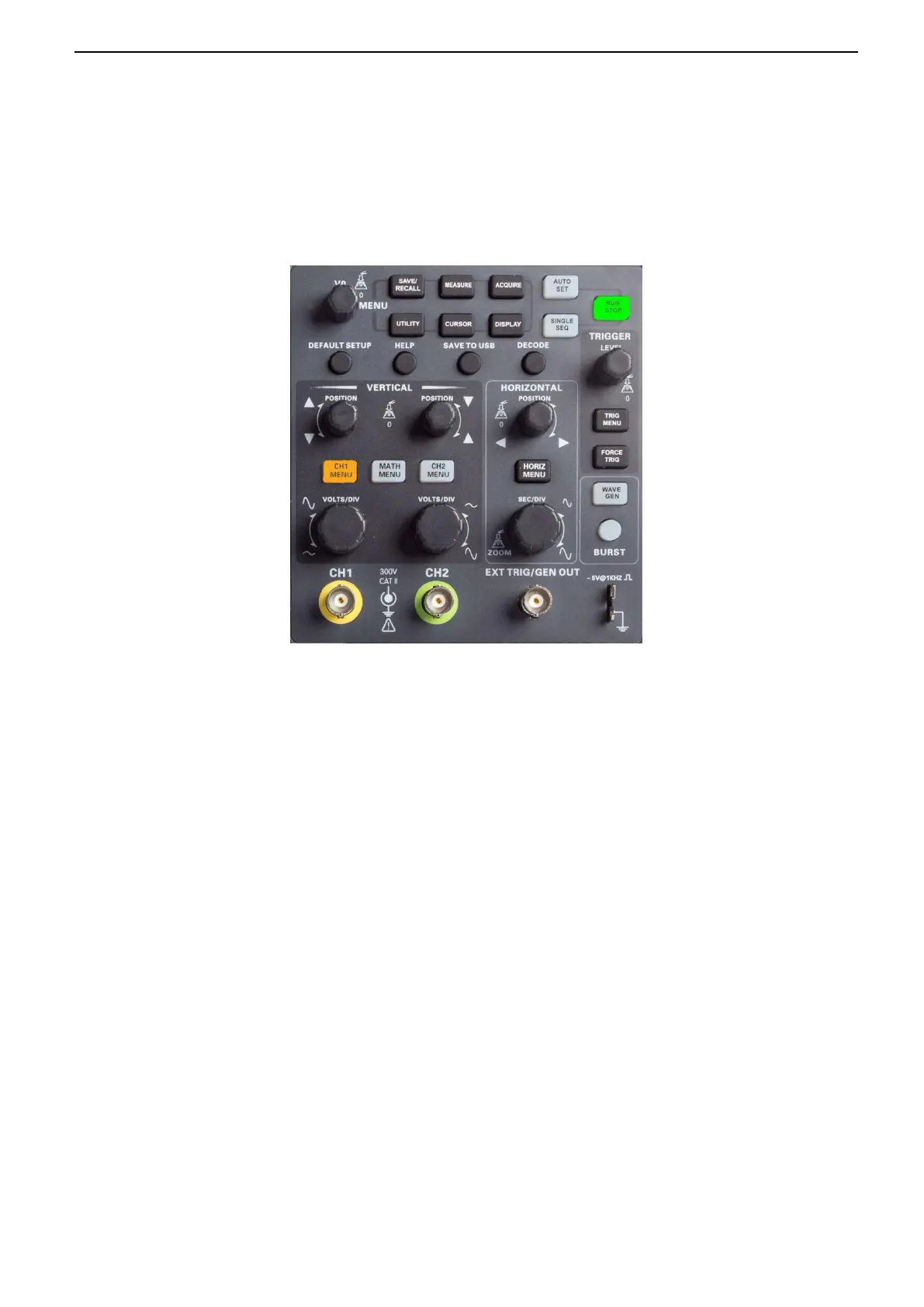
As shown in the figure below:
All the keys are described as follows:
Menu keys
[SAVE/RECALL]: "Save/Recall" menu, to save and recall files such as waveforms and settings.
[MEASURE]: “Measure” menu, to measure waveform parameters such as frequency and amplitude.
[ACQUIRE]: Waveform “Acquisition” menu, to set waveform acquisition parameters such as acquisition mode, storage
depth.
[UTILITY]: "Auxiliary function" menu, to view system information, perform system upgrades, self-calibration and other
auxiliary functions.
[CURSOR]: "Cursor" measurement menu, when using cursor measurement, you can use the [V0] knob to adjust the cursor
position.
[DISPLAY]: "Display Parameters" menu, to set the oscilloscope display parameters such as waveform brightness, grid
type, and persist.
Operation mode keys
[AUTO SET]: automatically set the control state of the oscilloscope so as to display suitable waveform.
[RUN/STOP]: continuously acquire waveform or stop acquisition
[SINGLE SEQ]: Acquire a single trigger, finish acquisition and then stop.


 To Next Page