©2007 Digitrax, Inc www.digitrax.com 10
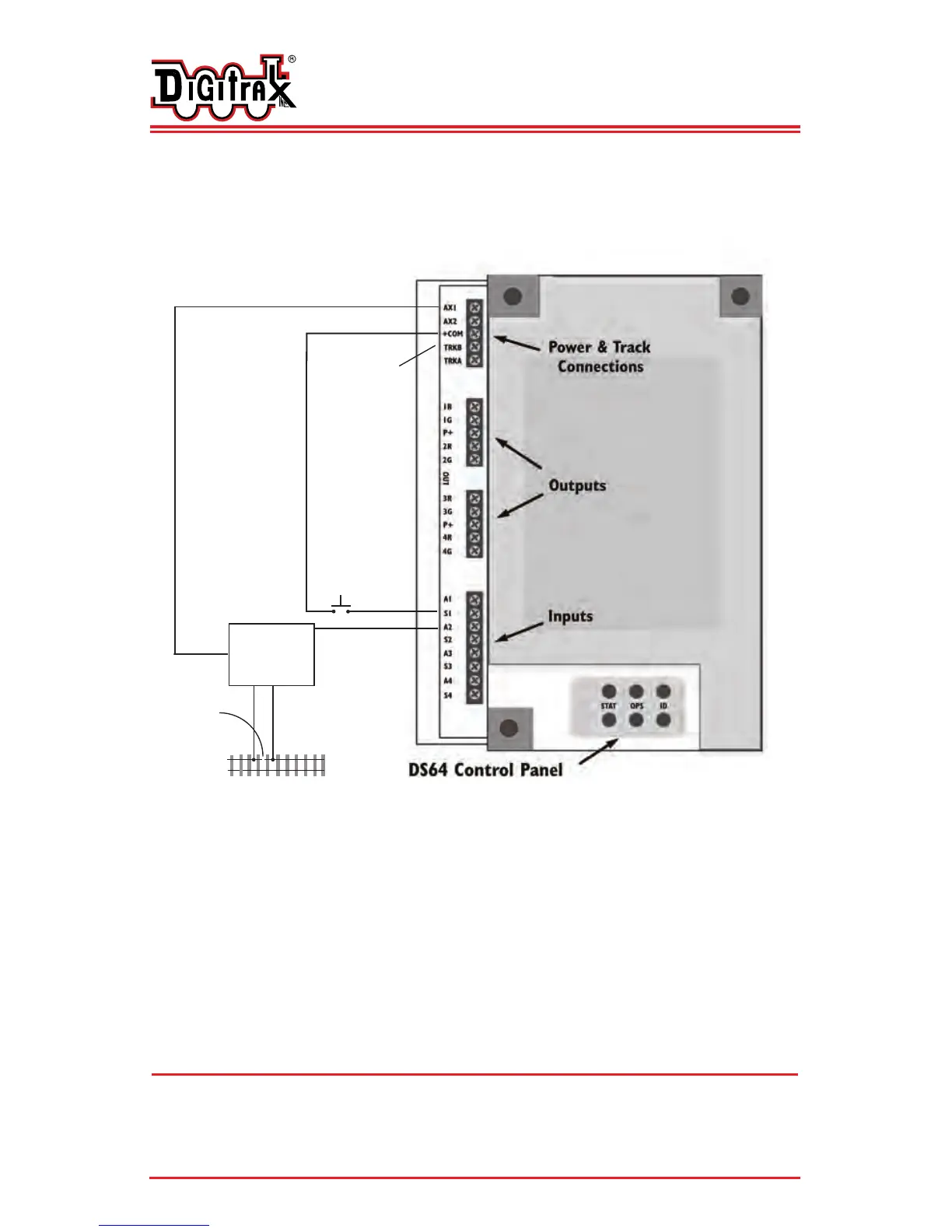
Figure 4: Connecting Input Devices to Your DS64
Using Option Switches to Control Turnouts with Your DS64
The DS64 gives you many options for how you can control the turnouts and
other stationary features on your layout. By setting the DS64’s option
switches you can configure it for many different possibilities.
D
D
i
i
g
g
i
i
t
t
r
r
a
a
x
x
C
C
o
o
m
m
p
p
l
l
e
e
t
t
e
e
T
T
r
r
a
a
i
i
n
n
C
C
o
o
n
n
t
t
r
r
o
o
l
l
R
R
u
u
n
n
Y
Y
o
o
u
u
r
r
T
T
r
r
a
a
i
i
n
n
s
s
,
,
N
N
o
o
t
t
Y
Y
o
o
u
u
r
r
T
T
r
r
a
a
c
c
k
k
!
!
Common +
Ground
BD4
Occupancy
Detector
Track
Track
Gap
Normally
Open
Switch
DS64 Track A&B
Inputs
DS64 AUX
Power Inputs
This diagram shows how various
inputs can be connected to the
DS64. You can use manual switches,
Digitrax occupancy detectors or
other manufacturers’ detectors.


 To Next Page