©2007 Digitrax, Inc www.digitrax.com 4
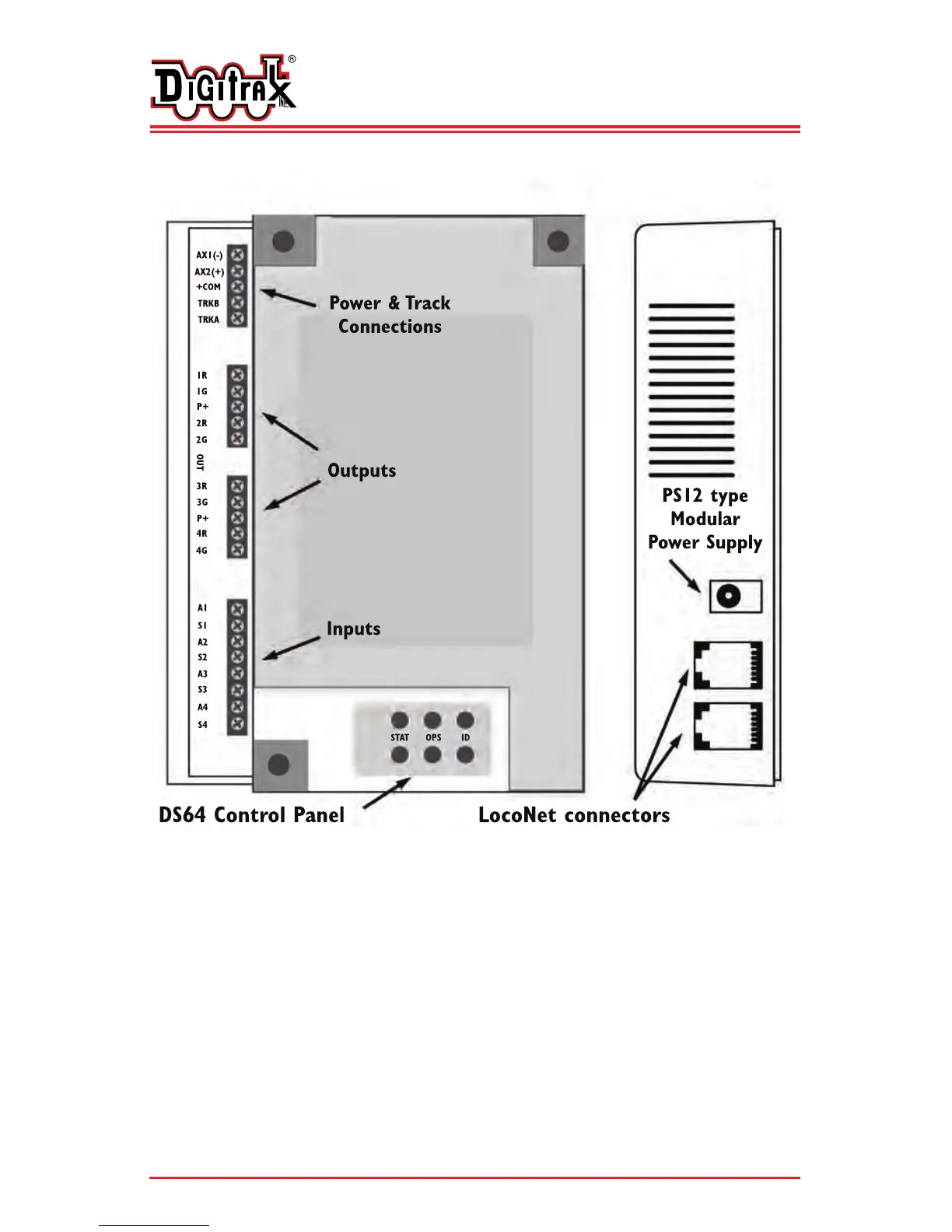
Figure 1: DS64 Diagram
D
D
i
i
g
g
i
i
t
t
r
r
a
a
x
x
C
C
o
o
m
m
p
p
l
l
e
e
t
t
e
e
T
T
r
r
a
a
i
i
n
n
C
C
o
o
n
n
t
t
r
r
o
o
l
l
R
R
u
u
n
n
Y
Y
o
o
u
u
r
r
T
T
r
r
a
a
i
i
n
n
s
s
,
,
N
N
o
o
t
t
Y
Y
o
o
u
u
r
r
T
T
r
r
a
a
c
c
k
k
!
!
DS64 Control Panel Buttons
STAT is used for setting up routes and for setting the DS64 board ID
for use with the DS64’s Inputs.
OPS is used for setting up how the DS64 works (for setting Option
Switches).
ID is used for programming the Switch Addresses of the DS64’s
Outputs.


 To Next Page