©2007 Digitrax, Inc www.digitrax.com 8
DS64 Address Programming
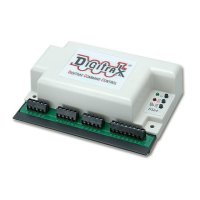
Your DS64 has 4 Outputs labeled 1R & 1G, 2R &2G, 3R & 3G, and 4R & 4G,
which are shipped from the factory programmed as Switch Addresses 01,
02, 03, and 04 respectively. You can set the Switch Address of each of these
four Outputs to any value from 01 - 2048.
1. On the DS64’s control panel, press and hold the ID button down for 3 sec-
onds until the green LED slowly blinks on and off. This indicates that the
DS64 is ready to accept address programming for the Outputs.
2. Using your DCC throttle in Switch mode, select the Switch Address you
want to program for Output 1 and issue either a Closed OR Thrown com-
mand. The LEDs will start to blink faster indicating that your Output 1 is
programmed to the Switch Address you selected.
3. Repeat step 2 to program the Switch Address for Output 2. The LEDs will
blink faster indicating that Output 2 is programmed to the address you
selected.
4. Repeat this process for Output 3 and Output 4. After Output 4 is pro-
grammed, the alternating lights will stop and you will see a single green
‘heart beat’ this is visual confirmation that all 4 Outputs have successfully
been programmed to the Switch Addresses you selected.
Note: To change a single Switch Address, you must program all four Switch
Addresses on a particular DS64. If you make a mistake while programming,
you’ll need to complete the programming cycle and then go back and start
again. The DS64 does not timeout during programming so, you must pro-
gram 4 switch addresses each time you enter the ID mode.
D
D
i
i
g
g
i
i
t
t
r
r
a
a
x
x
C
C
o
o
m
m
p
p
l
l
e
e
t
t
e
e
T
T
r
r
a
a
i
i
n
n
C
C
o
o
n
n
t
t
r
r
o
o
l
l
R
R
u
u
n
n
Y
Y
o
o
u
u
r
r
T
T
r
r
a
a
i
i
n
n
s
s
,
,
N
N
o
o
t
t
Y
Y
o
o
u
u
r
r
T
T
r
r
a
a
c
c
k
k
!
!


 To Next Page