EasyManua.ls Logo

Digitrax DS64 - User Manual

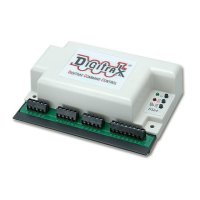
Digitrax DS64
20 pages
Print Icon
To Next Page IconTo Next Page
Loading...
DS64
Stationary Decoder for use with 4
slow motion, solenoid, or bi-polar
turnout machines
F
F
e
e
a
a
t
t
u
u
r
r
e
e
s
s
n Simple to hook up and configure
n Control 4 individual turnout machines, EITHER
4 Slow motion turnout machines, such as Tortoise
TM
by Circuitron or
Switchmaster
TM
OR
4 Solenoid-type turnout machines such as three wire (twin coil type) Peco or
Atlas Snap Switches or two wire bi-polar type turnout machines such as Kato
Unitrack, AristoCraft, or LGB turnouts with capacitive discharge capability
n Support for up to 8 routes
n Screw terminals make installation easy
n Use with any LocoNet Compatible System
n DCC compatible for non-LocoNet Use
n FCC Class B compliant
I
I
n
n
t
t
r
r
o
o
d
d
u
u
c
c
t
t
i
i
o
o
n
n
The DS64 is a state of the art stationary decoder that can control multiple types
of turnout machines and other stationary accessory motors and lighting. The
DS64 accepts commands from LocoNet Compatible Command Stations &
Throttles (via LocoNet), DCC Command Stations & Throttles (via the rails), a
computer (via LocoNet), or via eight manual inputs. Each output can handle up
to two devices simultaneously.
©2007 Digitrax, Inc www.digitrax.com 1
D
D
i
i
g
g
i
i
t
t
r
r
a
a
x
x
C
C
o
o
m
m
p
p
l
l
e
e
t
t
e
e
T
T
r
r
a
a
i
i
n
n
C
C
o
o
n
n
t
t
r
r
o
o
l
l
R
R
u
u
n
n
Y
Y
o
o
u
u
r
r
T
T
r
r
a
a
i
i
n
n
s
s
,
,
N
N
o
o
t
t
Y
Y
o
o
u
u
r
r
T
T
r
r
a
a
c
c
k
k
!
!
All Scales
Track Voltage Up to 22 Volts
Question and Answer IconNeed help?

Do you have a question about the Digitrax DS64 and is the answer not in the manual?

Summary

QuickStart Guide

Initial Setup Procedure

Provides initial setup steps for solenoid/bi-polar turnouts, including wiring and default addresses.

DS64 Powering and Connectivity

Powering Your DS64

Details power sources (rail, external DC, modular connector) and auxiliary power options.

DS64 Turnout Type Configuration

Slow Motion Turnout Setup

Step-by-step guide to reconfigure the DS64 for slow-motion turnouts.

Solenoid Turnout Setup

Instructions for setting up the DS64 for solenoid turnouts, including reverting from slow-motion.

Wiring Solenoid Turnouts

Solenoid Turnout Wiring Diagram

Details how to connect solenoid turnout machines to the DS64 outputs.

Wiring Slow Motion Turnouts

Slow Motion Turnout Wiring Diagram

Diagram showing wiring for slow-motion turnouts and crossing gates.

DS64 Address Programming

Address Programming Procedure

Explains how to program switch addresses for the DS64's outputs using a DCC throttle.

DS64 Input Configuration

Setting Board ID for Inputs

Step-by-step guide to setting the DS64's board ID for input functionality.

DS64 Option Switch Configuration

Changing Option Switch Settings

Details the procedure for changing option switch settings using the OPS button and throttle.

Option Switch Settings Table

Table listing default and alternative settings for various option switches (OpSw 01-21).

DS64 Option Switches: Type, Timing, Reset

OpSw 01: Turnout Type Selection

Explains OpSw 01's function in selecting between solenoid and slow-motion turnout modes.

DS64 Route Operations

Setting Up Routes

Outlines the procedure for setting up routes using the STAT button and DCC throttle.

How to Run DS64 Routes

Digitrax DS64 Specifications

General IconGeneral
BrandDigitrax
ModelDS64
CategoryMedia Converter
LanguageEnglish

Related product manuals