©2007 Digitrax, Inc www.digitrax.com 2
D
D
i
i
g
g
i
i
t
t
r
r
a
a
x
x
C
C
o
o
m
m
p
p
l
l
e
e
t
t
e
e
T
T
r
r
a
a
i
i
n
n
C
C
o
o
n
n
t
t
r
r
o
o
l
l
R
R
u
u
n
n
Y
Y
o
o
u
u
r
r
T
T
r
r
a
a
i
i
n
n
s
s
,
,
N
N
o
o
t
t
Y
Y
o
o
u
u
r
r
T
T
r
r
a
a
c
c
k
k
!
!
Q
Q
u
u
i
i
c
c
k
k
S
S
t
t
a
a
r
r
t
t
Your DS64, as shipped from the factory, is set up for solenoid or bi-
polar turnout operation. Three wire (twin coil type) Peco
TM
or Atlas
Snap Switches
TM
or two wire bi-polar type turnout machines such as
Kato Unitrack
TM
, AristoCraft
TM
, or LGB
TM
turnouts are all supported and
ready to use right out of the box! Follow these steps to get up and run-
ning quickly*:
Unpack the DS64 and mount it in a location with easy access to the
turnouts you want to control.
Connect the DS64’s ‘TRKA’ and ‘TRKB’ terminals to your track.
If you are using LocoNet, connect one end of an RJ12 cable to either
of the DS64’s LocoNet sockets and connect the other end of the cable
to your existing LocoNet network.
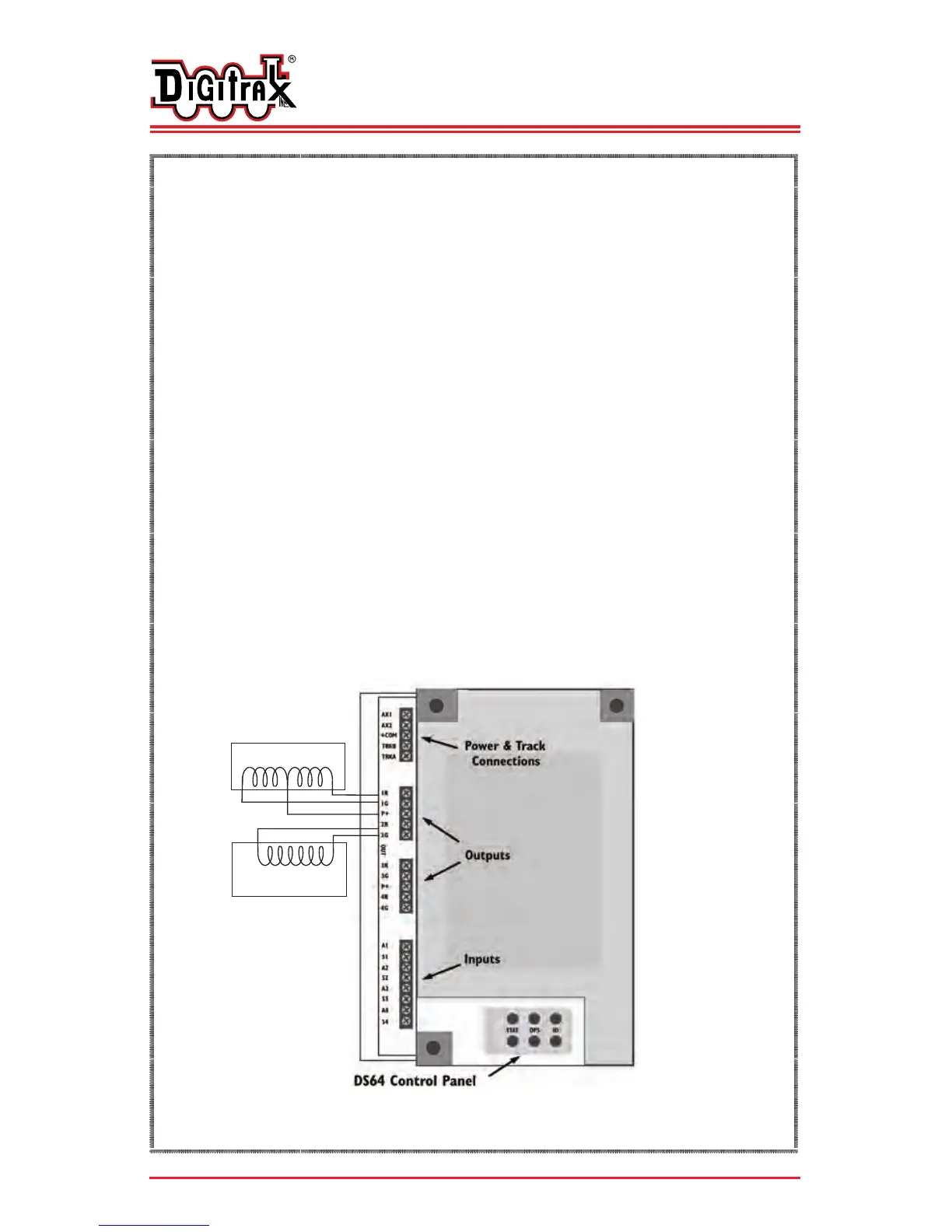
Wire your turnouts to the DS64 using the Figure below as your guide.
That’s it! Your DS64’s default turnout addresses are 01, 02, 03 and 04.
Using any DCC throttle, you can now operate your turnouts.
*NOTE: If you are using a slow motion type of turnout machine,
please refer to page 5 for setting up this type of turnout.
2 Wire (Bi-Polar) Solenoid
Turnout Machine
(Kato Unitrack, AristoCraft, LGB)
3 Wire Solenoid Turnout Machine
(Peco, Atlas and others)
Common +


 To Next Page