©2007 Digitrax, Inc www.digitrax.com 6
Connecting Your Turnouts to the DS64
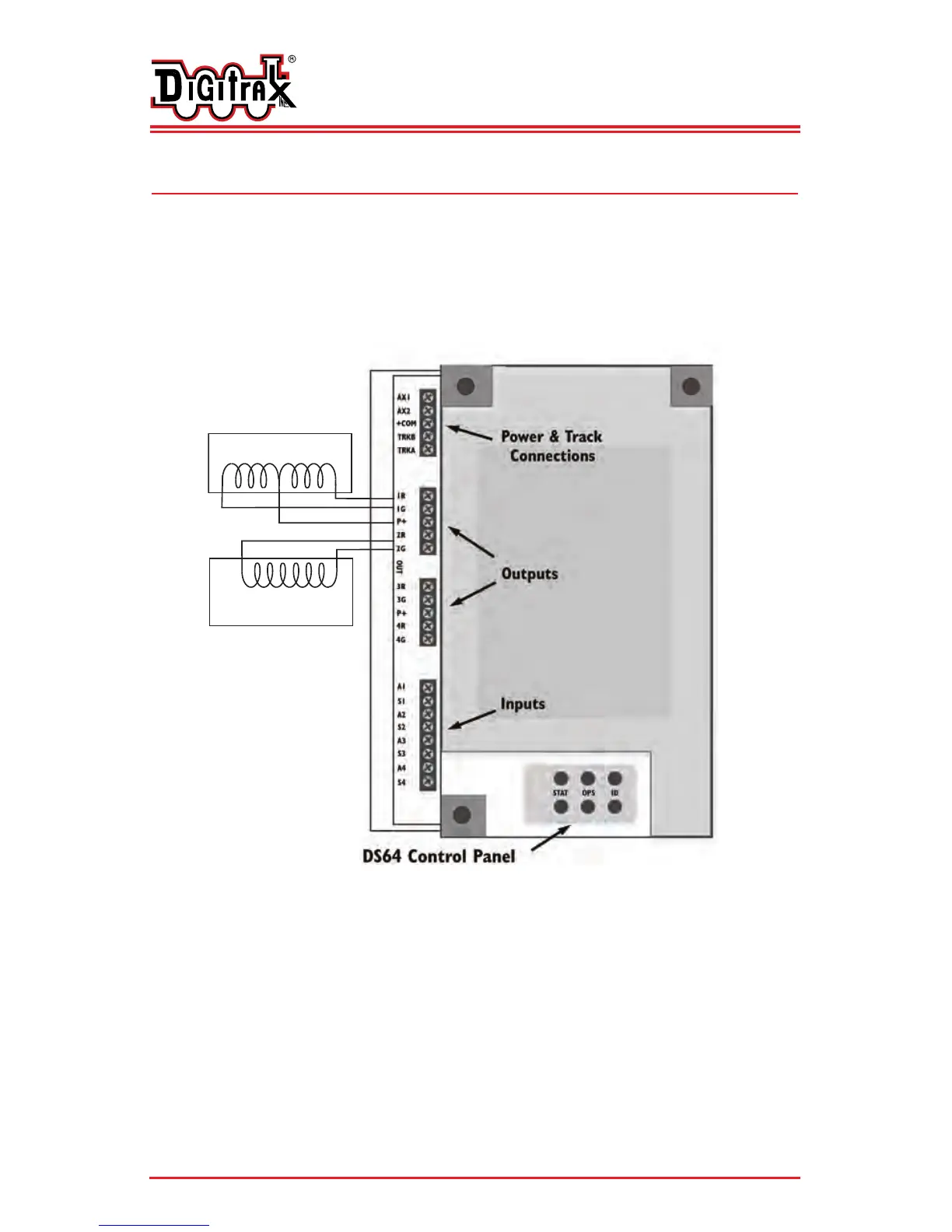
Once you have set up your DS64 to operate the type of turnouts you will use,
the next step is to hook up the turnouts to the outputs of the DS64. Each
type of turnout machine has specific requirements for wiring.
Note: Your DS64 has been configured either for solenoid turnouts OR slow
motion turnouts. Only one type of turnout can be used on any particular
DS64.
Figure 2: Hook up for solenoid type turnout machines.
D
D
i
i
g
g
i
i
t
t
r
r
a
a
x
x
C
C
o
o
m
m
p
p
l
l
e
e
t
t
e
e
T
T
r
r
a
a
i
i
n
n
C
C
o
o
n
n
t
t
r
r
o
o
l
l
R
R
u
u
n
n
Y
Y
o
o
u
u
r
r
T
T
r
r
a
a
i
i
n
n
s
s
,
,
N
N
o
o
t
t
Y
Y
o
o
u
u
r
r
T
T
r
r
a
a
c
c
k
k
!
!
2 Wire (Bi-Polar) Solenoid
Turnout Machine
(Kato Unitrack, AristoCraft, LGB)
3 Wire Solenoid Turnout Machine
(Peco, Atlas and others)
Common +
Note: Multiple turnout machines can be operated on a single DS64 output.
For example, you can run 2 Peco or Atlas Snap Switches on a single
DS64 output. Up to 4 Kato Unitrack switches (such as the Unitrack
double crossover) can be operated a on a single DS64 output.
Note: If you find that your turnout is operating “backwards” simply switch
the + & - wire connections to achieve correct operation.


 To Next Page