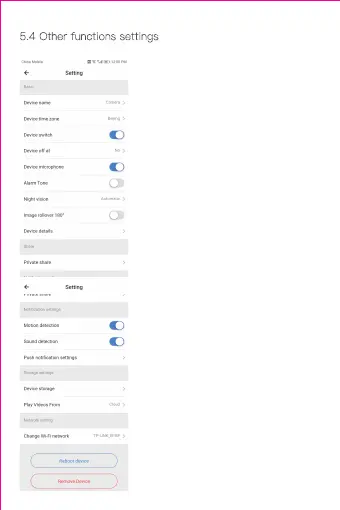
5.4 Other functions settings
Device Microphone:
Open / Close the microphone
Night Vision:
1、Off, close the night vision
2、On, always open night vision
3、Auto, automatic switchover
Rotate The Video Feed 180°:
Flip the picture when the camera
is installed under the roof.
Wi-Fi Network:
Change the Wi-Fi on the device.
Note:
The Wi-Fi must be searchable,
if the location changed and the
Wi-Fi is different, please reset
and connect to a new Wi-Fi
again.
Device Details:Check the ID
and the number
of the software\hardware of the
device.
Remove Device:Please remove
the camera in your account if
you need to use another account
to add the camera.


 To Next Page
 Loading...