Dimension One Spas – Reflections Owner’s Manual
22
Programming the Digital Control Panel
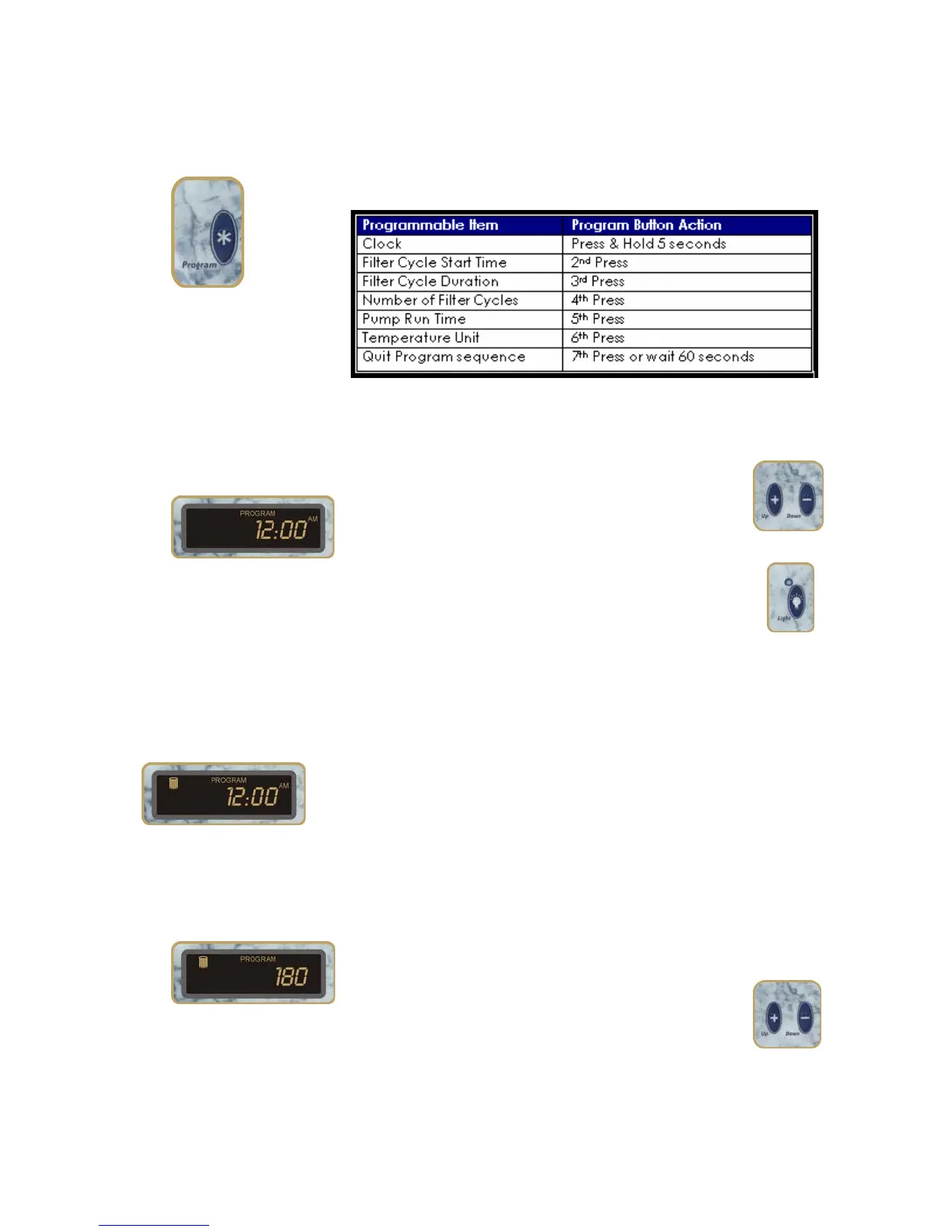
Program Button
To enter the programming mode, press and hold the Program
button for 5 seconds. Each time you press the button you’ll
move to the next step of the programming sequence.
To exit the programming sequence before the end, just wait for
60 seconds without touching any buttons.
Clock
When you enter Programming mode, the clock
appears with the Hour flashing. Use the UP or
DOWN Buttons to set the HOUR.
When the HOUR is correct, press the LIGHT Button to
move to the MINUTES setting.
Use the UP or DOWN Buttons to set the minutes, the
press Light to move to the AM/PM setting. Use the Up or Down
buttons to select AM or PM. Then press the Program button to
move on to the next step.
Filter Cycle Start Time:
When you press the Program button the 2
P
nd
P
time, the Filter Icon
appears in the Display Window to indicate that you are setting
the Filter Cycle Start Time.
Use the Up and Down buttons and the Light button to set the
Filter Cycle Starts time just as you did in setting the Clock (see
above).
Filter Cycle Duration
Pressing the Program button the third time brings you to the
Filter Cycle Duration. This tells your spa how long to run during
each filter cycle.
Use the UP or DOWN Buttons to choose from 60, 90,
120, 150, or 180 minutes. The factory default is 60
minutes.



 To Next Page