4 Using The Free-E Interface
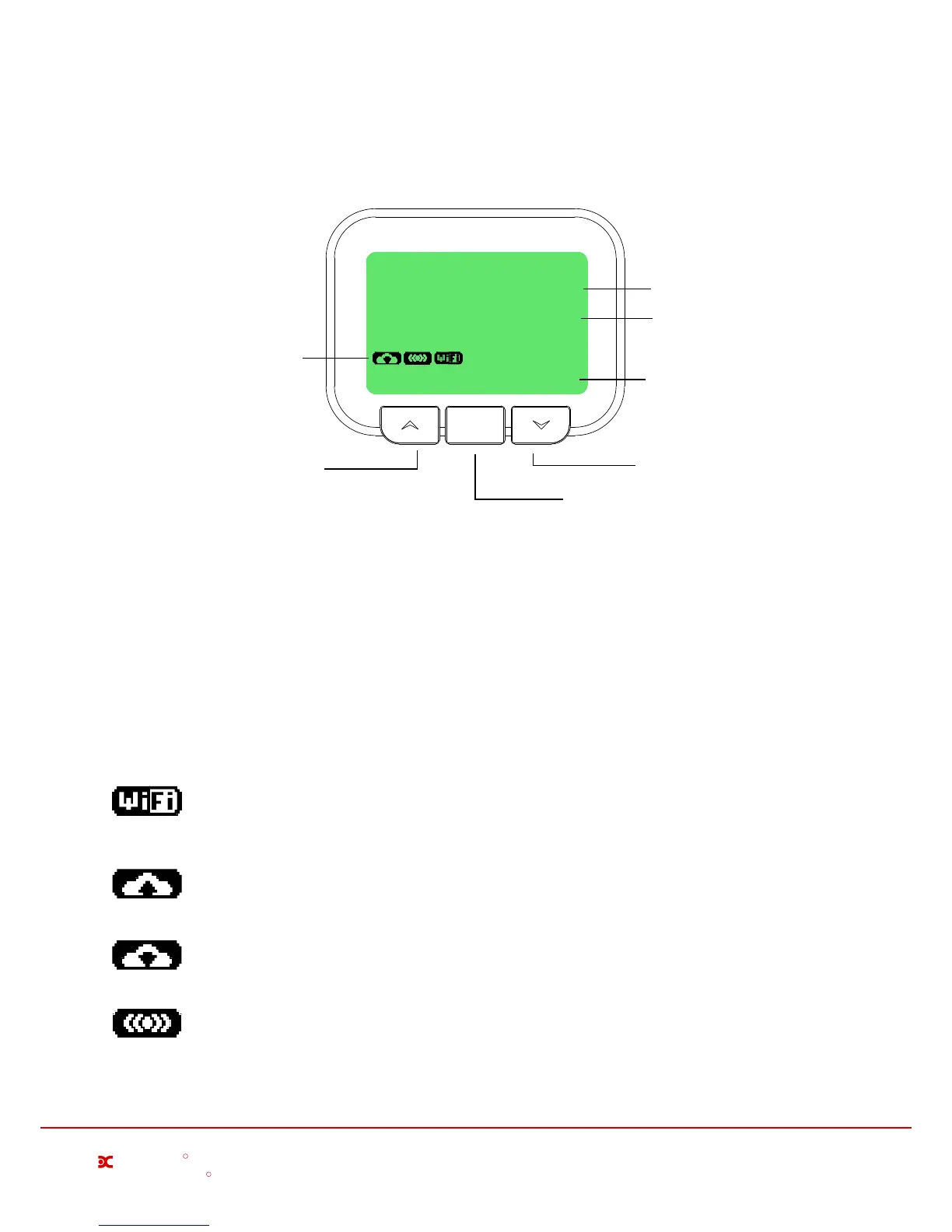
The Free-E interface is controlled using the three buttons located below the screen, as shown below;
ENTER
Export
Store
0.05kW
0.05kW
02/02/2015
08:23
Power being exported
Power being stored
Cloud upload status,
RF communications
and WiFi connection
icons
Back / Esc Button
Navigation Button
Enter / Confirm Button
Wi-Fi Connection
This symbol indicates that theWi-Fi is connected and operating correctly. If this symbol is not
displayed, please check your Wi-Fi connection.
Uploading to Cloud Storage
This symbol is not displayed permanently, but will flash every few minutes as data is uploaded to
the Dimplex cloud.
RF Communication
Displays when the Free-E meter is communicating with the master module.
Downloading Updates
This symbol is not displayed permanently, but will flash while a software update is being downloaded.
Millbrook House, Grange Drive, Hedge End, Southampton SO30 2DF
0844 879 3587
dimplex.co.uk | gdcgroup.co.uk
5
Dimplex
R
R
The enter button is used to access the advanced settings menu from the main menu. It is also the confirmation
button for selections made on the user interface. The left / back button is used to escape from menus or
selections.
All navigation up / down through the menus on the user interface will be carried out by using the right button.
This button allows scrolling down through the displayed options, and when the end of the menu is reached,
continuing to press the down / next button will return the user to the top of the menu.
The screen shown above in is the default screen saver on the Free-E user interface. It displays the current store
power being diverted in watts, the current power being imported or exported, the current date and time, and icons
for the connectivity status, which are;
Date and Time


 To Next Page