DN3PD1
Parameterization of the switching thresholds
14 18-09-27 / 33pd02-V0743
Configuration of the switching threshold and acknowledgement
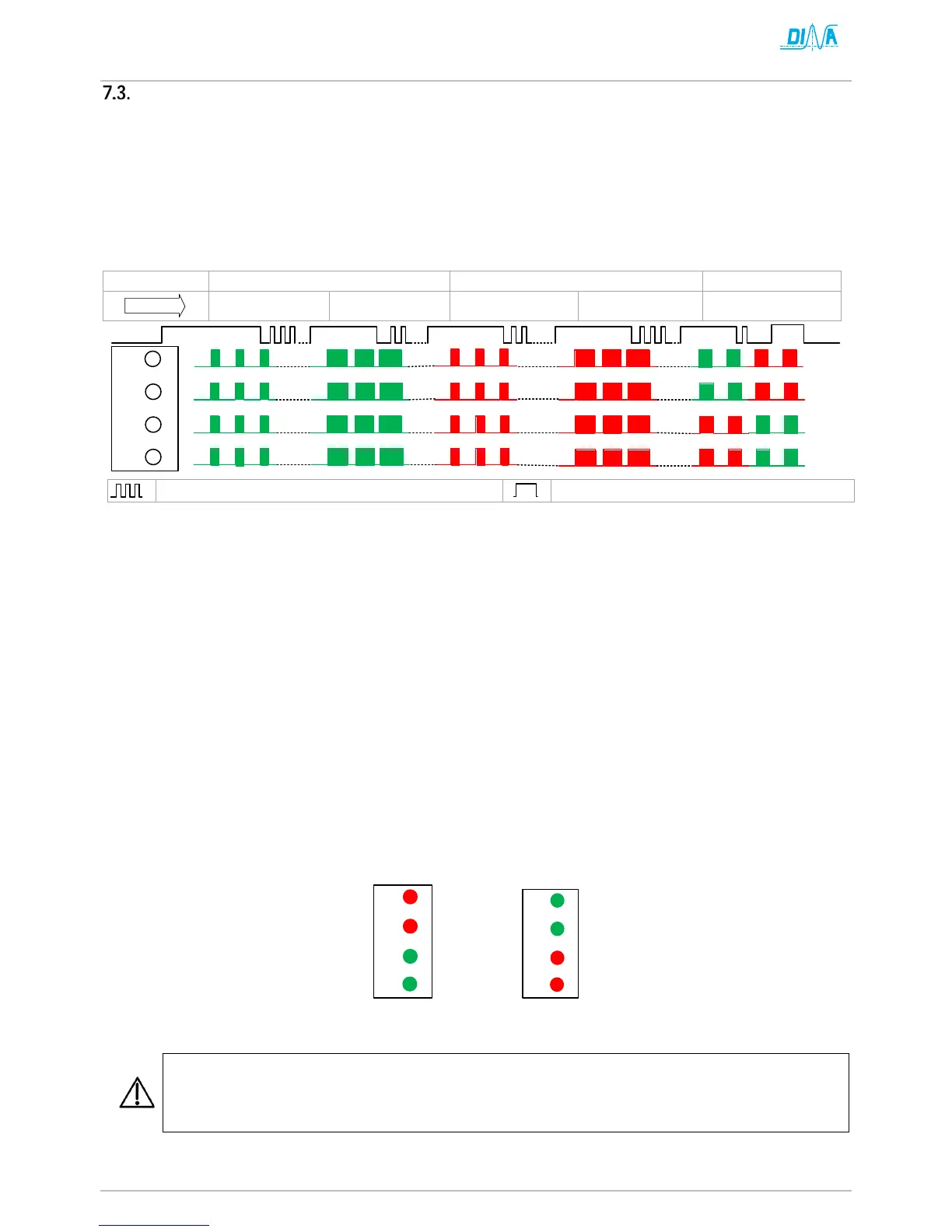
The current settings can be checked by briefly pressing the SET button. The LEDs show the parameters binary
coded in five steps (Level). Two levels each determine V-LIMIT 1 and V-LIMIT 2 (see frequency table), the fifth level
indicates the type of acknowledgment.
The permanent pressing of the SET button starts the parameterization mode and the levels can be run through.
Releasing the button allows you to change this level parameter. The configuration can be adjusted by a short
touch of the button. The new setting is saved again by pressing the button permanently.
Each level can be recognized by its flashing rhythm or the LED color.
Press SET button for >2s until all LED flash green.
Adjust V-LIMIT 1, Level 1.1 binary coded by short key press (column of the table 7-1)
Keep the SET button pressed: The value is saved and displayed as continuous light.
Keep the SET button pressed until the blinking rhythm of all LEDs changes.
Adjust V-LIMIT 1, Level 1.2 binary coded by short key press (row of the table 7-1).
Keep the SET button pressed: The value is saved and displayed as continuous light.
Keep the SET button pressed until the color of all LEDs changes.
Adjust V-LIMIT 2, Level 1.1 binary coded by short key press (column of the table 7-1)
Keep the SET button pressed: The value is saved and displayed as continuous light.
Keep the SET button pressed until the blinking rhythm of all LEDs changes.
Adjust V-LIMIT 2, Level 1.2 binary coded by short key press (row of the table 7-1).
Keep the SET button pressed. The value is saved and displayed as continuous light.
Keep the SET button pressed until the LED flash in pairs.
Adjust the acknowledgement*) by short key press
Keep the SET button pressed: The value is saved and displayed as continuous light.
Release the button. The configuration is completed. The unit is ready for operation, if the OK LED shows
green.
*) Adjust the acknowledgement
Checking the set parameters in the display mode (short pressing of the SET key) and verification of
the correct safety functions by checking the shutdown speeds, e.g. by comparison with the speed dis-
played on the frequency converter or use of other suitable speed measuring equipment.


 To Next Page