TPW
57
D
CBA
0.0
MODE
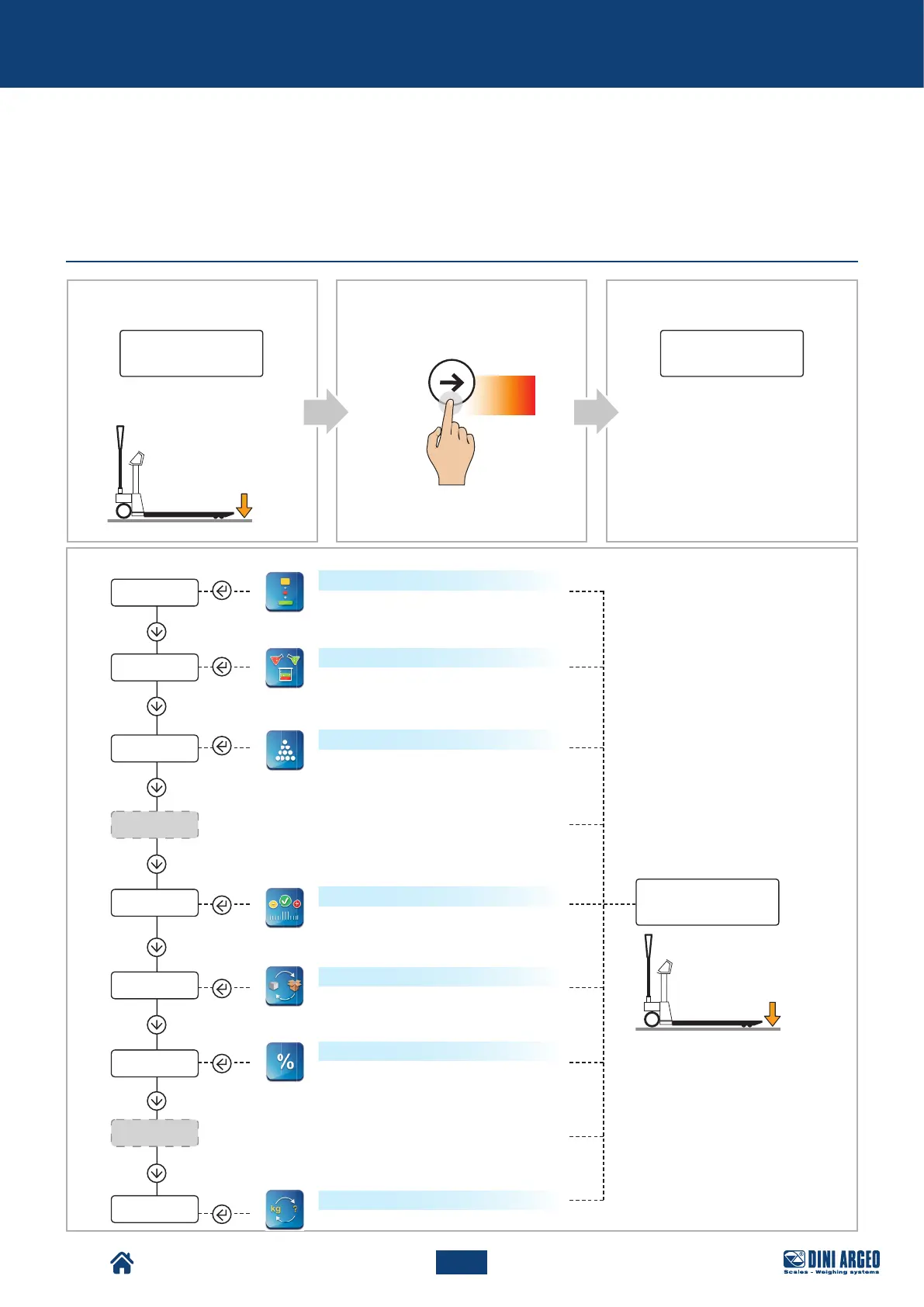
funCt
HI.RES
PerC
0.0
CheCk
Conver
total
formul
Count
net.Gro
HoLD
Advanced scale functions
USER_MAN_ENG_TPW_v4
ADVANCED SCALE FUNCTIONS
How to access the function menu
Display:
Pallet Truck Condition:
Display:
The indicator is in the
configuration menu: the currently
active function appears.
Press
for 5 s
Sum of the weight of several objects to
obtain the total weight
Horizontal accumulator
Mixing several components
Vertical formulation or accumulation:
mixing several components
Piece count
Checking the weight with respect to a
reference sample
Weight check
Once you have selected the
function, the scale goes back
to weighing mode.
Weighing in % compared to a refer-
ence sample
Net weight / gross weight exchange
Percentage weighing
Unit of measurement conversion



 To Next Page