EasyManua.ls Logo

Dini Argeo TPW Series - User Manual

Dini Argeo TPW Series
88 pages
Print Icon
To Next Page IconTo Next Page
Loading...
www.diniargeo.com
TPW
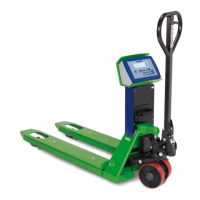
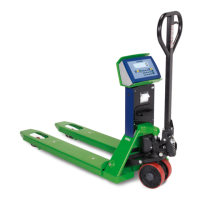
Pallet truck with integrated scale
ENGLISH
USER, INSTALLATION, MAINTENANCE INSTRUCTIONS - v4

Table of Contents

Questions and Answers

  • W
    Wyatt ShafferAug 21, 2025
    What to do if my Dini Argeo TPW does not print?
    • J
      johnsanchezAug 21, 2025
      If your Dini Argeo scale isn't printing, ensure there is a roll in the printer and that the printer is switched on. Also, check if the weight is unstable (unStAb), or if the net or gross weight is negative or insufficient (low). Finally, verify that there is no underload or overload (______ or ------) (un.oVEr), the scale was unloaded after the last printing (no.0.unS), and you are attempting to print an approved weight.
  • T
    Trevor SmithAug 25, 2025
    Why Dini Argeo Scales switches off suddenly?
    • J
      Jonathan ShannonAug 25, 2025
      If your Dini Argeo scale is suddenly switching off, it may be due to the automatic switch-off function being active, a low battery, battery failure, or a power supply line failure.
  • J
    Jacob JohnsonAug 26, 2025
    How to fix unstable weight on Dini Argeo Scales?
    • A
      Angela ButlerAug 26, 2025
      If the weight reading on your Dini Argeo scale is unstable, check if the weighing filter is active. If the scale is on a surface that vibrates due to machinery or vehicles, move it to a more stable surface.
  • S
    Sarah AvilaAug 27, 2025
    What to do if Dini Argeo Scales does not tare?
    • H
      Hayley HarveyAug 28, 2025
      If your Dini Argeo scale isn't taring, it could be due to several reasons: the weight is unstable (unStAb), the gross weight is negative (loW), the weight is insufficient, the weight exceeds the maximum capacity, the tare function has been deactivated, or in the event of manual tare, the value exceeds the maximum capacity.
  • M
    Maria WestAug 30, 2025
    Why Dini Argeo Scales does not accumulate?
    • D
      Dwayne WarrenAug 30, 2025
      If your Dini Argeo scale isn't accumulating, make sure there is a roll in the printer and that the printer is switched on. Also, ensure that the weight is stable (unStAb), the net or gross weight is not negative (loW), there is no underload or overload (______ or ------) (un.oVEr), the scale was unloaded after the last printing (no.0.unS), and the weight is sufficient for the weighing operation (low), meaning it's not less than 10 divisions for accumulator modes or less than 'Min' for approved products (as shown on the measuring plate).
  • J
    Jenny PriceSep 1, 2025
    Why Dini Argeo TPW is not reactive?
    • J
      James WilliamsSep 1, 2025
      If your Dini Argeo scale is not reactive, it might be because one of the energy-saving modes is active or an unsuitable weighing filter has been selected.
  • B
    Bianca EvansSep 3, 2025
    What does permanent “Zero” message on Dini Argeo Scales mean?
    • C
      Courtney PhillipsSep 3, 2025
      If your Dini Argeo scale permanently displays a “Zero” message, it means that the scale is unable to automatically reset the weight because it exceeds the maximum resettable weight at switch-on. Unload the scale and try again. If the scale continues to have the same problem even when there is nothing on it, contact the dealer.
  • R
    Ryan WuSep 5, 2025
    Why Dini Argeo TPW Scales does not carry out sampling?
    • H
      Heather DavisSep 5, 2025
      If your Dini Argeo scale does not carry out sampling, it may be because the weight is unstable (Err.Mot) or the weight is insufficient; in this case, add more pieces and try again (Error).
  • M
    Mary CastroSep 7, 2025
    Why Dini Argeo TPW Scales has lost the total?
    • J
      Jason JohnsonSep 7, 2025
      Switching off the Dini Argeo scale causes the accumulated totals to be lost.
  • L
    Leslie GarciaSep 9, 2025
    Why my Dini Argeo TPW display switches off and displays a dot?
    • R
      richardsonchristopherSep 9, 2025
      If your Dini Argeo scale display switches off and shows a dot, it could mean that stand-by mode is active. Try pressing a key to reactivate weighing. Alternatively, energy-saving mode might be active; contact the dealer for more information.

Summary

Product Description and Specifications

Intended Use and Foreseeable Misuse

Specifies proper applications and forbidden uses of the pallet truck.

Operator Obligations and Prohibitions

Outlines essential operator duties and prohibited actions.

Technical Specifications by Model

Detailed specifications for various TPW models.

Permitted Environmental Conditions

Defines acceptable operating environment parameters like temperature and humidity.

Assembly and Adjustment Guide

Assembly Warnings and Procedure

Safety precautions and step-by-step guide for assembling the pallet truck.

Operating the Pallet Truck

General Use Warnings

Essential safety guidelines for correct operation.

Load Lifting and Weight Reading

Procedures for lifting loads and reading weight values.

Advanced Scale Functions

Weight Check and Tolerance Settings

Verifying weight against predefined tolerances.

Percentage Weighing and Conversion

Performing percentage checks and unit conversions.

Maintenance Procedures

Maintenance Safety Warnings

Safety warnings for performing maintenance operations.

Troubleshooting and Error Messages

Common Operational Issues

Troubleshooting for printing, tare, weighing, and totalisation.

Error Message Solutions

Explanation of error codes displayed by the scale and their resolutions.

Dini Argeo TPW Series Specifications

General IconGeneral
BrandDini Argeo
ModelTPW Series
CategoryScales
LanguageEnglish

Related product manuals