13
403.FORD6 3.24 2013 Ford Taurus (40-Bit)
©2022 VOXX•DEI LLC. All rights reserved.
1 Key required!
For
Convenience-Only
programming, see next section.
1
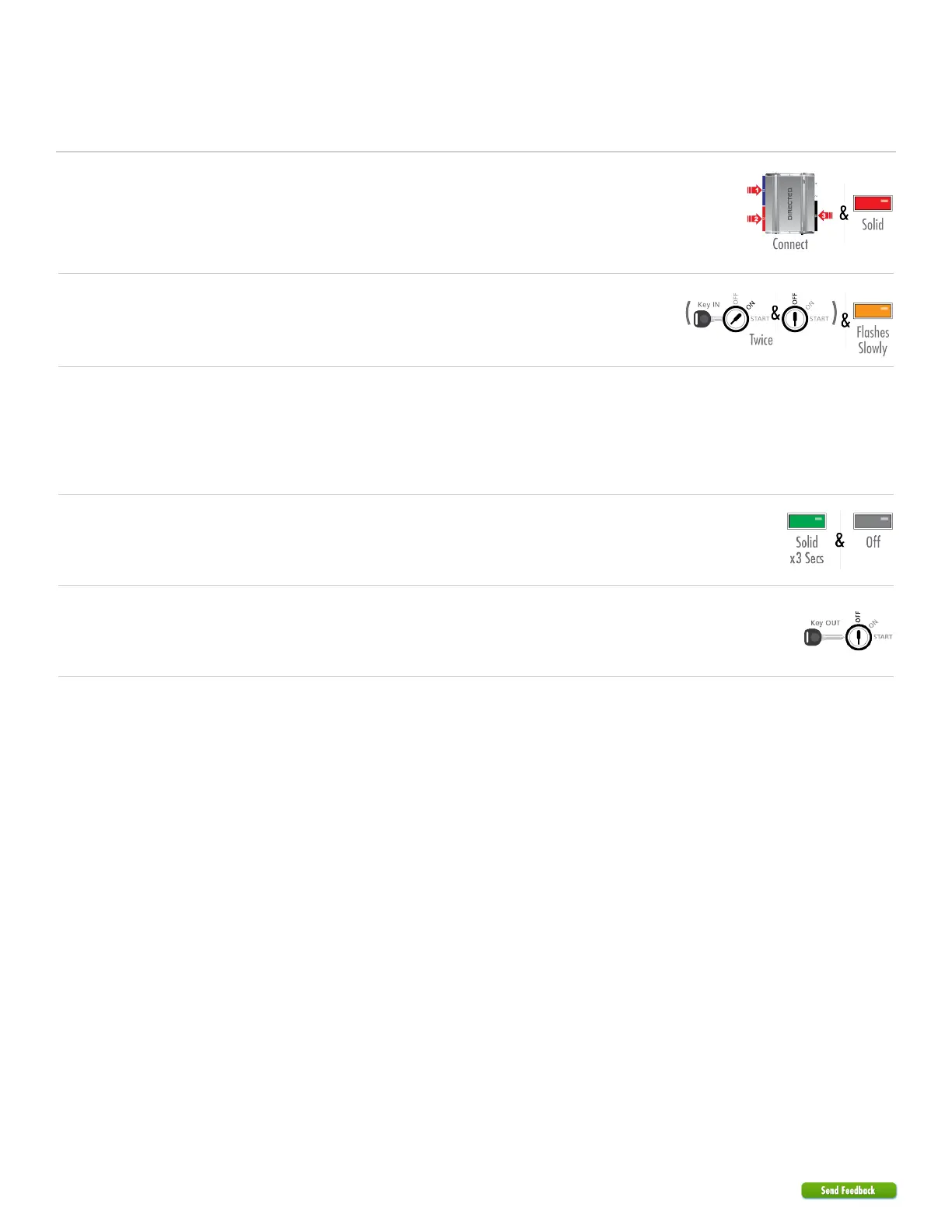
The harnesses must be connected in this exact order:
1. Connect the 14-pin.
2. Connect the 12-pin.
3. Connect the 10-pin.
When the LED turns on solid red, proceed with the next step.
2
Insert the key and turn the ignition ON and OFF twice.
The LED starts flashing orange slowly.
3
Turn the ignition off by removing the key from the ignition barrel, remove
themodule from thevehicle and reconnect it to your computer.
The website will automatically recognize that you are moving onto the
second phase of the programming sequence.
1.
Click Submit Key2GO Request.2.
4
When the configuration is completed, reconnect the module.
The LED will turn on solid green for 3 seconds, then turn off.
5
Remove the key from the ignition barrel.
You have successfully completed the module programming sequence.


 To Next Page