15
© 2009 Directed Electronics. All rights reserved.
Remote Control Configuration
Remote Programming
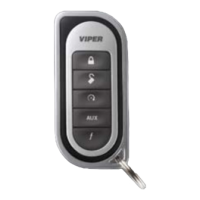
The Responder LE and 1-way companion remote controls have opera-
tions that can be configured to a user’s personal preferences. The fol-
lowing instruction will direct you through the available programming
options for both remote controls.
To enter programming, press and hold the
button for 8 seconds,
the remote emits one long beep and the transmit LED turns on to indi-
cate the main menu is accessed.
To exit programming or go back to a previous menu, press and re-
lease the
button. 1 short and 1 long beep is emitted for each step
back and when programming is exited the transmit LED turns off.
Note: The 1-way remote does not emit any confirmation beeps.
Pairing a 1-way or 2-way remote control
Note: The remote control may or may not emit sounds during this
operation.
Prepare the vehicle
Open1. a door.
Turn2. the ignition On.
Press3. and release then press and hold the control center button.
The control center LED flashes and siren chirps one time to con-
firm the system is prepared.
Release4. the button and proceed below.
Note: Begin pairing within 60 seconds or the system will exit (indi-
cated by a long siren chirp) and need to be prepared again.



 To Next Page