4
© 2016 Directed. All rights reserved.
Remote Control Functions
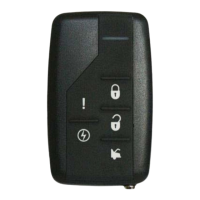
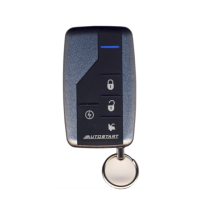
The remote buttons are used to send commands to the system. The but-
tons indicated below are for standard configuration.
Standard Configuration
AUX
AUX
AUX
Your 1-way remote coin cell battery can be changed by using a small at blade screwdriver to pry case apart. Replace battery and then snap case together.
Button
The lock function is controlled by pressing
AUX
AUX
AUX
Your 1-way remote coin cell battery can be changed by using a small at blade screwdriver to pry case apart. Replace battery and then snap case together.
on the remote control
for one second. When held for approximately two seconds, Panic is
activated.
AUX
AUX
AUX
Your 1-way remote coin cell battery can be changed by using a small at blade screwdriver to pry case apart. Replace battery and then snap case together.
Button
The unlocking function is controlled by pressing
AUX
AUX
AUX
Your 1-way remote coin cell battery can be changed by using a small at blade screwdriver to pry case apart. Replace battery and then snap case together.
on the remote con-
trol for one second. You can also turn Panic off with this button.
Button
Silent Mode
™
and an optional auxiliary function are controlled by
pressing . Silent Mode works by pressing for less than one
second before locking or unlocking. An optional auxiliary function such
as trunk release may be controlled by pressing and holding for
approximately two seconds.
Button
The remote start function of your system is controlled by pressing this
button for one second.
and Buttons
Car Finder is controlled by pressing these two buttons.






 To Next Page