
 Need help?
Do you have a question about the Directed Smart Start ASRF-1510 and is the answer not in the manual?
Ensure vehicle is parked safely in neutral or park before remote starting.
Disable starter before servicing and follow Industry Canada notice for operation.
Outlines compliance with FCC Part 15 and Industry Canada RSS 210 for device operation.
Introduces the state-of-the-art remote car starter and its advanced features.
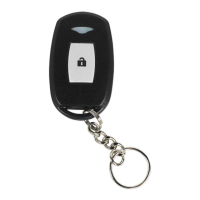
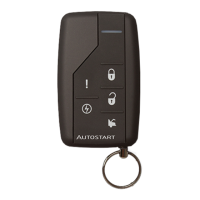
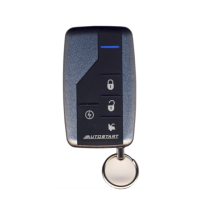
Details the functions of the 5-button remote control including LOCK, UNLOCK, TRUNK, START/STOP, and AUX.
Recommended settings for blower motor, wipers, radio, and headlights for remote starting.
Explains the security feature that prevents starting with the ignition key when armed.
How to arm and disarm the starter kill in passive mode via transmitter or automatic arming.
How to arm and disarm the starter kill in active mode via transmitter, with parking light feedback.
Procedure to set the vehicle into Ready Mode, essential for manual transmission remote starting.
Details three programmable options for completing Ready Mode and how to initiate the remote start process.
Steps to take over driving after the vehicle has been remotely started.
Using the remote to lock and unlock doors, arming/disarming the starter kill.
How to open the trunk using the remote transmitter, potentially disarming the alarm.
Procedure to keep the engine running and doors locked after exiting the vehicle.
Activating Idle Mode for manual transmission vehicles using the Ready Mode routine.
A variation of Idle Mode specifically for vehicles with push-button ignition.
How to put the system into Valet Mode using the ignition key to disable remote start functions.
How to put the system into Valet Mode using the remote transmitter to disable remote start functions.
Activating panic mode using the AUX button and controlling it with LOCK/UNLOCK buttons.
How to activate Cold Weather Mode to automatically start the engine at intervals in cold temperatures.
Procedures to exit Cold Weather Mode and verify its status, especially for automatic transmissions.
How to disable or enable the remote transmitter's LED indicator flashing.
Automatic door locking/unlocking based on ignition key position and brake pedal press.
Relocks doors and re-arms security system after remote start to maintain protection.
Prevents accidental remote starts and offers alternative start methods like Swap Start.
How to configure the system to idle down a turbocharger after the user leaves the vehicle.
Remotely sets the vehicle to a no-remote-start mode, useful for indoor parking.
Using AUX 1 for selective door unlocking and configuring horn confirmation.
Using a single remote to operate two vehicles equipped with the same starter model.
Arming/disarming the factory alarm and understanding intrusion codes via horn.
A table correlating horn flashes to specific intrusion events like door or hood opening.
A table mapping parking light flash patterns to system status and events.
Step-by-step guide on how to replace the transmitter's batteries.
 General
| Range | Up to 1 mile |
|---|---|
| Operating Range | Up to 1 mile |
| Compatibility | Vehicles with automatic transmissions |
| Features | Smartphone control, keyless entry, trunk release |
| Smartphone Control | Yes |
| Warranty | 1 year limited warranty |



 To Next Page