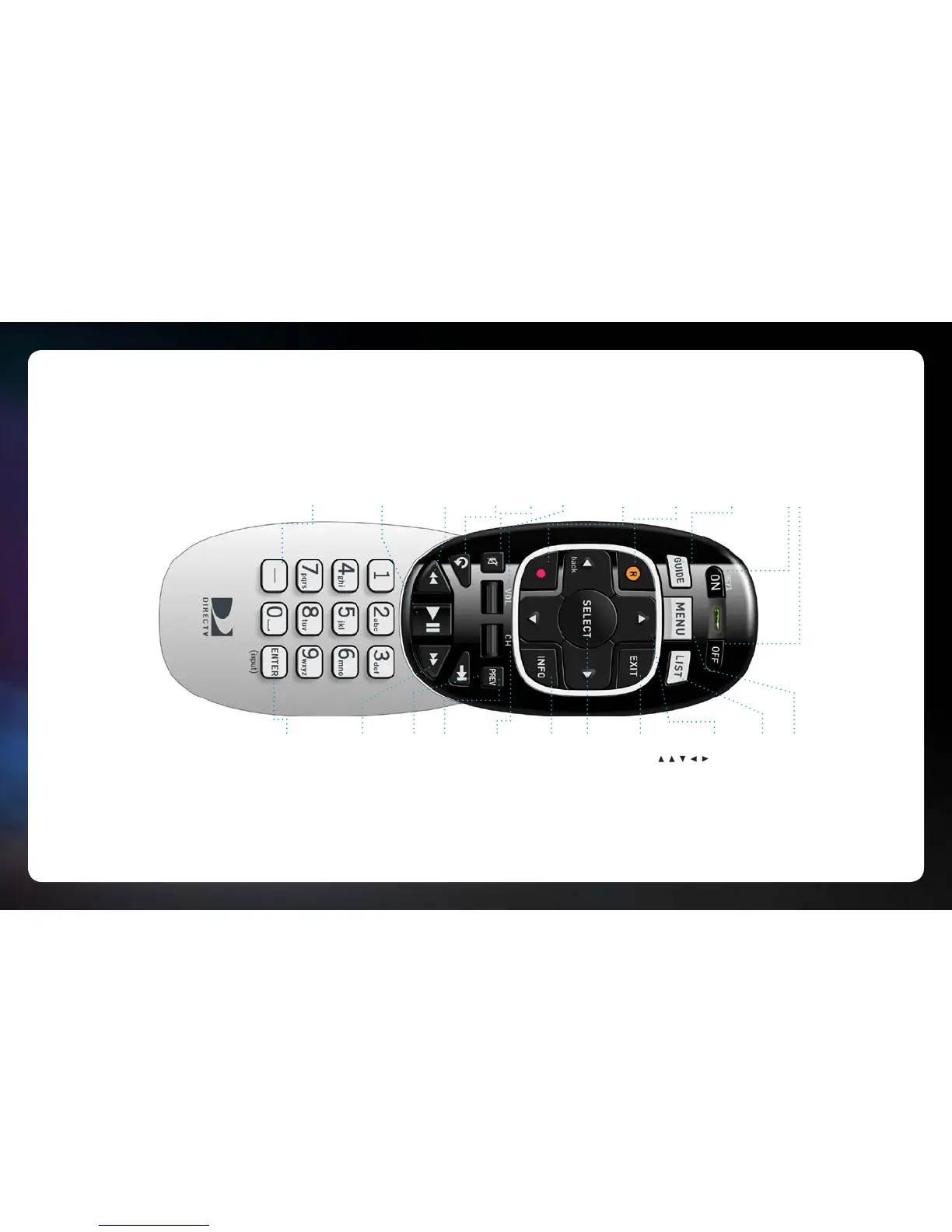
MENU
Display the MENU.
LIST
Display the LIST of your recorded
programs.
ARROWS
Press to move up within a menu.
Press to move down within a menu.
Press to move right within a menu.
Press to move left within a menu.
Press to go back within menus.
EXIT
EXIT the menu and return to previous
channel viewed. Stop playback while
viewing recorded content.
SELECT
SELECT item highlighted on-screen.
INFO
Display INFORMATION about the program
now playing or highlighted in the
On-Screen Guide.
CH
Change TV CHANNELS.
Scroll a full page while viewing the
On-Screen Guide.
PREV
Return to PREVIOUS channel viewed.
ADVANCE
ADVANCE 30 seconds.
Press and hold to jump ahead to the end
of a recorded program.
FAST-FORWARD
FAST-FORWARD at increasing speeds—
press up to four times. Press and hold to
jump to next tick mark. Jump ahead 12
hours while viewing the On-Screen Guide.
ENTER
Press for Mini Guide while viewing your
program and dismissed with EXIT.
ENTER also replaces TV INPUT button:
To cycle through the equipment
connected to your TV, press and hold for
three seconds until LED light at top turns
green. Then scroll through inputs by
pressing ENTER again.
ON/OFF
Turns both DIRECTV
®
Receiver and TV ON
or OFF at the sema time. (Remote must
be programmed for TV. DVR Receiver still
records when off).
GUIDE
Press once for On-Screen Guide. Press
twice for programming grouped into
categories.
RECORD
RECORD program now playing or
highlighted in the On-Screen Guide.
Press twice to record the entire series.
RED CIRCLE BUTTON
Jump back 12 hours while viewing the
On-Screen Guide. Access ScoreGuide™
while viewing any sports channel.
VOL
Increase or decrease the VOLUME level.
MUTE
MUTE the sound.
REPLAY
REPLAY previous six seconds.Press and
hold to jump back to the beginning of a
recorded program
REWIND
REWIND at increasing speeds— press up
to four times. Press and hold to jump to
previous tick mark. Jump back 12 hours
while viewing the On-Screen Guide..
PLAY/PAUSE
PLAY current program. Press once while
program is playing to PAUSE. Press
and hold while program is playing for
slow motion.
DASH
Press for Guide Options while viewing
On-Screen Guide. Press twice to delete
recorded shows from your playlist.
Press to display last 6 digits of Receiver
ID, Satellite signal type (SWiM or
Multiswitch) and internet status.
V1.5GENIEHR2X26NOV2013



 To Previous Page