17
Using SmartAudio (Not applicable to HDZero Whoop VTX)
HDZero Race VTX can be controlled by FC using the TBS SmartAudio V2.1. In this case, the VTX will
output RF power and channel commanded by FC directly. To avoid conflict, the VTX menu is not
available if SmartAudio is enabled.
Notes:
- HDZero Race VTX outputs 0.1mW when SmartAudio PIT mode is ON.
- HDZero Race VTX does not support SmartAudio out range PIT mode.
- When HDZero Race VTX boots up, it will automatically detect the existence of a valid SmartAudio
link with FC within 10 seconds. If the link exists, FC will fully control race VTX’s RF output power and
working frequency.
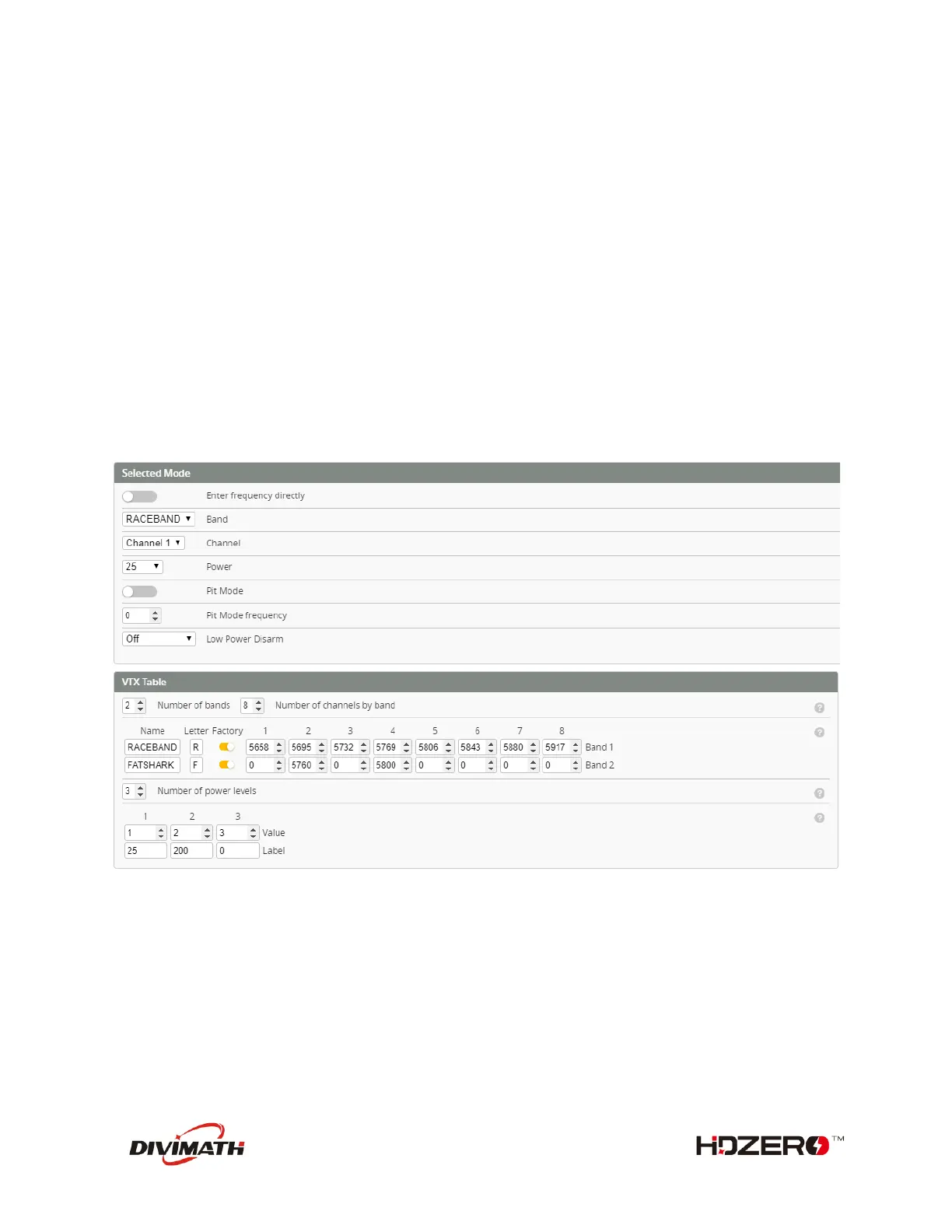
VTX table needs to be set as below. Please note that HDZero Race VTX supports all 8 channels (R1 ~ R8)
on R band, and 2 channels (F2 and F4) on F band.
The above setting can also be done with the following CLI commands:
vtxtable bands 2
vtxtable channels 8
vtxtable band 1 RACEBAND R FACTORY 5658 5695 5732 5769 5806 5843 5880 5917
vtxtable band 2 FATSHARK F FACTORY 0 5760 0 5800 0 0 0 0
vtxtable powerlevels 3
vtxtable powervalues 1 2 3
vtxtable powerlabels 25 200 0
save



 To Next Page