18
With SmartAudio, the user can change channel number and power level even when quad is in the air.
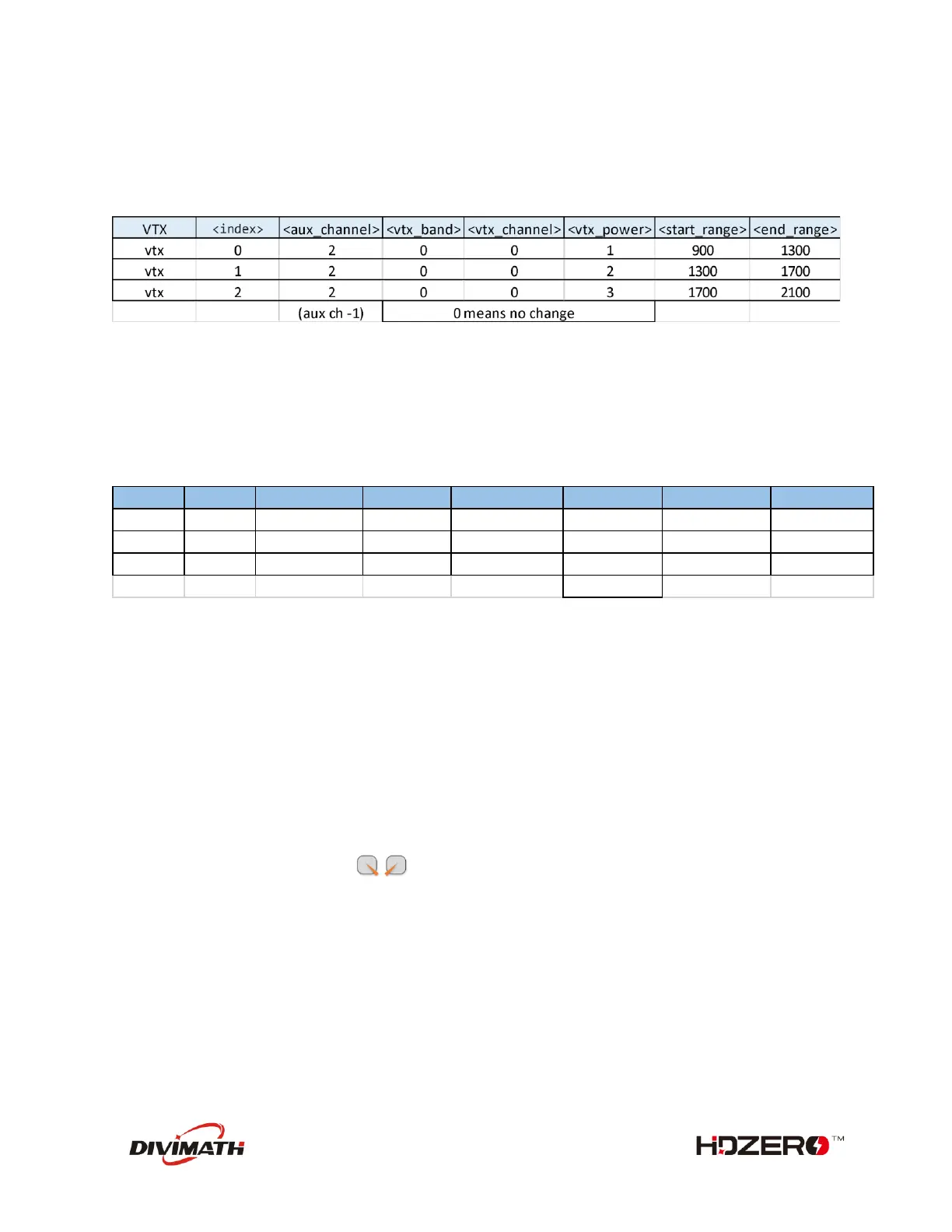
Example 1: Map a 3-phase button (aux channel 3) to 3 different RF power levels (25mW, 200mW, and
0mW).
vtx 0 2 0 0 1 900 1300
vtx 1 2 0 0 2 1300 1700
vtx 2 2 0 0 3 1700 2100
save
Example 2: Map a 3-phase button (aux channel 4) to Channel R1, R2 and F2.
vtx 3 3 1 1 0 900 1300
vtx 4 3 1 2 0 1300 1700
vtx 5 3 2 2 0 1700 2100
save
3 different RF power levels are specified on the above table. #1 and #2 specify 25 mW and 200mW RF
power respectively, and #3 is to turn off RF output completely.
HDZero Race VTX will become very hot if it is on the bench without airflow, even if it is on 25mW or
PIT mode. It is recommended to put VTX on 0mW while quad is waiting on the line.
When #3 is selected from SmartAudio menu by mistake, the receiver will lose video feed since VTX is not
transmitting. Use stick command to exit 0mW mode.



 To Next Page