EasyManua.ls Logo

DMP Electronics Command Processor XR200 - Installation; Mounting the Enclosure

DMP Electronics Command Processor XR200
32 pages
Print Icon
To Next Page IconTo Next Page
To Previous Page IconTo Previous Page
Loading...
Digital Monitoring Products XR200 Installation Guide
6
INSTALLATION
XR200 Installation Guide Digital Monitoring Products
7
INSTALLATION
Installation
4.1 Mounting the Enclosure
The metal enclosure for the XR200 must be mounted in a secure, dry place to protect the panel from
damage due to tampering or the elements. It is not necessary to remove the XR200 PC board when installing
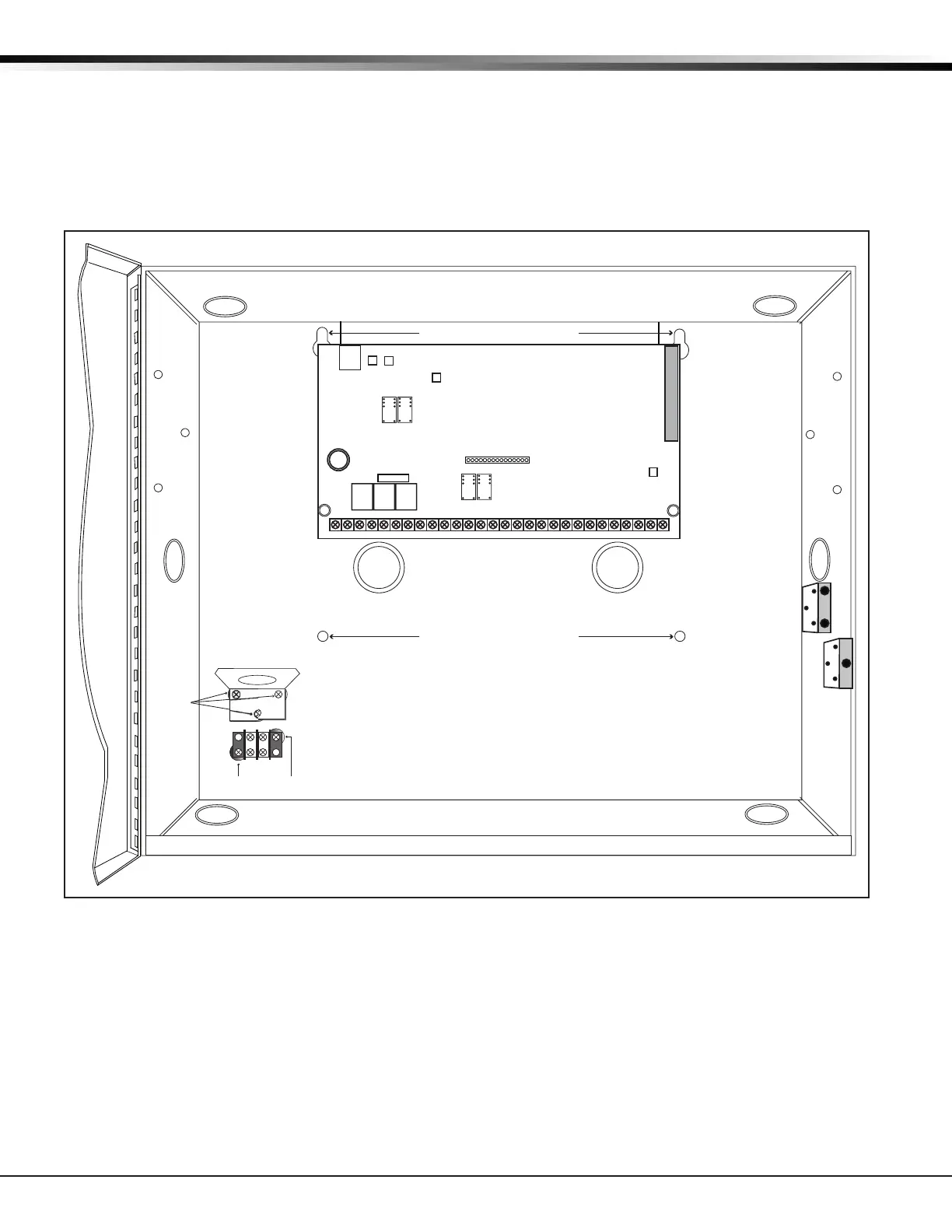
the enclosure. Below are the mounting hole locations for the Model 350A Enclosure.
Note: The mounting holes are the same for the 350 Enclosure as those shown below for the 350A Enclosure.

















   

  



 


 











  



 


































Figure 3: Model 350A Enclosure with Mounting Hole Locations

Table of Contents

Related product manuals