64
Appendices
Installing and Cleaning the Optional
Dust Filter
We recommend you clean the dust filter every 500 hours of
operation, or more often if you are using the projector in a
dusty environment.
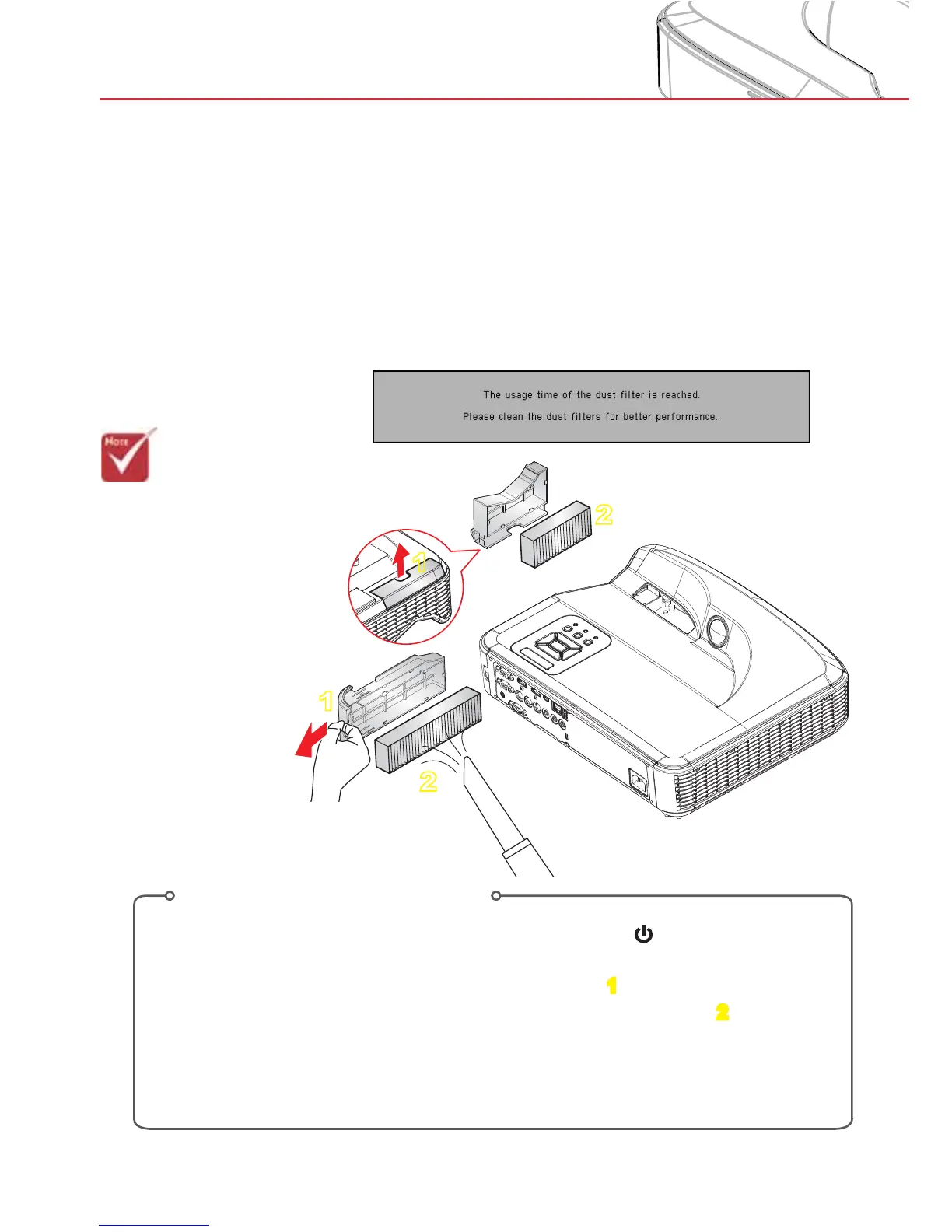
When the warning message appears on the screen, do the
following to clean the air filter:
>The optional dust
filter should be
used in dusty
environments.
>If the dust filter is
installed proper
maintenance will
prevent overheat-
ing and projector
malfunction.
>The dust filter is
optional.
Air Filter Cleaning Procedure:
1. Switch off the power to the projector by pressing the “ ” button.
2. Disconnect the power cord.
3. Pull out the dust filter, as shown in the illustration.
1
4. Carefully remove the dust filter. Then clean or change the filter.
2
To install the filter, reverse the previous steps.
5. Turn on the projector and reset the filter usage counter after the dust filter is
replaced.
1
1
2
2


 To Next Page