Chapter 3 Using Your GPS Tracker
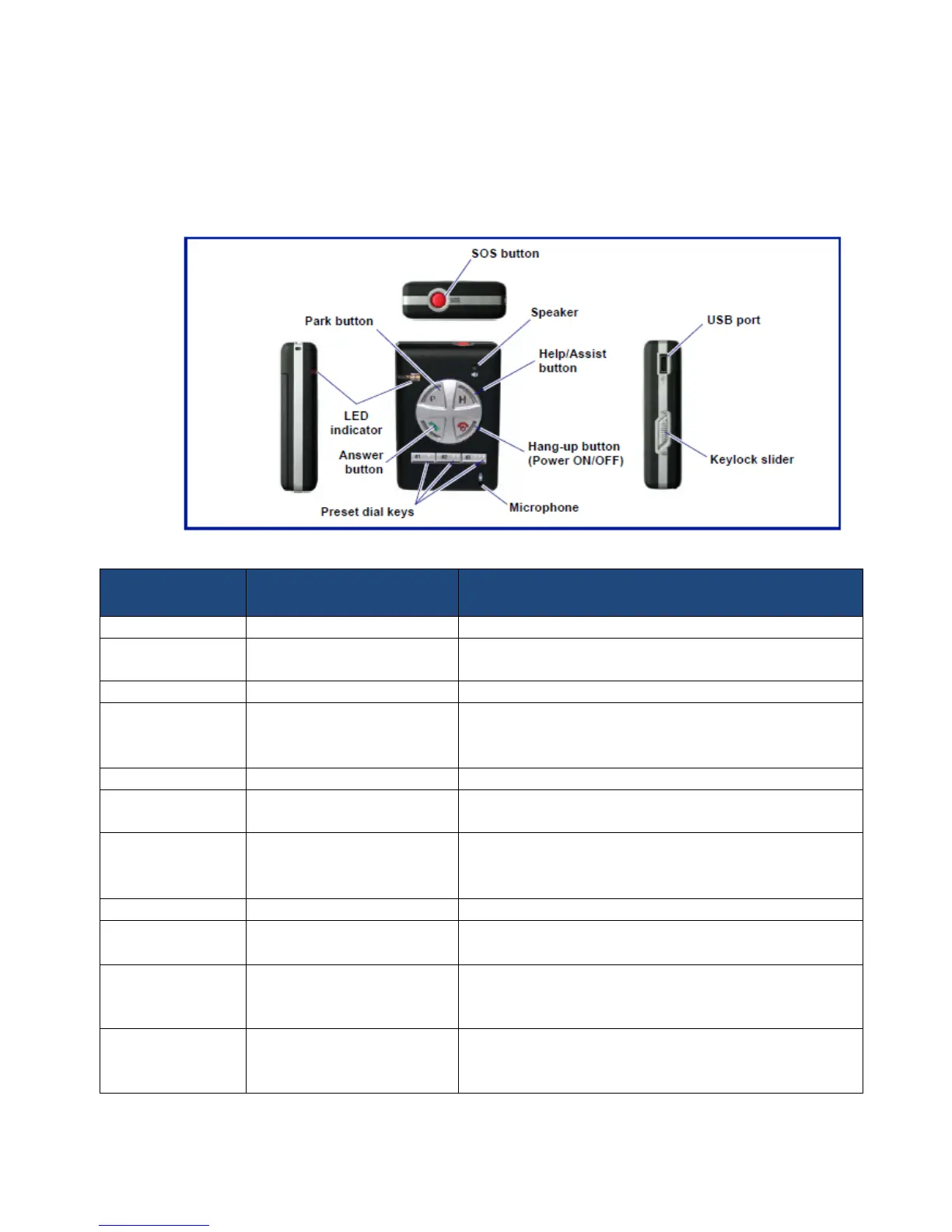
3.1 Understanding the Buttons and Indicators
Item Function Descriptions
Answer button
Answer incoming voice call
Press the Answer button to pick up an incoming call
Activate the motion detection
alert function
Press the Park button for three seconds to activate. Press the
Hangup button to deactivate
Speaker
Broadcast
continuous
help
messages to all six
pre-programmed numbers
Press the Help/Assist button and hold for three seconds to activate.
Press the Hangup button again to release
Power
ON/OFF
button
Press and hold to toggle the Power
ON/OFF
button
Microphone Used for voice calls and room
monitor mode
Three buttons for three different
preset numbers enabling
one-button dialing for phone calls
Press one of the preset dial buttons and hold for three seconds to place a
call. Press the Power button to end the call
LED indicator Displays status of the GPS Tracker
Used with USB cable included in
package
Lock buttons to prevent
accidentally dialing out or
activating features
Slide the keylock slider to lock or unlock the buttons
Automatically dial the preset
emergency number (e.g., 911)
Press and hold the red SOS button for three seconds to activate an
SOS call



 To Next Page