9
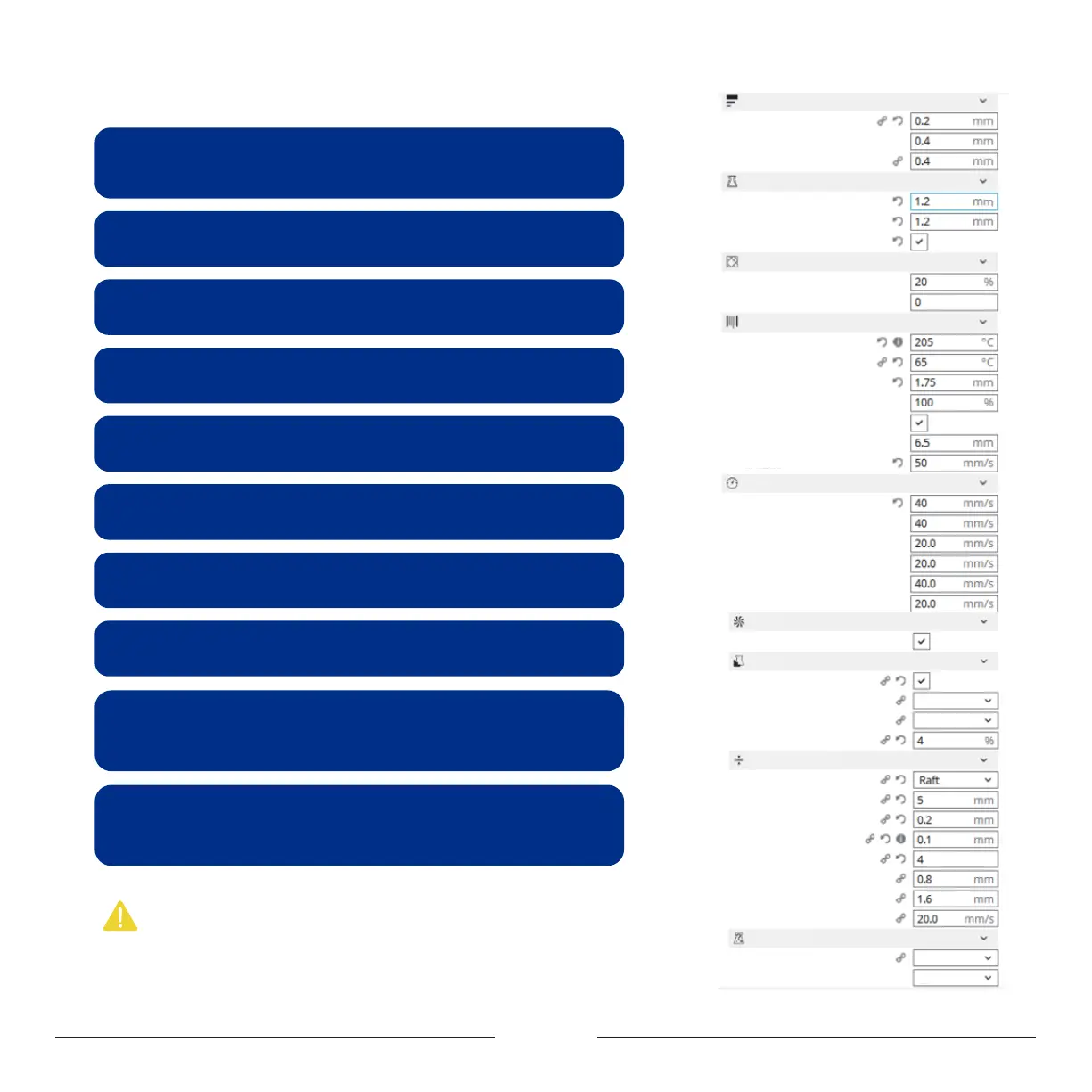
Description of key profile settings:
Layer Height: For the height of each layer of printing, smaller value will produce finer
surface, but cost more printing time. Suggested range is 0.05 to 0.3, not exceeding
3/4 of the diameter of the nozzle. MOOZ used 0.4mm nozzle, means not exceeding 0.3.
Wall Thickness: For the printing thickness of the outer surface of the model, the
setting of 1.2 indicates that the outer surface will go three rounds, since the width of
each round equals to the diameter of the nozzle, namely 0.4.
Top/Bottom Thickness: Determine the bottom/top thickness of the model.
Infill Density: Determine the filling density of the internal grid of the model, generally set
at 15% or less.
Printing Temperature: Need to be set according to filament type. Suggested value
for PLA is 190~220℃, and for TPU is 210~230℃.
Build Plate Temperature: Need to be set according to filament type. Suggested
value for PLA is 60℃~80℃, and for TPU is 60℃~80℃, and for PETG is 75℃~80℃, and for
Wood is 30℃~50℃。
Diameter: Set filament diameter to 1.75.
Travel Speed: Travel speed should be set no greater than 40mm/s, otherwise the
Z linear actuators may lose some steps when traveling downward from home position
too fast and cause zero point deviation.
Support Placement:If the model has any hovering part, the option must be
switched on. Generally, "Everywhere" indicates that support can be added on the model
itself. If you select "Touching build plate", it indicates that support can be added only
between the print platform and the model hovering position, not on the model.
Build Plate Adhesion:Brim: A few layers of outer ring should be added on the bottom
edge of the model so as to prevent warping.
Raft: Get the whole model raised by adding a raft-like base on the bottom when the
heated bed leveling status is small or not satisfying.
Note:
1. Hover the mouse over the option, and the corresponding hint will appear.
2. Right-click anywhere within the parameter setting area, you can “Configure setting visibility”.
Layer Height
Line Width
Support Line Width
Wall Thickness
Top/Bottom Thickness
Print Thin walls
Quality
Shell
Infill
Infill Density
Gradual Infill Steps
Material
Cooling
Build Plate Adhesion
Special Modes
Build Plate Temperature
Diameter
Flow
Enable Retraction
Retraction Distance
Retraction speed
Print Speed
Infill Speed
Outer Wall Speed
Inner Wall Speed
Enable Print Cooling
Generate Support
Support Placement
Support Pattern
Support Density
Build Plate Adhesion Type
Raft Extra Margin
Raft Air Gap
Initial Layer Z Overlap
Raft Top Layers
Raft Base Line Width
Raft Line Spacing
Raft Print Speed
Print Sequence
Surface Mode
Top/Bottom Speed
Wall Speed
Support
Printing Temperature
Speed
Everywhere
Zig Zag
All at Once
Normal


 To Next Page