13
Operation Steps:
III
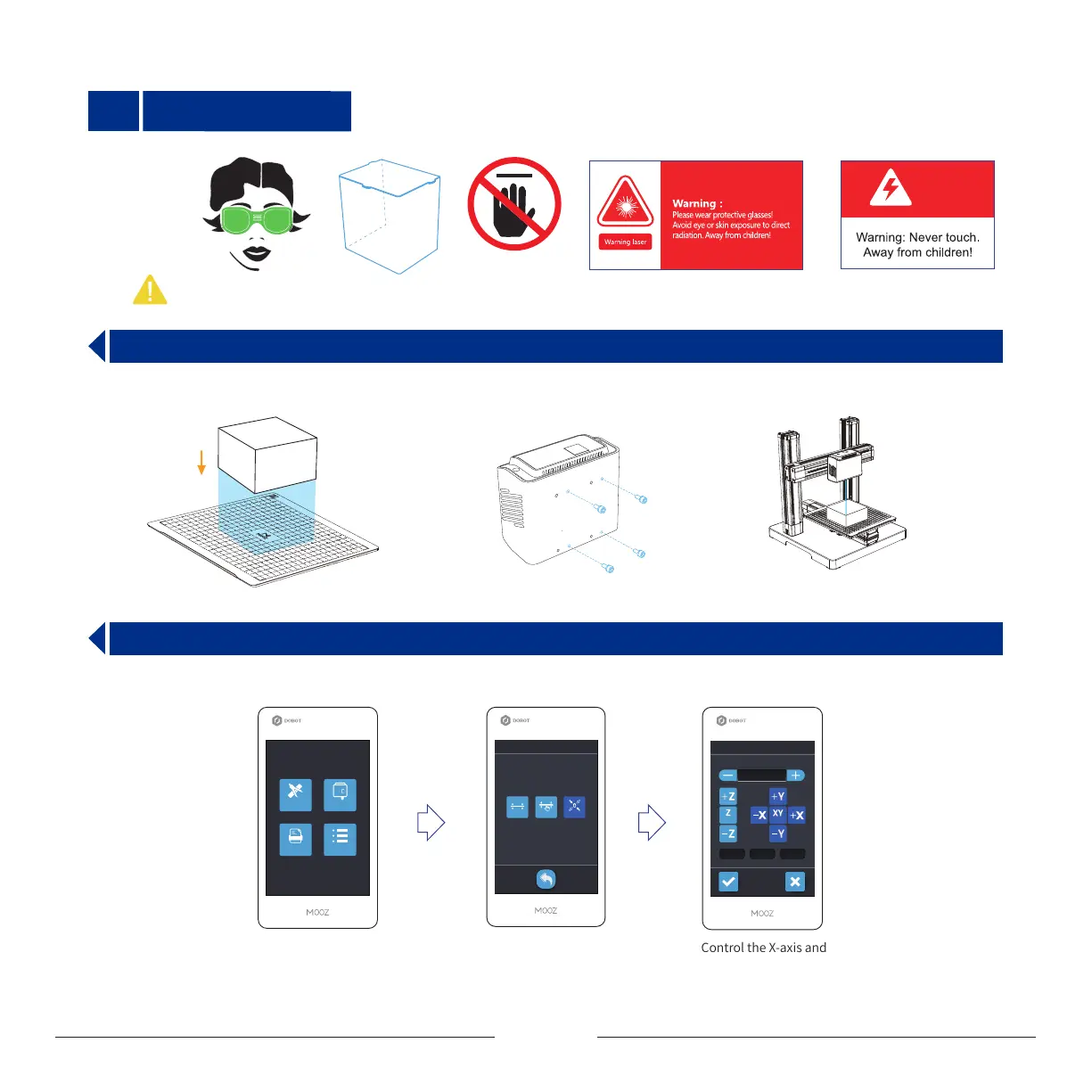
Operation steps: Stick a small piece of tape to the bottom of workpiece (traceless double-sided tape is recommended), keeping the
edges of the workpiece aligned with grids and adhere it to the heated bed.
3.1 Fix the Workpiece and Replace the Functional Module
3.2 Set the Zero Point
Wear the protective glasses to focus
the laser and set zero point
Control the X-axis and
Y-axis to make the laser spot
irradiated on the workpiece
Press the Calibration button Press the “Entrance to zero
point setting interface” button
0 mm
Zero Setting
Y: 20X: 20 Z: 20
Fine Tune:
1 mm0.06 mm 10 mm
Home
Home
Protective
Shield
No Touch
Warning
Note: Please be sure to wear the goggles and use the protective shield for safety!
Laser Engraving
Workpiece
Heated bed
Calibration
Tool
File Settings
调平
Y: 20X: 20 Z: 20
1 mm0.06 mm 10 mm
Calibrate
Auto Level Manual Level Zero Setting


 To Next Page