File
Model.gcode
........ .gcode
.........
.........
.........
.........
.........
Prev Page
Delete Duplicate Return
Execute Next Page
Calibration
Tool
File Settings
1
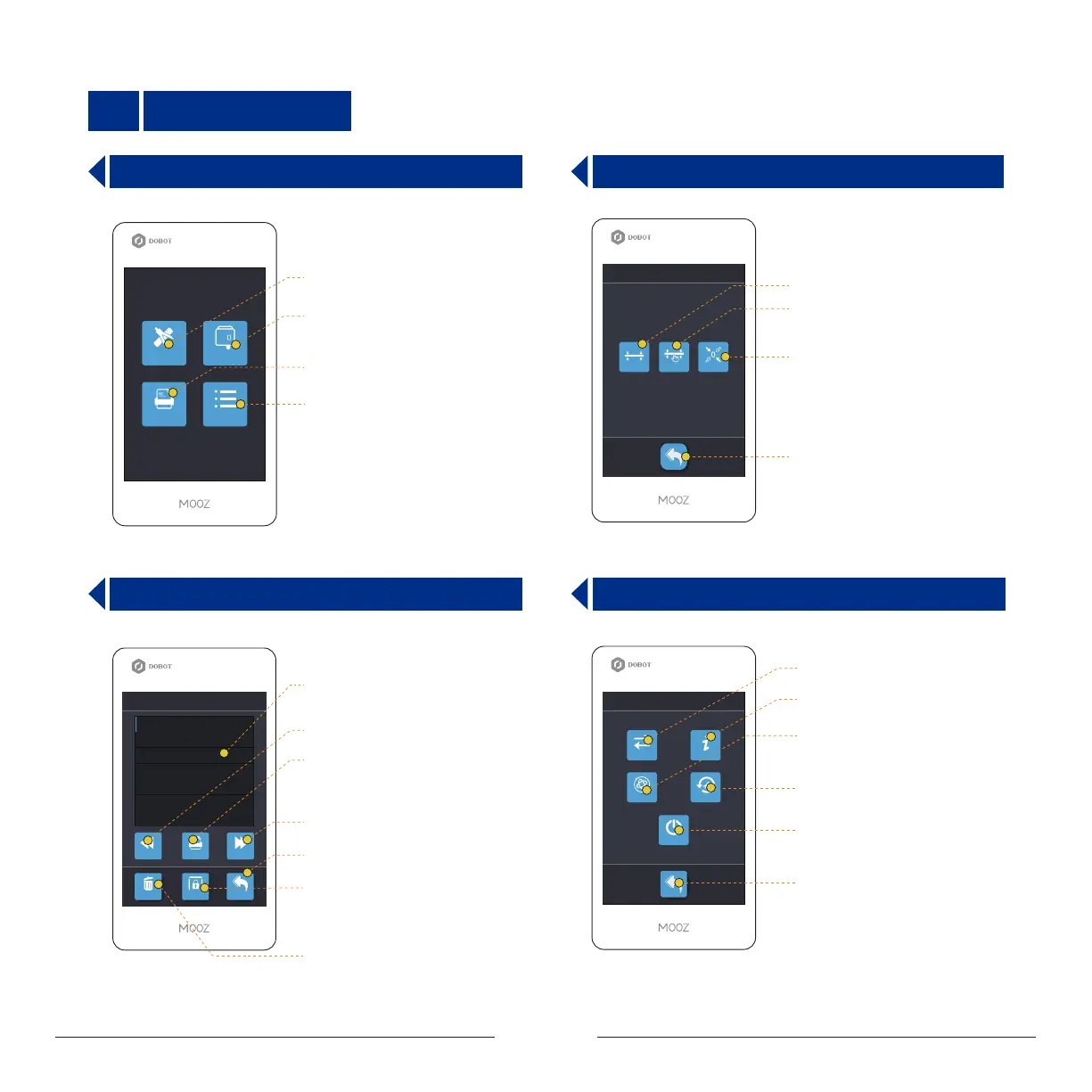
Operation Panel
1.1 Home Page
1.2 Calibration Page
1.3 File Directory Interface 1.4 Settings Interface
调平
Y: 20X: 20 Z: 20
1 mm0.06 mm 10 mm
3-Point Leveling Interface
File Directory Interface
Control Tools Interface
Settings Interface
Calibrate
Auto Level Manual Level Zero Setting
Automatic levelling
Manual levelling
Entrance to zero point setting
interface
Return
Return
Page backward
Page forward
Display supported Gcode files
in the current disk
File execution button: After selecting
the file, press the button to start printing
or engraving or carving
File delete: Delete the selected file
Protective Cover
WiFi
Misc
EN/中
Info
Power Off
FW Upgrade
Switch languages
WiFi
Machine information
Restore factory settings
Power-off
Return
I


 To Next Page