• With an SD Card installed, press the “SD
Card” to save runs to the SD Card.
• Press the “Uconnect” button to save the runs
to the Owner web page.
• Press the “Cancel” button to view the last
timer “Ticket.”
The “Tickets” contain the timers listed below:
• Reaction Time
Measures the driver’s reaction time for launch-
ing the vehicle against a simulated a drag strip
timing light (behavior modeled after 500 Sports-
man Tree) displayed in the Driver Information
Display (DID).
NOTE:
The Reaction Time, MPH, ⅛ and ¼ Mile
timers will be “ready” when the vehicle is at
0 MPH (0 km/h)
• 0-60 MPH (0-100 km/h)
Displays the time it takes for the vehicle to go
from 0 to 60 mph (0 to 100 km/h).
• 0-100 MPH (0-160 km/h)
Displays the time it takes for the vehicle to go
from 0 to 100 mph (0 to 160 km/h).
• ⅛ Mile (200 meter)
Displays the time it takes for the vehicle to go an
⅛ mile (200 meters).
• ¼ Mile (400 meter)
Displays the time it takes for the vehicle to go an
¼ mile (400 meters).
• Brake Distance
Displays the distance it takes the vehicle to
make a full stop.
NOTE:
The distance measurement will be aborted if
the brake pedal is released or the parking
brake is engaged, before the vehicle comes
to a complete stop.
• Brake Speed
Displays the speed the vehicle is traveling when
the brake pedal is depressed.
NOTE:
Brake Distance and Speed timers will only
display ⴖreadyⴖ when vehicle is traveling at
greater than 30 MPH (48 km/h).
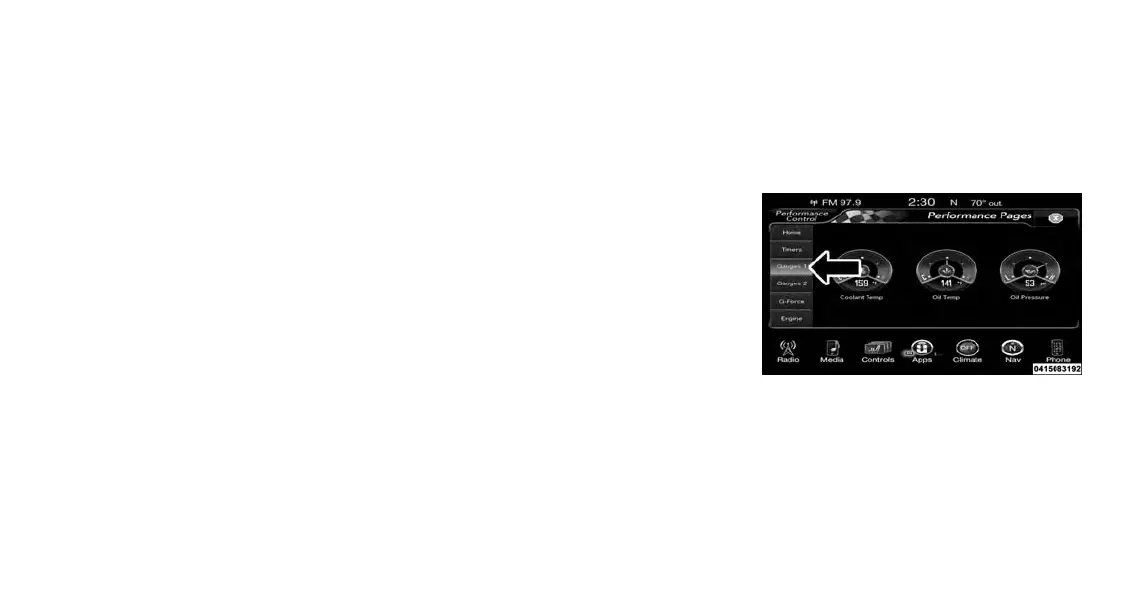
Gauges 1
When selected, this screen displays the follow-
ing values:
• Coolant Temperature
Shows the actual coolant temperature.
Performance Pages — Gauges 1
176















 To Next Page