MULTIMEDIA 25
TIMERS
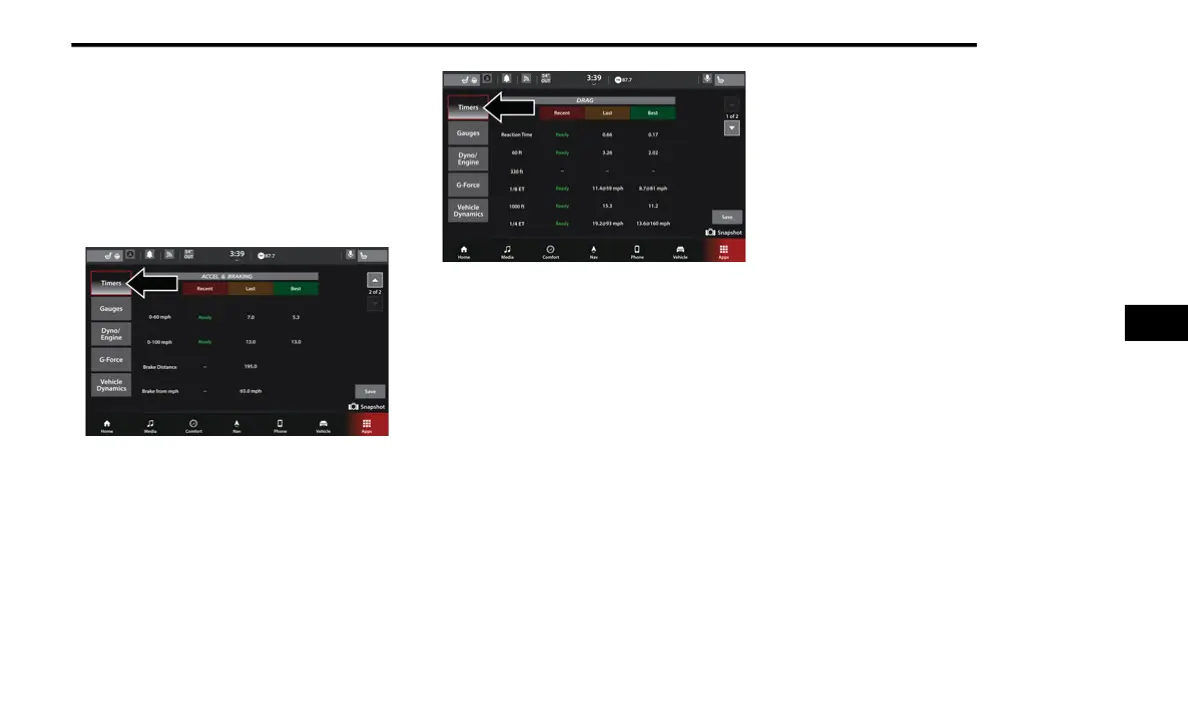
When the Timers page is selected, you will be
able to select the Drag or Accel & Braking tabs
by either pressing the Up or Down arrows
towards the right side of the touchscreen, or
dragging your finger in an upwards or
downwards motion.
Timers — Accel & Braking
Timers — Drag
Recent
A real-time summary of performance timers
for the most recent valid run, or the status of
a test in progress.
Last
The last recorded run of performance timers.
Best
The best recorded run of performance
timers, except for braking data.
Save To USB
Pressing the Save to USB button will let you
save all of the timer data from both the Drag
and Accel & Braking timers pages. The
operation of the Save feature is listed below:
NOTE:
Pressing the Snapshot icon in the lower right
corner of the screen at any time will save a
screenshot of the screen currently being viewed
to the connected USB device. Information about
your vehicle appears at the time a snapshot is
taken such as the vehicle’s VIN, miles on the
odometer, longitude and latitude coordinates,
and more.
With a USB jump drive installed, press the
USB button to save to the jump drive.
Press the Cancel button to return to the
Timer page.
5
21_WD_S_SU_EN_USC_t.book Page 25















 To Next Page