MULTIMEDIA 29
Left G-Force
Measures the peak force on the left side of
the vehicle.
Rear G-Force
Measures the peak acceleration force on the
rear of the vehicle.
NOTE:
Front, Right, Left, and Rear G-Forces are all
peak values. These readings can be reset by
clearing peak G-Force on the instrument
cluster.
The friction circle display shows instantaneous
G-Force as a highlight and previous G-Force as
dots within the circle. The system records
previous G-Force for three minutes. If there are
multiple samples at a given point, the color of
the dot will darken from blue to red. Vectors
more frequent will show in red; infrequent
vectors will show in blue.
Pitch & Roll
The Pitch & Roll page displays the vehicle’s
current pitch (angle up and down) and roll
(angle side to side) in degrees. The pitch and roll
gauges provide a visualization of the current
vehicle angle.
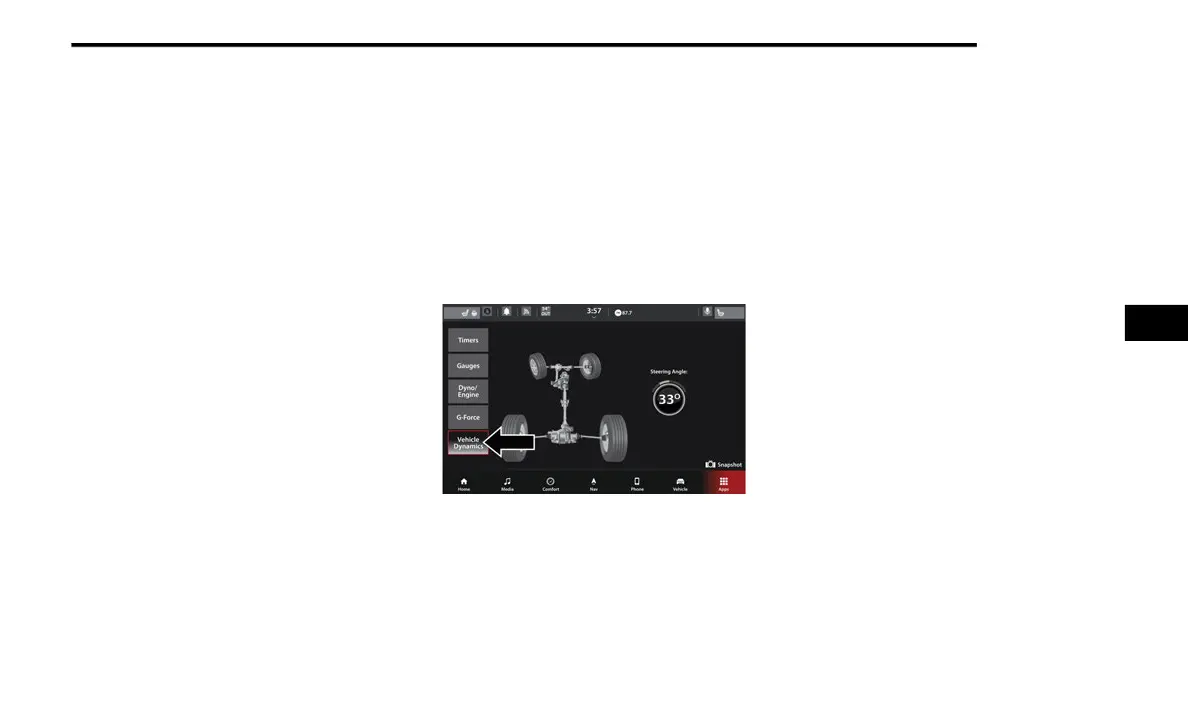
VEHICLE DYNAMICS
The Vehicle Dynamics page displays
information concerning the vehicle’s drivetrain
Vehicle Dynamics
Steering Wheel Angle
Steering Wheel Angle utilizes the steering angle
sensor to measure the degree of the steering
wheel relative to zero (straight ahead) reference
angle. The zero degree reference angle
measurement indicates a steering wheel
straight ahead position.
SRT DRIVE MODES
Your SRT vehicle is equipped with a Drive
Modes feature which allows for coordinating the
operation of various vehicle systems depending
upon the type of driving behavior desired. The
Drive Modes feature is controlled through the
touchscreen and may be accessed by
performing any of the following:
Selecting “SRT” and then “Drive Modes” from
the Vehicle menu.
Pushing the SRT button on the instrument
panel switchbank.
5
21_WD_S_SU_EN_USC_t.book Page 29















 To Next Page